13
VT 4.0 OPERATING MANUAL
© 2002 Design, 2011 Doc. No. 12-5213-r02 (9/6/11)
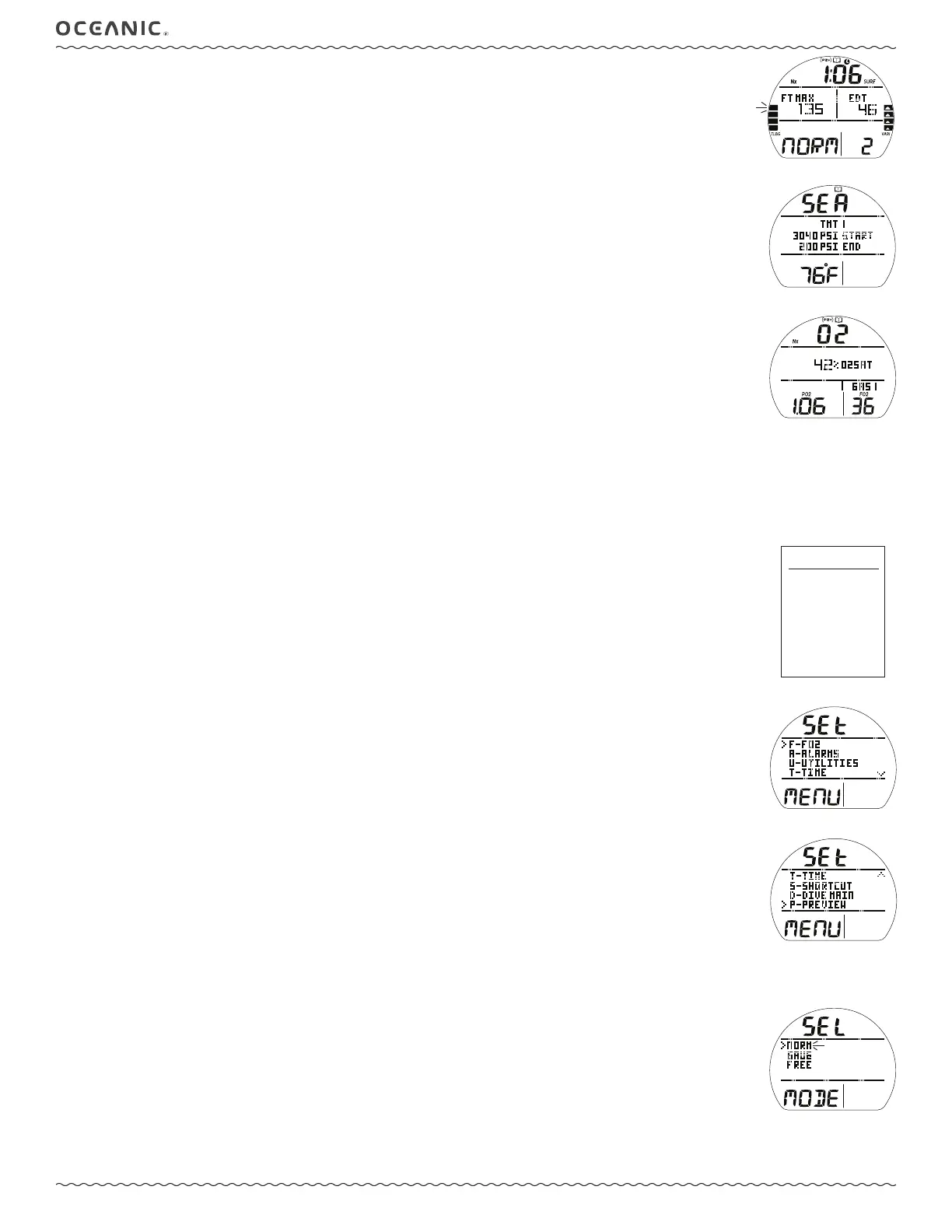
Log Data 1, information includes (Fig. 13):
> Log (book) icon, and Nx and (PZ+) icons if they apply.
> Pre dive Surface Interval (hr:min) with Time (clock) and SURF icons, - : - - if # 1 (no previous dive that period).
> Max Depth with graphics FT (or M) and MAX.
> Elapsed Dive Time (min) with graphic EDT.
> Graphic NORM, GAUG, or VIOL with dive Number.
> TLBG with max segment flashing, others fixed up to end of dive accumulation. All flash if Violation. Blank if GAUG.
> VARI, max Ascent Rate sustained for 4 sec.
• S (< 2 sec) to access that dive's Log Data 2 screen.
• S (2 sec), at any time, to revert to Log Menu.
Log Data 2, information includes (Fig. 14):
> Log (book) icon.
> Graphic SEA (or EL2 - EL7), altitude level of dive.
> Graphics TMT 1, xxx PSI (or BAR) START, and xxx PSI (or BAR) END, indicating Tank 1 pressures.
> Temperature with ° icon and graphic F (or C), minimum recorded during that dive.
• S (< 2 sec) to access that dive's Log Data 3 screen if Nx, or revert to Log Menu if Air or GAUG.
• S (2 sec), at any time, to revert to Log Menu.
Log Data 3 (Nx only), information includes (Fig. 15):
> Log (book) and Nx icons with graphic O2.
> (PZ+) icon, if it was selected.
> O2 accumulated at end of dive with graphic %O2SAT.
> Max level of PO2 achieved with icon.
> Graphic GAS 1 (or 2 or 3), one in use when dive ended.
> FO2 value set for Gas in used when dive ended, with icon.
• S (< 2 sec) to revert to Log Menu.
• S (2 sec), at any time, to revert to Log Menu.
NORM/GAUG SET MENU
The Set Menu selection provides access to a listing of sub menus that contain items specific to NORM and GAUG modes as well
as some utility items that also apply to FREE mode.
• S (< 2 sec) to access the Set Menu while the pointer icon ( > ) is next to that item on the Main Menu.
Set Menu, information includes (Fig. 16A/B):
> Graphics SEt and MENU with selections -
> F - FO2 (NORM only).
> A - ALARMS.
> U - UTILITIES.
> T - TIME.
> S - SHORTCUT.
> D - DIVE MAIN.
> P - PREVIEW.
These Set Groups are described after the Main Menu items (starting on page 16).
• A (< 2 sec) to step forward (down) through Menu selections.
• M (< 2 sec) to step back (up) through Menu selections.
• S (< 2 sec) to access the item next to the pointer ( > ).
• S (2 sec) to revert to Main Menu.
SELECT OP (OPERATING) MODE
This feature allows another Operating Mode to be selected.
Select OP Mode, information includes (Fig. 17):
> Graphics SEL and DIVE MODE.
> Graphic NORM, flashing.
> Graphics GAUG and FREE.
• A (< 2 sec) to step forward (down) through selections.
• M (< 2 sec) to step back (up) through selections.
• S (< 2 sec) to select that Mode and revert to it's SURF Main screen.
• S (2 sec) to revert to Main Menu.
Fig. 13 - LOG DATA 1
Fig. 14 - LOG DATA 2
Fig. 15 - LOG DATA 3
Press S (< 2 sec) to access.
Fig. 16B - SET MENU
Fig. 17 - SELECT OP MODE
Fig. 16A - SET MENU



 To Next Page