40
VT 4.0 OPERATING MANUAL
© 2002 Design, 2011 Doc. No. 12-5213-r02 (9/6/11)
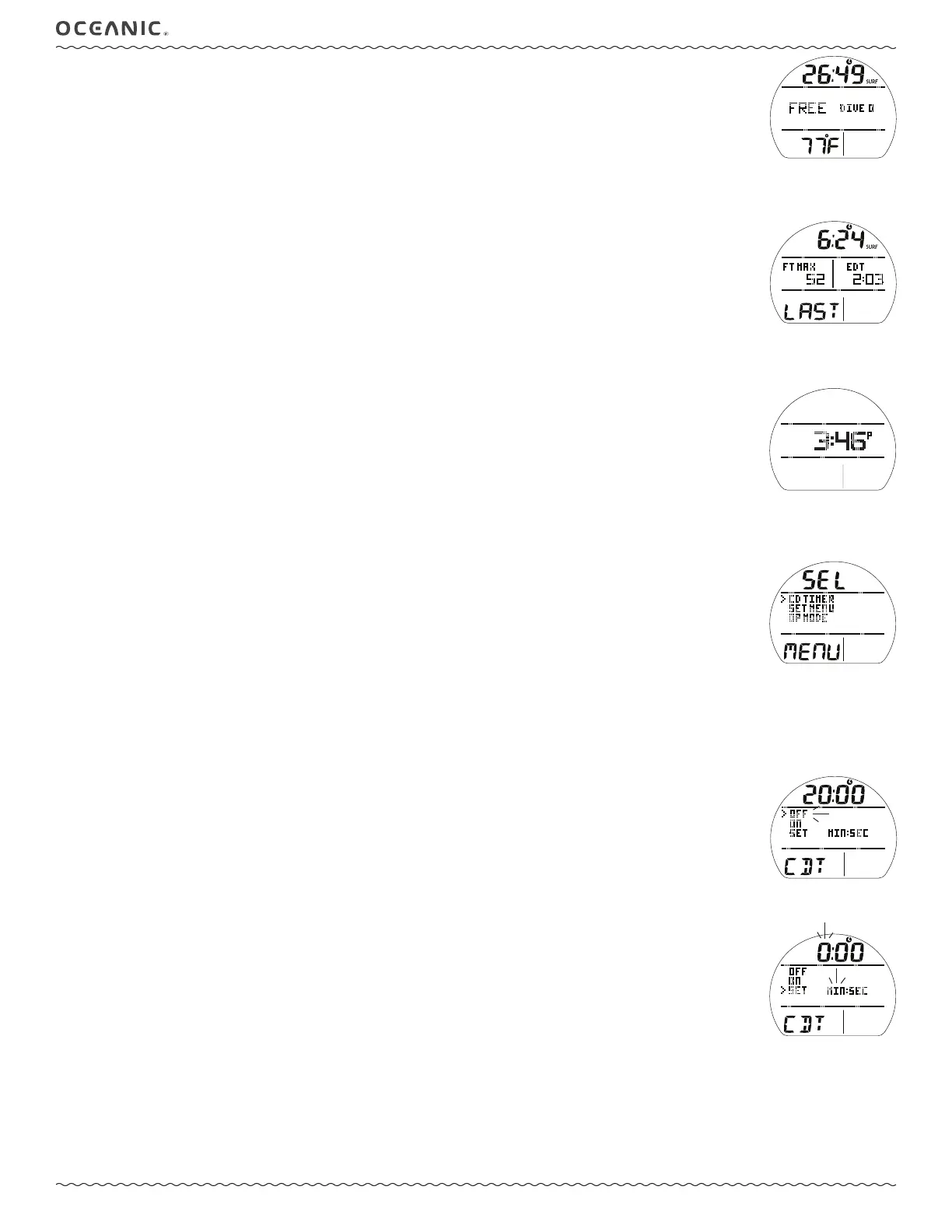
FREE SURF MAIN, information includes (Fig. 93):
> SI (min:sec up to 59:59, then hr:min) with Time (clock) and SURF icons.
> Graphic FREE (operating mode).
> Graphic DIVE and number of dives completed during that operating period, up to 99 (0 if no dive made yet).
> Temperature with ° icon and graphic F (or C).
> Battery icon, if voltage is low.
• A (< 2 sec) to access ALT 1.
• M (< 2 sec) to access FREE Main Menu.
• M (2 sec) to access FREE Shortcut.
• S (2 sec) to access Compass.
• S (< 2 sec) to activate Smartglo Backlight.
FREE SURF ALT 1, information includes (Fig. 94):
> SI (min:sec) with Time (clock) and SURF icons.
> Max Depth with graphics FT (or M) and MAX.
> Elapsed Dive Time (min:sec up to 9:59, then 10 - if >) with graphic EDT.
> Graphic LAST, indicating that data is from the dive previously conducted while in FREE mode.
• A (< 2 sec) to access ALT 2.
• 10 sec, revert to Main if A is not pressed.
• S (< 2 sec) to activate Backlight.
FREE SURF ALT 2, information includes (Fig. 95):
> Altitude graphic, if EL2 (to EL7), blank if Sea level.
> Time of Day (hr: min) with graphic A (or P).
• A (< 2 sec) to revert to Main.
• 5 sec, revert to Main if A is not pressed.
• S (< 2 sec) to activate Backlight.
FREE MENU
• M (< 2 sec) to access Menu (Fig. 96), while viewing FREE Surface Main.
• A (< 2 sec) to step forward (down) through selections.
• M (< 2 sec) to step back (up) through selections.
• S (< 2 sec) to access the selection indicated by pointer icon ( > ).
• S (2 sec) to revert from the Main Menu to Surface Main.
• M (2 sec) any time to revert to Surface Main.
• 2 min (no button action) will revert to Surface Main.
CD TIMER (Countdown Timer)
Upon access from the Menu, one of the following is displayed -
> OFF solid and 0:00, if no time was previously set.
> ON and the remaining CD Time (min:sec), if running.
> OFF flashing and the time previously set, if it has ended.
CDT Status, information includes (Fig. 97):
> CD Time (min:sec) with Time (clock) icon.
>> 0:00 with colon solid, if no time set.
>> 0:00 with colon flashing, if On and no time left.
>> remaining time with colon flashing, if On and running.
>> time previously set with colon solid, if not started yet.
> Graphic OFF, select to Stop CD if running.
> Graphic ON, select to Start CD if a time is displayed (stopped or not yet started).
> Graphics SET and MIN:SEC, select to set a CD time.
• A (< 2 sec) to step forward (down) through selections.
• M (< 2 sec) to step back (up) through selections.
• S (2 sec) to revert to Main Menu.
• S (< 2 sec) to save the selection and ->
>> if OFF or ON, Stop or Start the CD then revert to Main.
>> if SET, the graphic MIN and left (minute) digits of the Time will flash (Fig. 98).
• A (hold) to increase Minute Set Point at a rate of 8 per second from 0: to 59: in increments of 1: (min).
• A (< 2 sec) to increase Set Point one at a time.
• M (< 2 sec) to decrease Set Point one at a time.
• S (< 2 sec) to save the Minute setting and flash the Seconds digits and graphic SEC.
• A (hold) to increase Seconds Set Point at a rate of 8 per second from :00 to :59 in increments of :01 (sec).
• A (< 2 sec) to increase the Set Point one at a time.
• M (< 2 sec) to decrease the Set Point one at a time.
• S (< 2 sec) to save the full CDT min:sec setting and revert to the CDT Status screen with OFF flashing.
Fig. 94 - FREE SURF ALT 1
(Last dive)
Fig. 93 - FREE SURF MAIN
(no dive yet)
Fig. 95 - FREE SURF ALT 2
(EL if above Sea level)
Fig. 96 - FREE SURF MENU
Fig. 97 - CDT STATUS
Fig. 98 - SET CDT



 To Next Page