16
VT 4.0 OPERATING MANUAL
© 2002 Design, 2011 Doc. No. 12-5213-r02 (9/6/11)
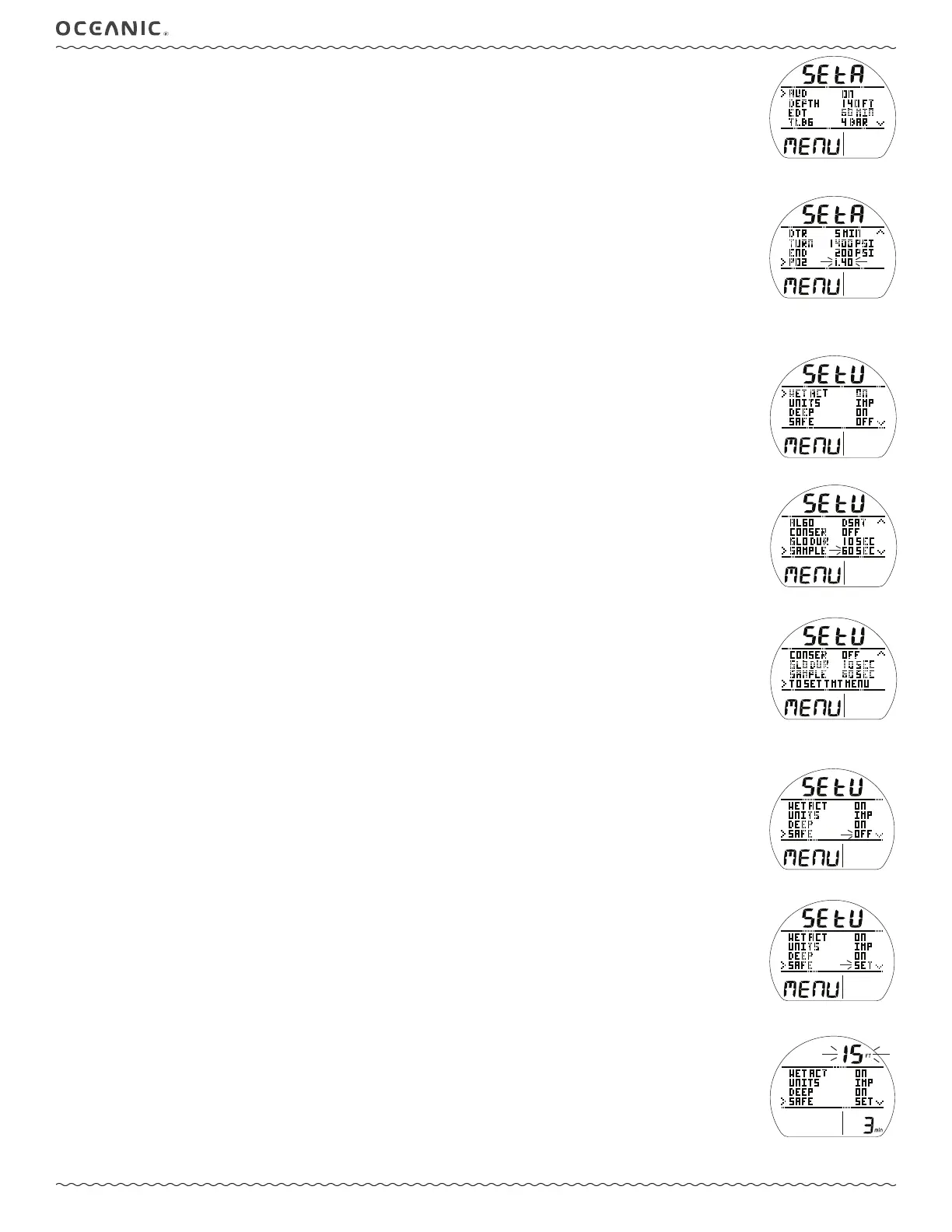
SET A (Alarms) Menu, information includes (Fig. 24A/B):
> Graphics SEt A and MENU.
Selections with their last Set Points saved include:
> AUD with Set Point (ON or OFF),
audible
.
> DEPTH with Set Point (OFF, or 30 to 330 FT, or 10 to 100 M), increments of 10 FT (3 M).
> EDT with Set Point (OFF, or 10 to 180 MIN),
elapsed dive time
, increments of 5 MIN.
> TLBG* with Set Point (1 to 4 BAR), increments of 1 BAR.
> DTR* with Set Point (OFF, or 1 to 20 MIN), increments of 1 MIN.
> TURN with Set Point (OFF, or 1000 to 3000 PSI, or 70 to 205 BAR), increments of 250 PSI (5 BAR).
> END with Set Point (300 to 1500 PSI or 20 to 105 BAR), increments of 100 PSI (5 BAR).
> PO2* with Set Point (1.20 to 1.60), increments of 0.10.
*These items apply to NORM only.
• A (< 2 sec) to toggle or increase Set Point.
• A (hold) to increase Set Point at a rate of 8 per second.
• M (< 2 sec) to decrease Set Point.
• S (< 2 sec) to save the setting and revert to the Set A Menu.
SET U (Utilities) Menu, information includes (Fig. 25A - C):
> Graphics SEt U and MENU.
Selections with their last Set Points saved include:
> WET ACT with Set Point (ON or OFF) >>
wet activation
.
> UNITS with Set Point (IMP or MET) >>
imperial or metric
.
> DEEP* with Set Point (ON or OFF) >>
no deco deep stop
.
> SAFE* with Set Point** (OFF, TMR, ON) >>
no deco safety stop
.
> ALGO* with Set Point (DSAT or PZ+) >>
algorithm, basis for Ni-O2 calculations
.
> CONSER* with Set Point (OFF or ON) >> no deco
conservative factor, reduces NDLs based on altitude
.
> GLO DUR with Set Point (5, 10, or 15 SEC) >>
time backlight remains on
.
> SAMPLE with Set Point (2, 15, 30, or 60 SEC) >>
rate data is recorded for PC download
.
> TO SET TMT MENU** >>
to access Set TMT menu
.
*These items apply to NORM only.
**Description expanded, next pages.
Additional information relating to the effects of the items included are described in associated sections throughout this manual.
• A (< 2 sec) to step forward (down) through selections.
• M (< 2 sec) to step back (up) through selections.
• S (< 2 sec) when the pointer icon is next to a selection will flash that item's Set Point.
• A (< 2 sec) to toggle or increase Set Point.
• M (< 2 sec) to decrease Set Point.
• S (< 2 sec) to save the setting and revert to Set U Menu.
Set Safety Stop, information includes (Fig. 26):
The Set U menu will display OFF, ON, or TMR solid.
• S (< 2 sec) will flash (Fig. 26A) the graphic allowing step through of the others with the addition of the SET selection (Fig.
26B).
OFF >> TMR >> SET >> ON.
• S (< 2 sec) while SET is flashing will display the Stop Depth and Time with the Depth setting flashing (Fig. 26C).
• A (< 2 sec) to step forward through Depth settings (10, 15, 20 FT or 3, 4, 5, 6 M).
• M (< 2 sec) to step back through Depth settings.
• S (< 2 sec) to save Depth setting and flash Time digits.
• A or M (< 2 sec) to toggle Times between 3 and 5 min.
• S (< 2 sec) to save Depth/Time setting and revert to the Set U Menu with SET flashing.
• A (< 2 sec), then S (< 2 sec) to flash, then save ON.
Fig. 24A - SET A MENU
(stepping through)
Fig. 24B - SET PO2
(changing the setting)
Fig. 25B - SET U MENU
(changing a setting)
Fig. 25C - SET U MENU
(stepping through)
Fig. 25A - SET U MENU
(stepping through)
Fig. 26A - SET SAFETY
STOP
Fig. 26C - SET SS
(Depth, Time)
Fig. 26B - SET SS
(to access Set Depth/Time)



 To Next Page