35
VT 4.0 OPERATING MANUAL
© 2002 Design, 2011 Doc. No. 12-5213-r02 (9/6/11)
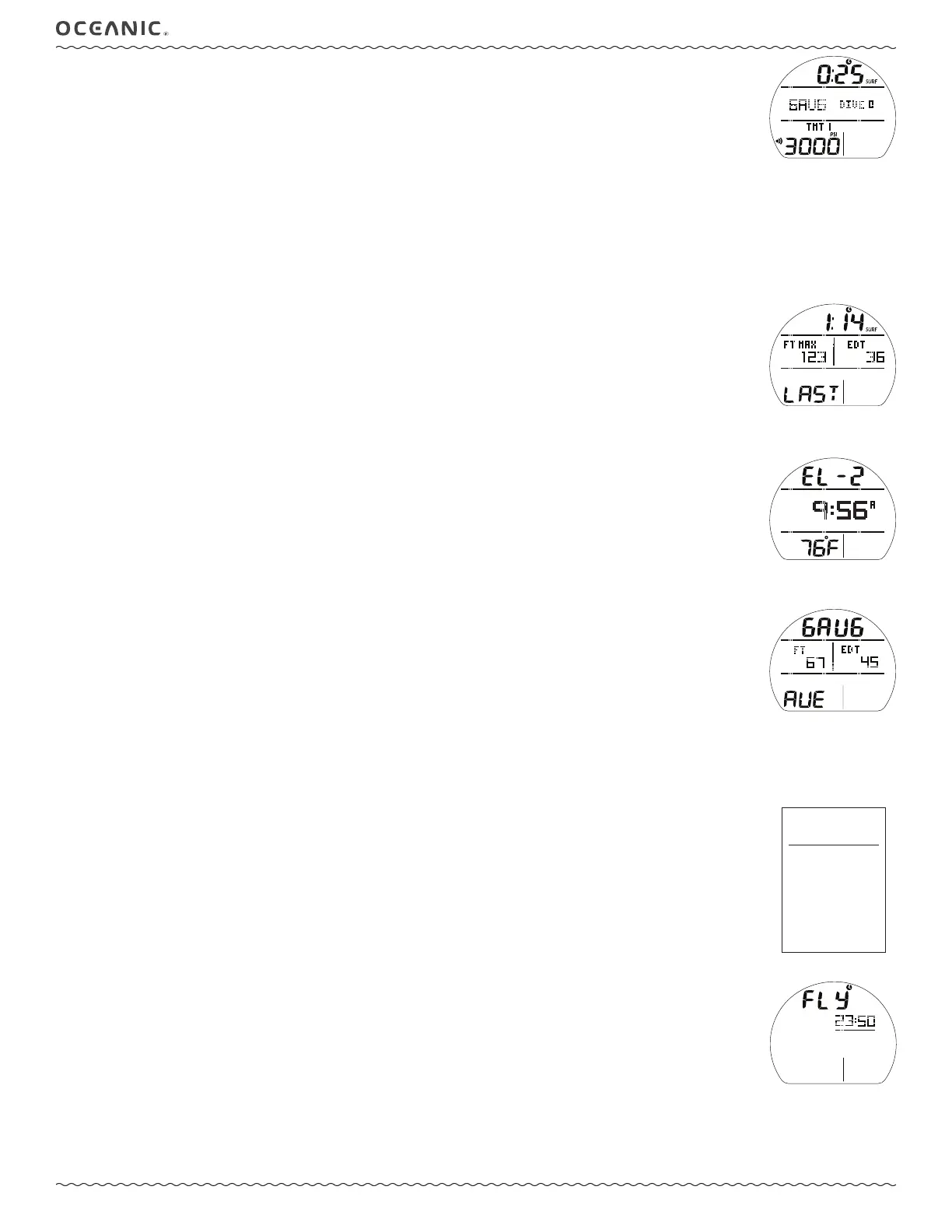
GAUG SURF MAIN, information includes (Fig. 80):
> SI (hr:min) with Time (clock) and SURF icons; if no dive yet, this is time since activation.
> Graphic GAUG (operating mode).
> Graphic DIVE and number of dives completed during that operating period, up to 24 (0 if no dive made yet).
> Graphic TMT 1, default on surface before first dive and 10 minutes after surfacing from dives.
> Tank Pressure with PSI (or BAR) and Link (speaker) icons, if the Receiver is successfully Linked with an active TMT
(Transmitter), 000 flashing after 15 seconds of lost Link.
> Battery icon, if voltage is low.
• A (< 2 sec) to access ALT 1.
• M (< 2 sec) to access GAUG Main Menu.
• M (2 sec) to access GAUG Shortcut.
• S (2 sec) to access Compass.
• S (< 2 sec) to activate Smartglo Backlight.
GAUG SURF ALT 1, information includes (Fig. 81):
> SI* (hr:min) with Time (clock) and SURF icons.
> Max Depth* with graphics FT (or M) and MAX.
> Elapsed Dive Time* (hr:min) with graphic EDT.
> Graphic LAST, indicating that data is from the dive previously conducted while in GAUG mode.
*Dashes if no previous dive.
• A (< 2 sec) to access ALT 2.
• 10 sec, revert to Main if A is not pressed.
• S (< 2 sec) to activate Backlight.
GAUG SURF ALT 2, information includes (Fig. 82):
> Altitude graphic, if EL - 2 (to EL - 7), blank if Sea level.
> Time of Day (hr:min) with graphic A (or P).
> Temperature with ° icon and graphic F (or C).
• A (< 2 sec) to access ALT 3.
• 5 sec, revert to Main if A is not pressed.
• S (< 2 sec) to activate Backlight.
GAUG SURF ALT 3, information includes (Fig. 83):
> Graphics GAUG and AVE (average).
> Average Depth* with graphic FT (or M).
> Average EDT* (min) with graphic.
*These are average values calculated for the dive, or series of repetitive dives, conducted while still in GAUG.
• A (< 2 sec) to revert to Main.
• 5 sec, revert to Main if A is not pressed.
• S (< 2 sec) to activate Backlight.
GAUG MENU
• M (< 2 sec) to access Menu, while viewing Surface Main.
• A (< 2 sec) to step forward through selections (down screen).
• A (hold) to scroll forward through selections (down screen) at a rate of 4 per second.
• M (< 2 sec) to step back through selections (up screen).
• S (< 2 sec) to access the selection indicated by pointer icon ( > ).
• S (2 sec) to revert from the Main Menu to Surface Main.
• M (2 sec) any time to revert to Surface Main.
• 2 min (no button action) will revert to Surface Main.
FLY, information includes (Fig. 84):
> Graphic FLY with countdown time (hr:min) and Time (clock) icon, dashes if no dive yet.
• S (< 2 sec) to revert to Main Menu.
LOG, shared with NORM (see page 12).
SET MENU, similar to NORM (see page 13).
> GAUG does not access the Set F (FO2) Menu.
OP MODE, similar to NORM (see page 13).
Fig. 80 - GAUG SURF MAIN
(no dive yet)
Fig. 81 - GAUG SURF ALT 1
(Last dive's data)
Fig. 83 - GAUG SURF ALT 3
(average values)
Fig. 82 - GAUG SURF ALT 2
(Last dive's data)
Fig. 84 - FLY
(10 min after dive)



 To Next Page