26
VT 4.0 OPERATING MANUAL
© 2002 Design, 2011 Doc. No. 12-5213-r02 (9/6/11)
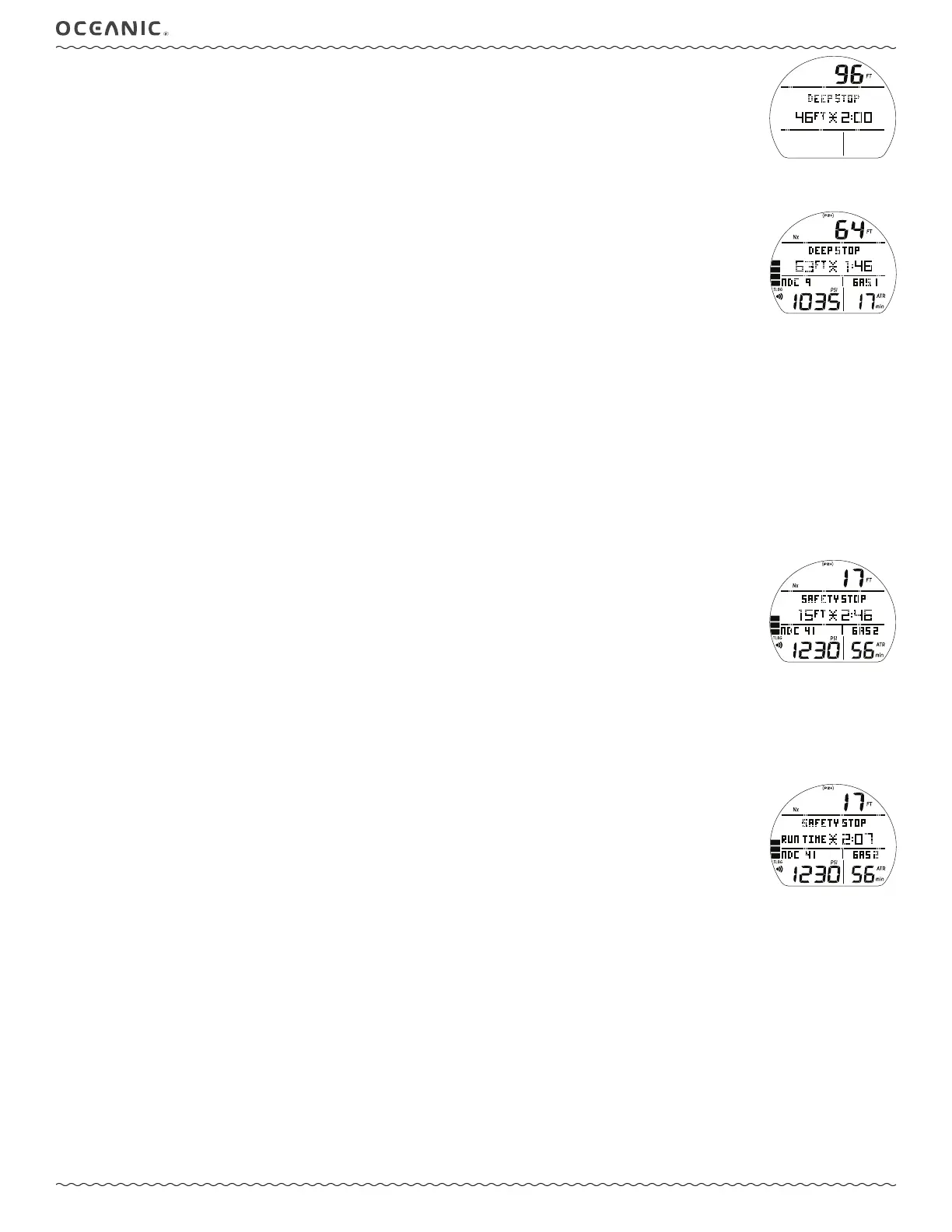
Deep Stop Preview, information includes (Fig. 48) -
> Current Depth with FT (or M) icon.
> Graphic DEEP STOP with Stop icon (arrows and bar).
> Stop Depth with graphic FT (or M) and countdown Time as 2:00 (min:sec).
• 5 sec, revert to No Deco Main.
• S (< 2 sec) to activate Smartglo
®
Backlight.
DEEP STOP MAIN, information includes (Fig. 49) -
> Current Depth with FT (or M) icon.
> Nx, (PZ+), CF icons - if they apply.
> Graphic DEEP STOP with Stop icon (arrows and bar).
> Stop Depth with graphic FT (or M) and countdown Time as 2:00 (min:sec).
> DTR (up to 999 min) with graphic NDC.
> Pressure with PSI (or BAR) and Link icons.
> Graphic GAS1 (or 2, 3, 4), one in use.
> ATR (up to 199 min) with icons.
> TLBG, VARI - if they apply.
• A (< 2 sec) to access ALTs.
• M (2 sec) to access Gas/TMT Switching*.
• S (< 2 sec) to activate Smartglo
®
Backlight or acknowledge alarms.
• S (2 sec) to access Compass*.
*These items can only be accessed while viewing the Main.
DS Alts, information includes -
#1 >> is similar to No Deco Main (Fig. 44).
#2 >> is similar to No Deco ALT 1 (Fig. 45).
#3 >> is similar to No Deco ALT 2 (Fig. 46).
#4 >> is similar to No Deco ALT 3 (Fig. 47).
SAFETY STOP MAIN, information includes* (Fig. 50A/B) -
> Current Depth with FT (or M) icon.
> Nx, (PZ+), CF icons - if they apply.
> Graphic SAFETY STOP with Stop icon (arrows and bar).
> Stop Depth set with graphic FT (or M) with set time (min:sec) counting down to 0:00,
- or -
> Graphic RUN TIME with Time counting up from 0:00 to 9:59 (min:sec).
> DTR (up to 999 min) with graphic NDC.
> Pressure with PSI (or BAR) and Link icons.
> Graphic GAS1 (or 2, 3, 4), one in use.
> ATR (up to 199 min) with icons.
> TLBG, VARI - if they apply.
• A (< 2 sec) to access ALTs.
• A (2 sec) to reset Timer to 0:00, if in use.
• M (< 2 sec) to start/stop Timer, if in use.
• M (2 sec) to access Gas/TMT Switching*.
• S (< 2 sec) to activate Smartglo
®
Backlight or acknowledge alarms.
• S (2 sec) to access Compass*.
*These items can only be accessed while viewing the Main.
SS ALTs, information is similar to No Deco ALTs (Fig. 44 to 47).
Fig. 48 - DEEP STOP
PREVIEW
Fig. 49 - DS MAIN
Fig. 50A - SS MAIN
(set for Depth/Time prior to dive)
Fig. 50B - SS MAIN
(set for Run Timer prior to dive)
*Which information is
displayed is determined by the
Set Point saved during setup of
the Set U menu (see page 40).
^ ^ ^ ^ ^
^ ^ ^ ^ ^



 To Next Page