10
Installation
Before You Install
Please read the user manual carefully before performing the
installation. The power consumption of the display is approxi-
mately 43 watts. Please use the power cord designated for
the product. When an extension cord is required, use one with
the correct power rating. The cord must be grounded and the
grounding feature must not be defeated. The product should
be installed on a flat surface to avoid tipping. Space should be
maintained between the back of the product and the wall for
proper ventilation. If you would like to mount the TV onto the
wall, please see the installation section of the manual for ad-
ditional information. Avoid installing the product in the kitchen,
bathroom or other places with high humidity dust or smoke,
so as not to shorten the service life of the electronic compo-
nents. Please ensure the product is installed with the screen
in landscape orientation. Any 90° clockwise or counterclock-
wise installation may induce poor ventilation and component
damage.
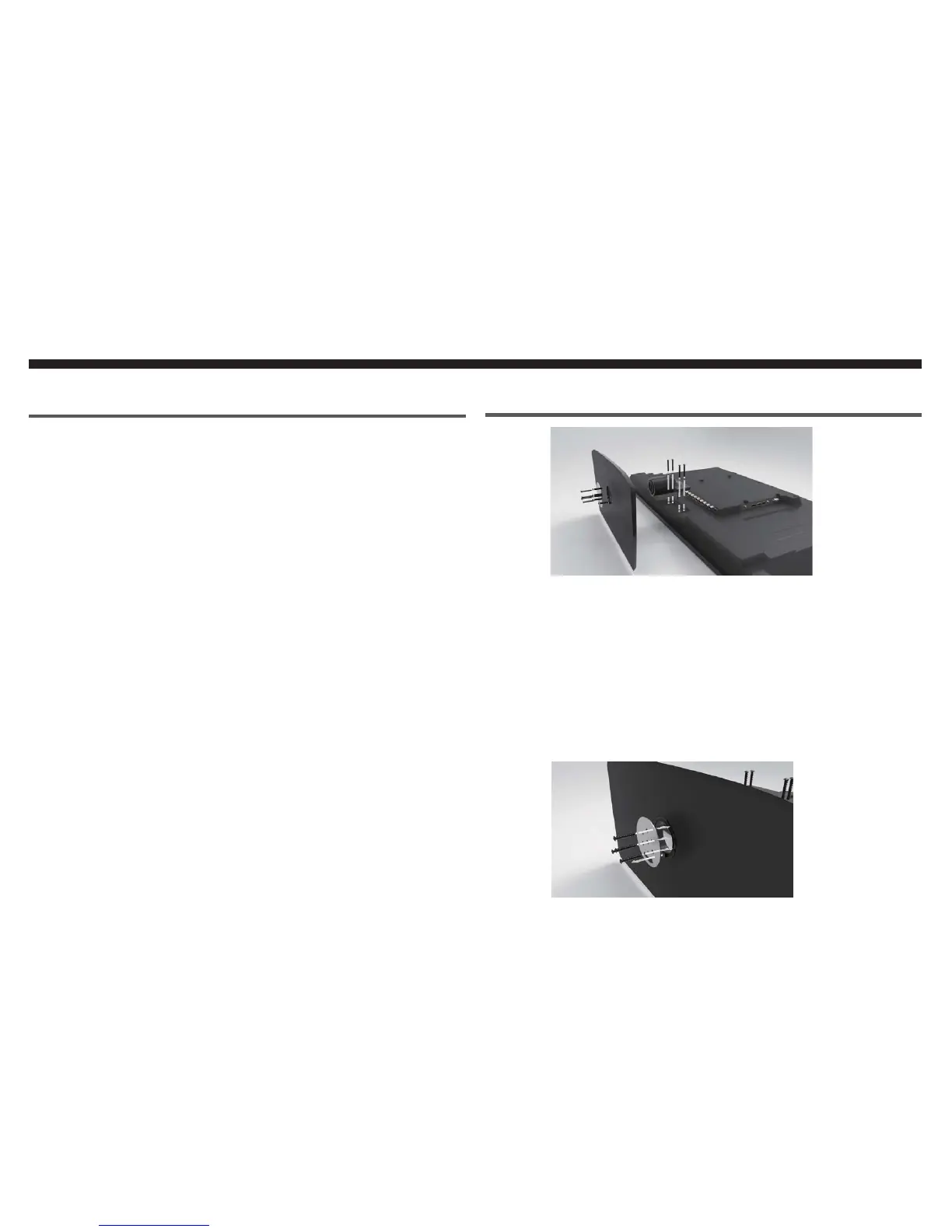
Attaching the TV Base
Screws (B)
Screws (A)
1. Find a cloth covered table. Please lay the TV flat on
the table with the TV screen facing downwards.
If your TV comes with the neck pre-installed,then you
may skip to step 3. To install the neck,place it in the
slot at the bottom of the back of the TV. Use four of
the included screws (B) to secure the neck to the TV.
Install the TV base onto the neck of the TV with the
protruding plastic block on the circular hole facing
downwards.
2.
3.
Screws (A)


 To Next Page