Home
oCOSMO
HDTV
CE3230
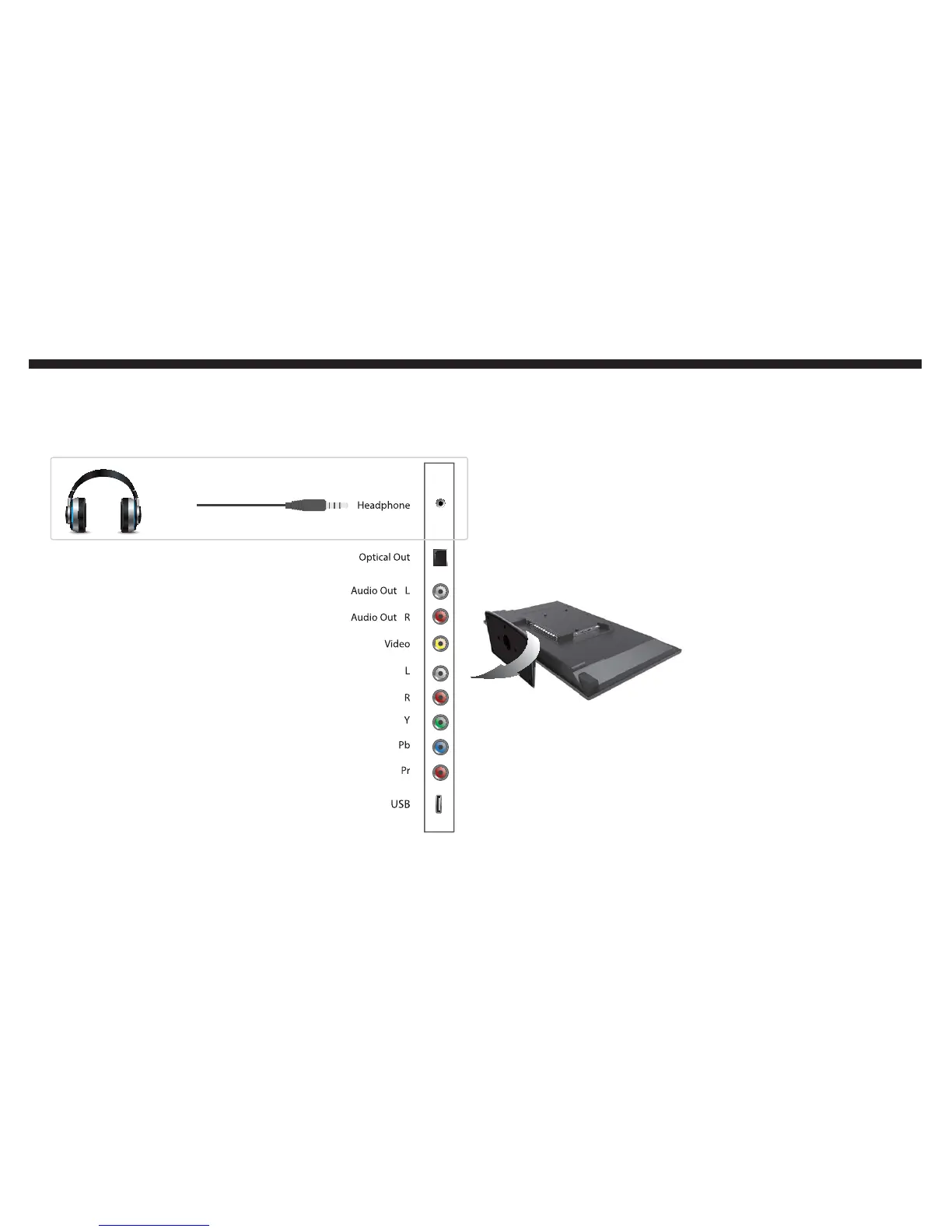
Page 24 (If You Want to Connect a Headphone to the TV)
oCOSMO CE3230 - If You Want to Connect a Headphone to the TV
54 pages
Manual
Save Page as PDF
To Next Page
To Next Page
To Previous Page
To Previous Page
Loading...
24
Set
up
If
y
ou
want
t
o connect a headphone to the
TV
...
Once
you
connect
the
head-
phone
to
the
TV
,
the
TV’
s
speaker
s
will
aut
omatically
be
muted
.
Y
ou
can
control
the
volume
b
y
using
the
V
OL+
or
V
OL
-
but
ton
on
the
TV’
s
remot
e
control.
23
25
Table of Contents
Main Page
Features
1
Important Information
2
Safety Instructions
4
Safety Instructions
5
TV Antenna Connection Protection
7
External Television Antenna Grounding
7
Lighting Protection
7
Power Lines
7
Contents
8
Introduction
9
Opening the Package
9
Package Contents
9
Installation
10
Before You Install
10
Attaching the TV Base
10
Preparing Your TV for a Wall Mount
11
Mounting Pattern Specification
11
Front and Side Views of the TV
12
Back View of the TV
13
TV Connections
14
COSMO TV Remote Control
15
Installing Batteries to the Remote
19
Setup
20
Suggestions for Connecting Your TV
20
If You Want to Connect an Antenna
20
If You Want to Connect a Computer to the TV
23
If You Want to Connect a Headphone to the TV
24
Operation
30
Switching Video Sources on Your TV
30
Navigating the TV Menu
30
Using the TV Menu
31
Picture
31
Picture Settings
32
Screen Size
32
Pc Settings
32
Color Temperature
33
Advance Picture Settings
33
Sound
34
Sound Settings
34
Surround Mode
35
Analog Sound
35
Digital Sound
35
Other Settings
35
Channel
36
Channel List
36
Favorite List
36
Channel Setting
36
Parental
37
Signal Type
37
Auto Channel Search
37
Lock Parental Control
37
Change Password
38
Keypad Lock
38
Source Lock
38
Closed Caption
39
Menu Language
39
OSD Timer
39
Others
40
No Operation Power off
40
All Reset
40
Detailed Explanations
41
USB Connection Explained
41
Browsing Music and Photo
41
Media Setting
41
Technical Limitation
42
Closed Captioning Explained
42
TV Ratings Explained
43
General Operation
43
USTV Rating
43
MPAA Rating
44
TV Program Description
44
TV Aspect Ratio Explained
45
Browsing Channels
45
To Add to the Favorite List
45
To Delete from the Favorite List
45
Maintenance
46
Cleaning the TV
46
Frequently Asked Q&As
46
Cleaning the Bezel and Remote Control
46
How Come the Tv’s Clock Isn’t Completely Accurate?
47
Why Does the TV Show Not Support or HDCP Fail?
47
Why Is the Picture on the TV very DIM or Dark?
47
Why Is My Picture Blurry?
47
Specification
49
Other manuals for oCOSMO CE3230
Quick Start Guide
2 pages


 To Next Page