20
Setup
Suggestions for Connecting your TV
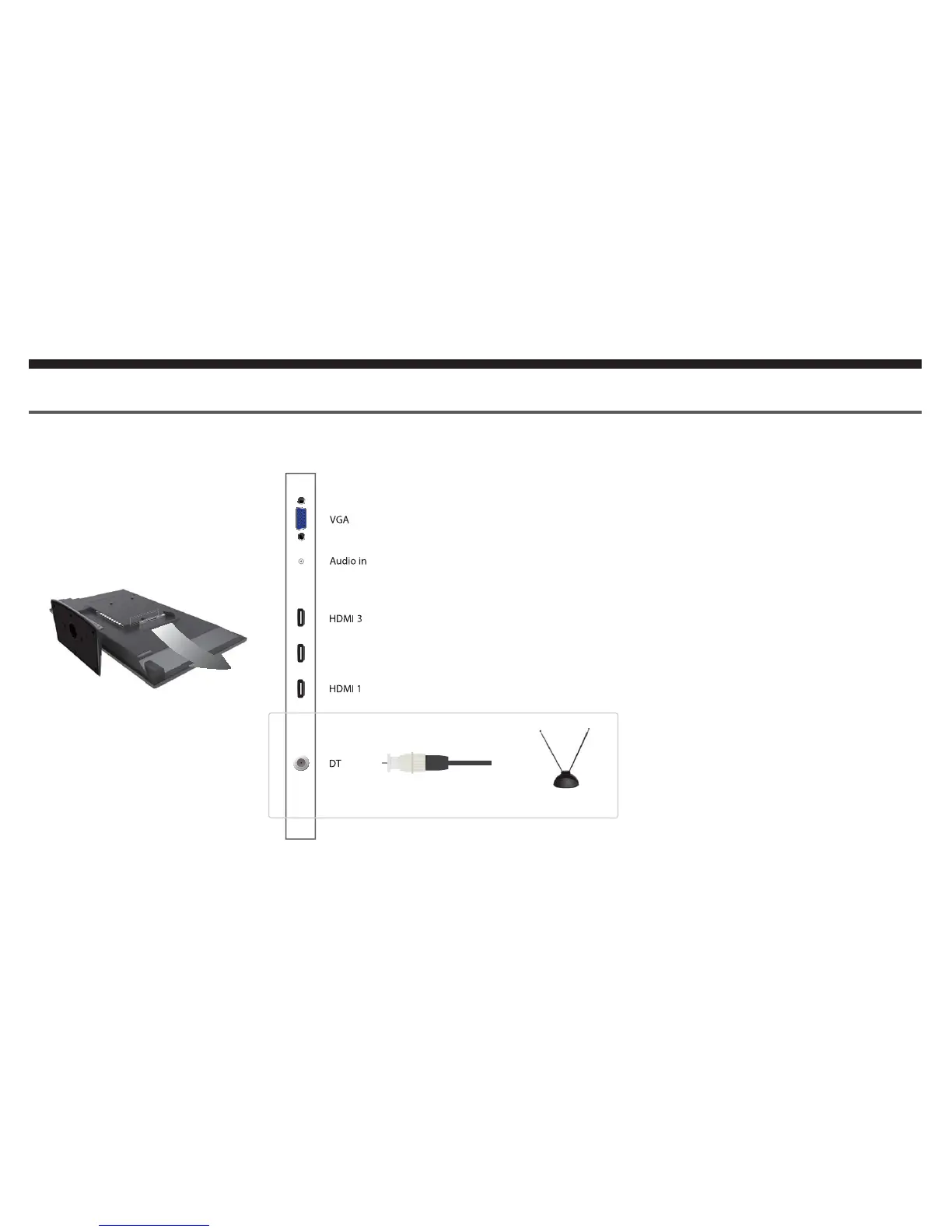
If you want to connect an antenna...
HDMI 2 /MHL
Once you screw in and tighten the an-
tenna coax cable you have to scan
for the channels before you can
watch TV.
Turn on the TV by pressing the
POWER button on the oCOSMO
TV remote.
Press the TV button to switch to the
source TV.
Press the MENU button to activate
the TV's menu. Use Żor Źbuttons
to highlight the CHANNEL option
and press ENTER.
Inside the CHANNEL option high-
light SIGNAL TYPE and make
sure it is AIR. If not, use the Ż or
Źbutton to switch it to AIR.
Select AUTO CHANNEL SEARCH
with the Ÿ or źbutton and press
ENTER to use the option.
When the search finishes you can
watch the TV.
1.
2.
3.
4.
5.
6.
THIS IS A HIGH DEFINITION SETUP


 To Next Page