27
Setup
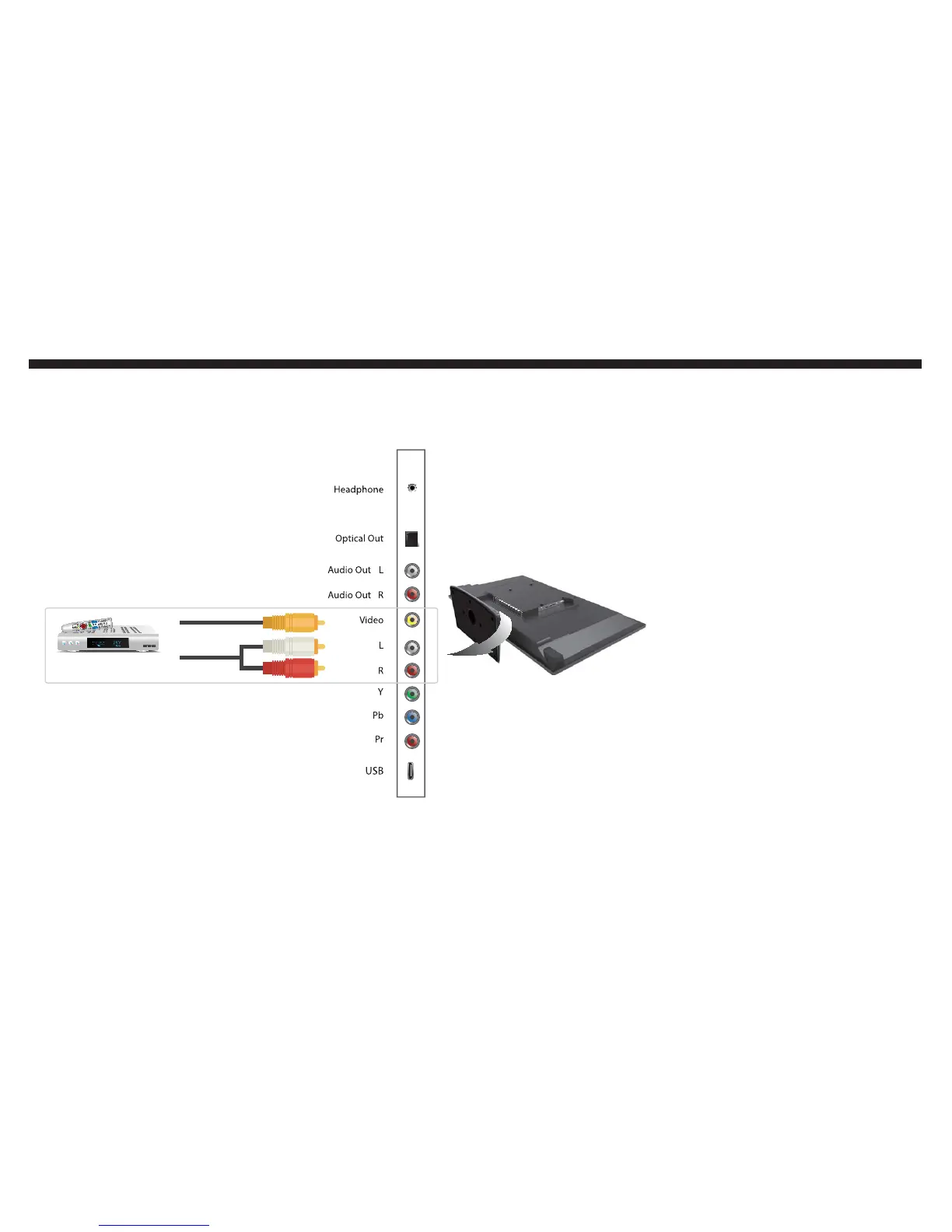
If you want to connect a regular cable box, satellite
box, or a DVD player with yellow, red, and white plugs...
Once you plug in 3 colored plugs (yellow,
red, and white) by matching the same col-
ors on both the TV and the DVD player or
cable/satellite box, you’ll need to change
to the correct source in order to watch
TV.
Turn on the DVD player or cable/sat-
ellite box.
Press POWER on your oCOSMO re-
mote to turn on the TV.
Press the SOURCE button near the
arrow buttons to open the source
menu.
Use the Ÿ or ź button to highlight
the AV connection and press ENTER
to select it.
You can now watch the TV.
Be sure to use your cable or satel-
lite box’s remote to change chan-
nels.
Please Note:
This setup shares the same audio
connection with YPbPr. You can only
use one or the other, not both.
To setup the cable or satellite box
remote control for controlling the TV,
please call the cable or satellite TV
company and ask them for SONY®
TV’s universal remote code.
1.
2.
3.
4.
5.
6.
r
r
Video6ource
Audio6ource
COM326,7E
THIS IS A STANDARD DEFINITION SETUP


 To Next Page