CONTINUED »
ODYSSEY7Q - BOTTOM
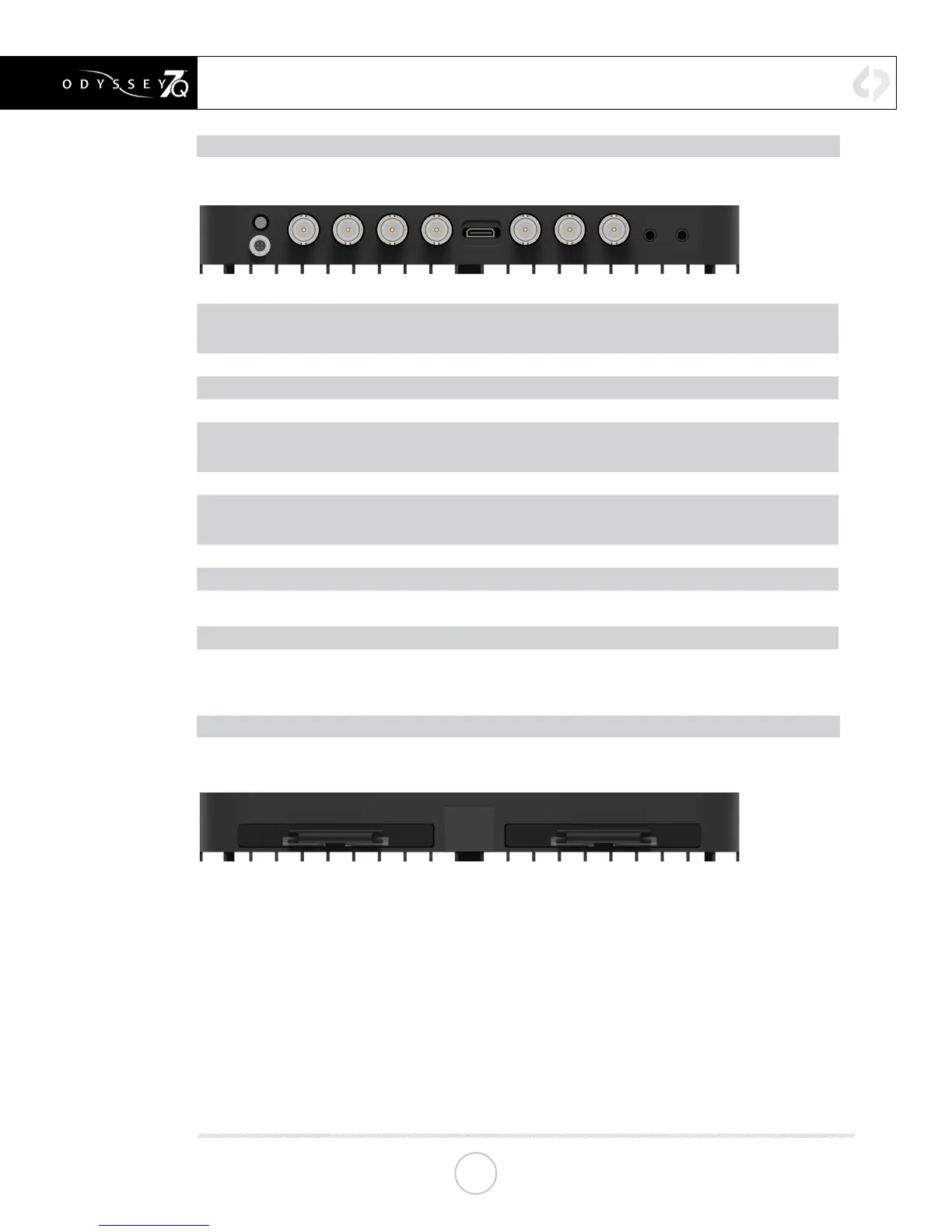
There are eleven connector ports on the bottom side of the Odyssey7Q (left to right)
PWR ON
Power input socket to Odyssey7Q (see Geng Started – Power). Just in front of the PWR ON port is
a buon, which is a Force Power On/O control. Hold buon ve seconds to force power o. This is
only to be used if standard power on or o procedures fail (see Geng Started – Inializing).
SDI A IN
BNC connector for 3G-SDI input A
SDI B IN
BNC connector for 3G-SDI input B
LTC IO
BNC connector for Linear Timecode input/output
SDI A IO
BNC connector for 3G-SDI input/output A. In Mul-Stream monitoring mode, the Odyssey7Q can
accept up to four HD video inputs. These IO ports allow addional inputs or addional outputs for
the Odyssey7Q.
HDMI IN
HDMI 1.4 input from HDMI video source.
SDI B IO
BNC connector for 3G-SDI input/output B. In Mul-Stream monitoring mode, the Odyssey7Q can
accept up to four HD video inputs. These IO ports allow addional inputs or addional outputs for
the Odyssey7Q.
SDI A OUT
BNC connector for 3G-SDI output A
SDI B OUT
BNC connector for 3G-SDI output B
AUDIO IN
3.5mm mini-phone stereo socket for analog audio in. This input will be enabled in a free future
rmware update.
AUDIO OUT
3.5mm mini-phone stereo headphone socket.
ODYSSEY7Q - TOP
There are two Solid State Drive (SSD) slots, SSD1 and SSD2.
Only Convergent Design 256 GB and 512 GB SSDs can be used to capture video on the
Odyssey7Q. The Odyssey Utility Drive can be used for rmware updates and other future
functions, but not to record video les. To mount SSD, insert connector-end rst with the label
facing forward and the handle near ush with the back of the Odyssey7Q. Push gently but
rmly until the handle ange is ush with the top of the Odyssey7Q. It is a snug t, but the SSD
should insert smoothly.
ANATOMY
13


 To Next Page