www.oes-scoreboards.com | 1.877.652.5833
4056 Blakie Rd., London ON Canada N6L 1P7
Issued: 2017-05-15
• First intermission time must be set. This is time that will be between
segments
• To SET segment times
o Enter value on numeric keypad of the segment desired to be
modify.
Maximum value is: 99
o Press ENTER.
o Enter minutes of the timer value on numeric keypad.
o Press ENTER.
o Enter seconds of the timer value on numeric keypad.
o Press ENTER.
Maximum value is: 59 minutes and 59 seconds.
o Enter Horn length in seconds on numeric keypad.
Maximum value is: 9 seconds. (Enter “0” for no horn)
o Press ENTER.
o Repeat for all segments to be modified.
• To RUN segment timers
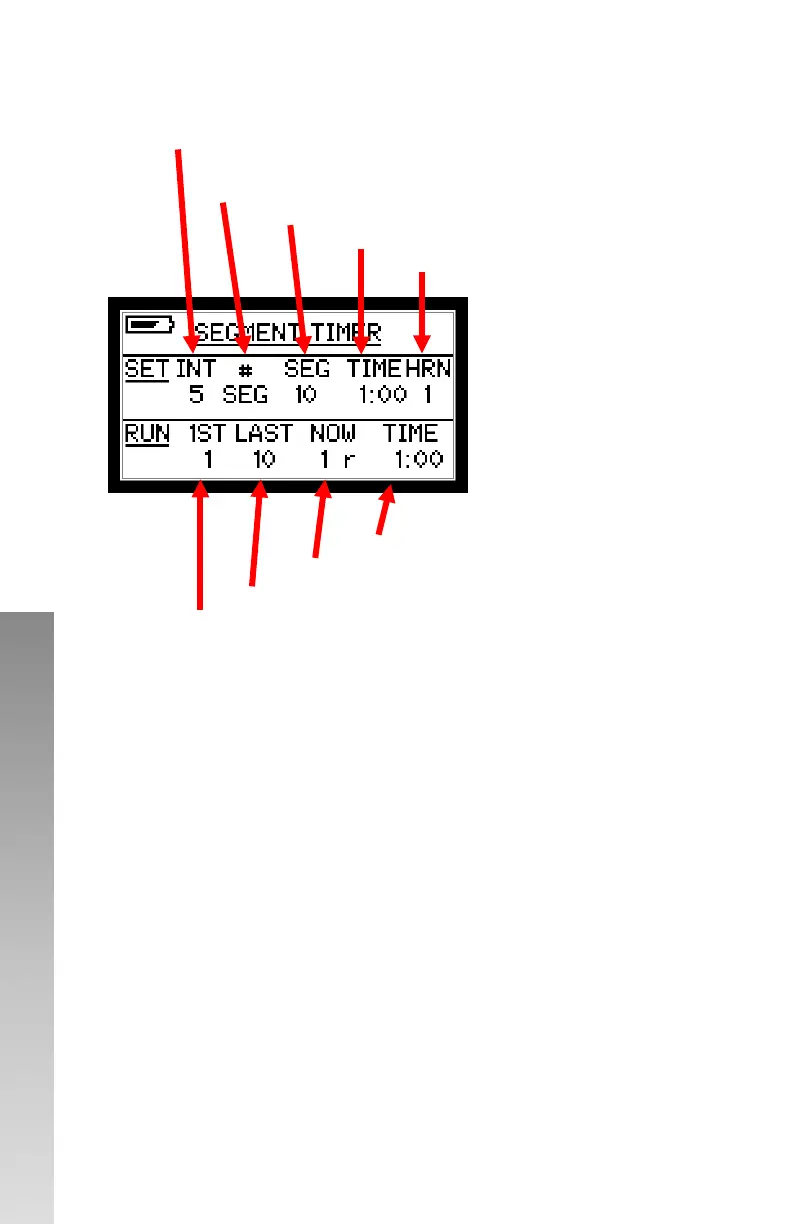
INT: Intermission time in seconds between segments
#: SEG will display segment number programed
#: 1>> will display number of segments from 1st
SEG: is the current segment to be modified
TIME: is the time for the segment selected
HRN: is the number of seconds the horn
will sound.
TIME: running time on current segment
NOW: number of the current segment running
LAST: Last segment to be ran in sequence
1st: First segment to be ran in sequence



 To Next Page