www.oes-scoreboards.com | 1.877.652.5833
4056 Blakie Rd., London ON Canada N6L 1P7
Issued: 2017-05-15
CONFIGURATION OPTION #7 – SB OUTPUTS (SCOREBOARD
OUTPUTS)
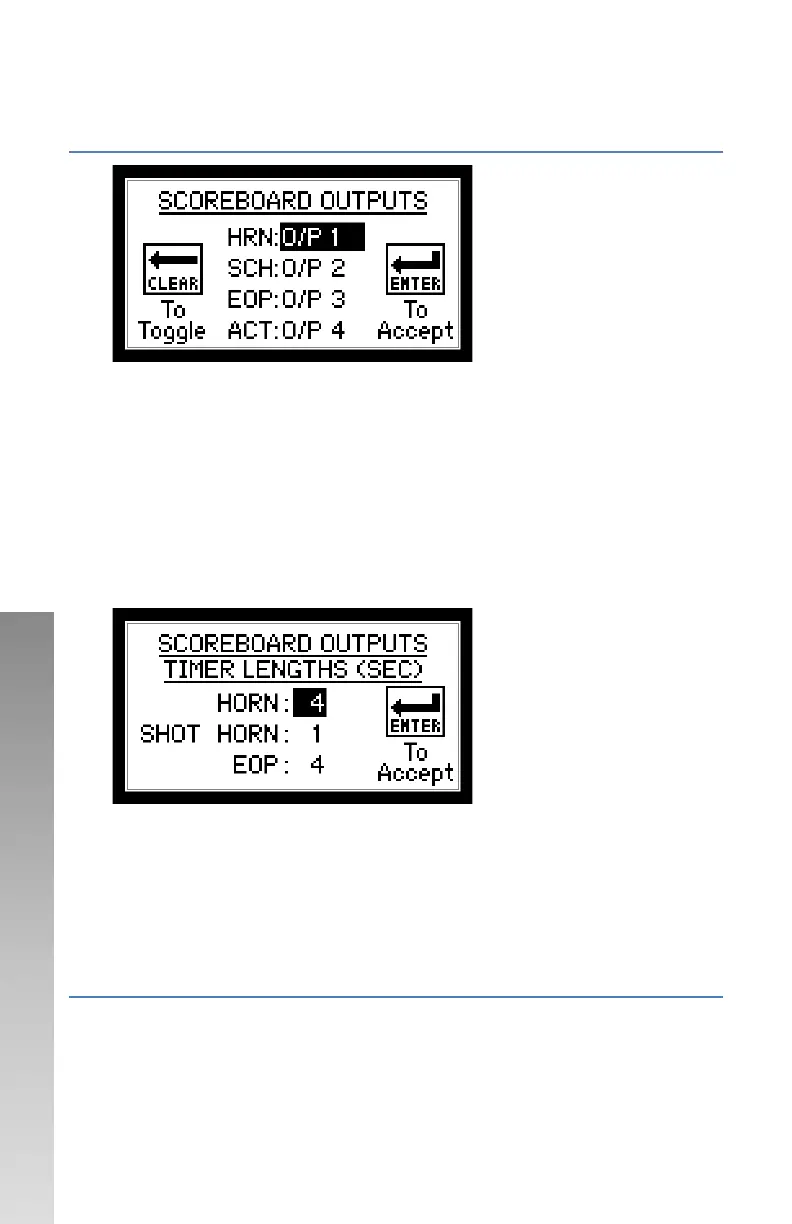
Follow on-screen instructions.
• Available options are No O/P or O/P 1-4 for the following:
o HORN – Main Scoreboard Horn.
o SCH – Shot Clock Horn.
o EOP – End of period indicator.
o ACT – System active – output will be on if controller is on.
• Anytime the Sport or Protocol is edited – default values for
Scoreboard Outputs are set.
• After done editing the outputs, the next screen appears to set output
time lengths.
To set each value:
• Enter value on the numeric keypad.
• Press ENTER.
Note that the value entered is in seconds.
For Manual Horn only, enter a value of “0”.
CONFIGURATION OPTION #9 – RF (RADIO FREQUENCE
CHANNELS)
SETTING RADIO CHANNEL IN CONTROLLER
Factory setting can be found on serial number label.
*** ENSURE ALL OTHER CONTROLLERS ARE POWERED OFF BEFORE
PROCEEDING. ***


 To Next Page