OPERATIONS
3
CMS-108 Electronic Cash RegisterUSER GUIDE:
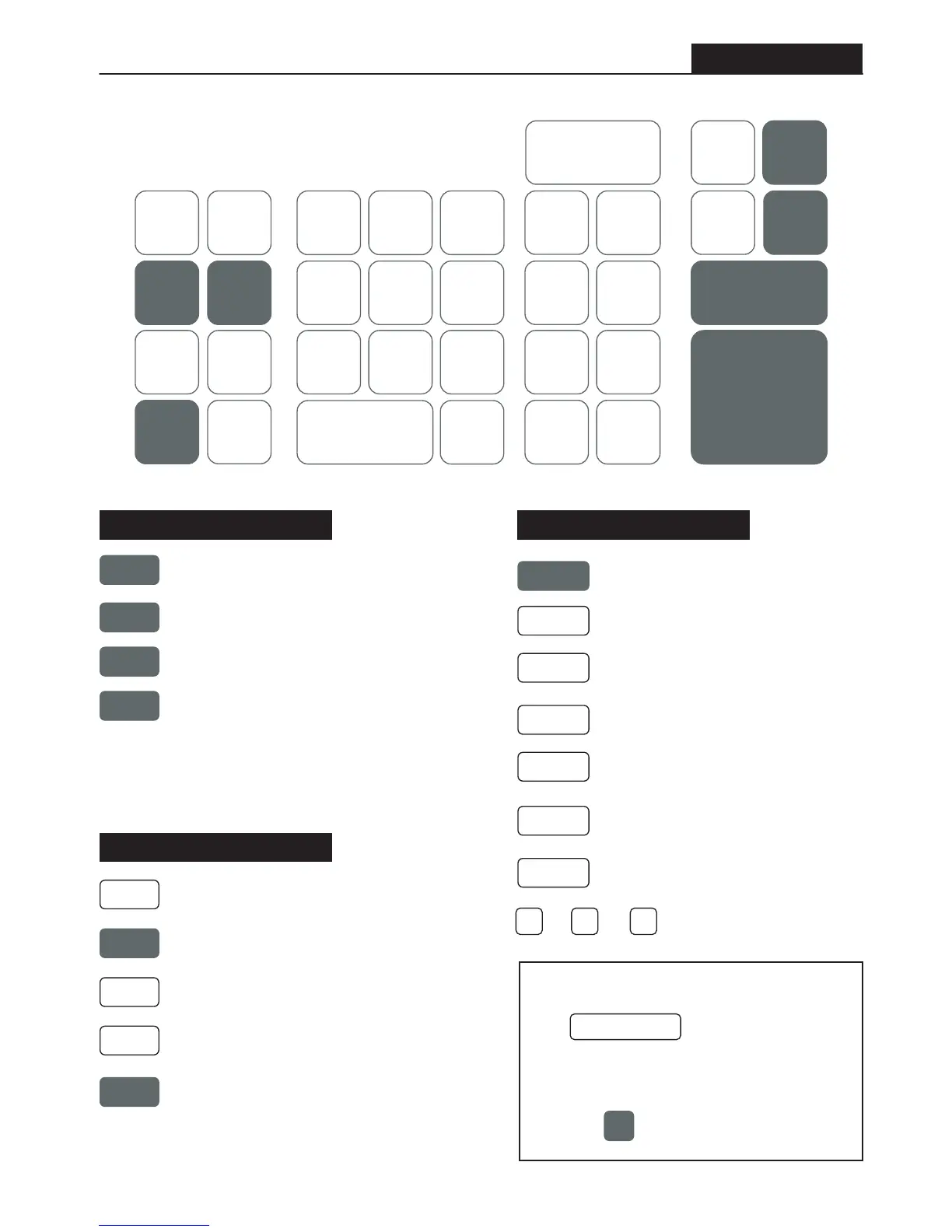
Keypad layout
FEED
RA
PO
C
VOID
REF/-
PLU
QTY/
TIME
7 8 9
4
1
0
5
2
6
00
CLERK
DEPT 4 DEPT 8
DEPT 3
DEPT 2
DEPT 1 DEPT 5
DEPT 6
DEPT 7
VAT
(tax/shift)
CHECK
-%
(discount)
CHARGE
ST/#/NS
TOTAL
3
(amount tendered)
(clear)
(received
on a/c)
(refund)
(paid out)
Finalizing Keys
Negative Sales Keys
TOTAL
CHARGE
CHECK
ST/#/NS
Amount Tendered
To finalize a cash transaction
-%
REF/-
VOID
PO
To finalize a transaction to credit card
To finalize a transaction to check
ST Sub-Total
– to add up registrations
# Non Add
– to add an invoice number to your receipt
NS No Sale
– to open drawer when no sale occurs
Discount
To do an item discount or a subtotal discount
Refund
To reverse a transaction, to reverse a registration
Void
To immediately delete an incorrect registration
Paid Out
To remove cash from the drawer outside of a sale
RA
Received On Account
To receive cash into the drawer outside of a sale
C
To delete an incorrect entry
To clear en electronic error
QTY/TIME
To multiply an amount, to display time
PLU
Price Look Up
To register a pre-coded item
CLERK
To sign staff on & off
VAT
Tax Shift
To register an item with a different tax rate
DEPT
Departments 1 to 8
To record sales entries
FEED
Feeds the paper roll
Function Keys
to &
0900
Ten-keypad to input numbers
E.g. a continuous pip sound
1. An incorrect key was depressed.
2. An incorrect key sequence was entered.
Press the clear button to exit.
E 0.00
C
Electronic error


 To Next Page