OPERATIONS
5
CMS-108 Electronic Cash RegisterUSER GUIDE:
Recording transaction
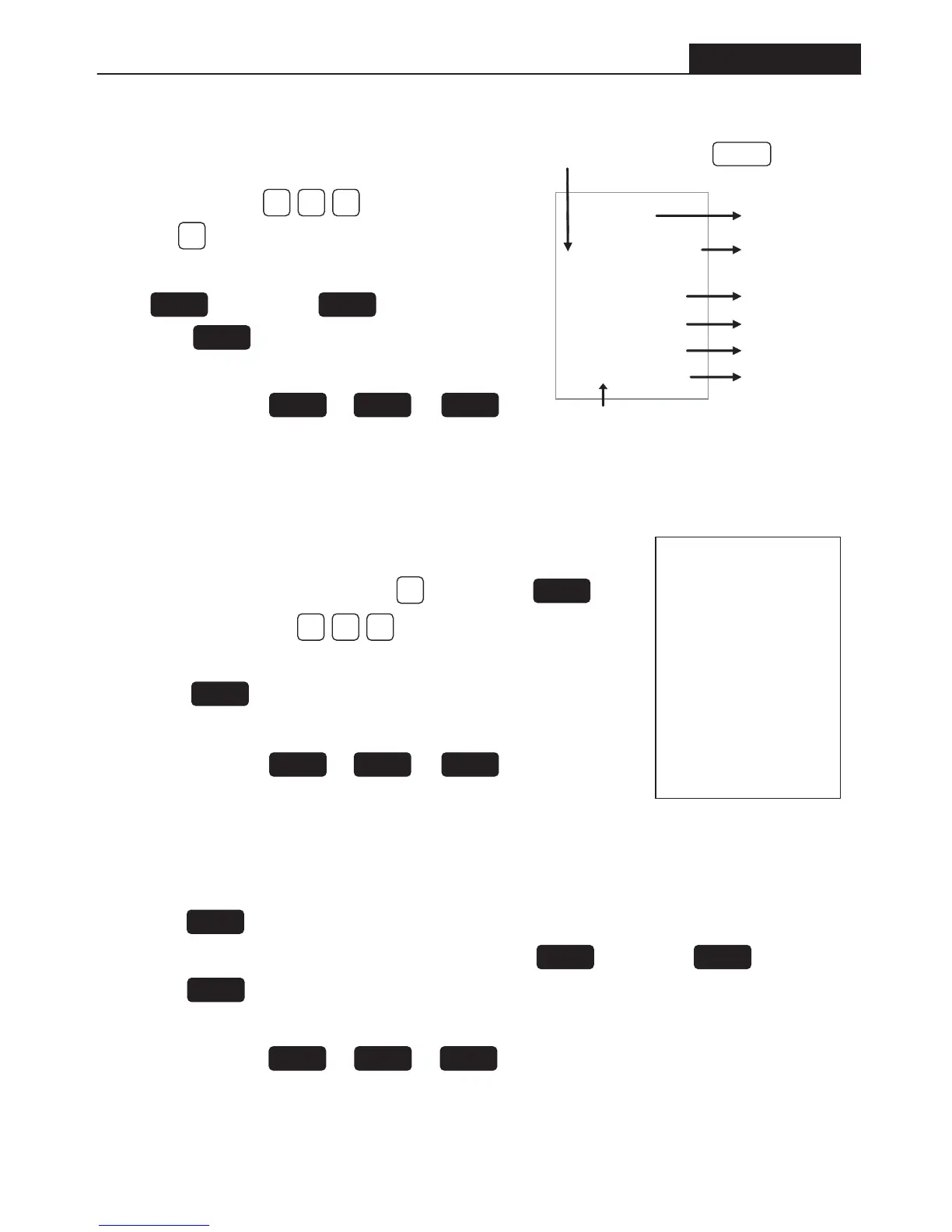
To record an entry e.g. 1 x R10.00.
• Enter the price, e.g.. = ten Rand
(use the button as your Rand button).
• Select a DEPARTMENT to record this amount.
e.g.. = Groceries = Butchery
• Press the button to total all entries.
• Enter the amount that the customer tenders.
• Press the amt tend / or or
to finalize the transaction. The change amount will be displayed.
DEPT 1 DEPT 2
ST/#/NS
TOTAL CHECK CHARGE
03.05.04
.1.
110.00
10.00 ST
20.00 CA
10.00 CG
12 00 001-
Date
Amount Tendered
Clerk
Time
Department Registration
Change
Total Entry
Receipt Number
DEPT 1
1000
00
Recording transaction (multiple entry)
To record an entry e.g. 5 x R10.00 = R50.00
• Enter the quantity you are selling e.g.. . Then press
• Enter the unit price e.g.. = ten Rand
• Select a DEPARTMENT to record this amount.
• Press the button to total all entries.
• Enter the amount that the customer tenders.
• Press the amt tend / or or
to finalize the transaction. The change amount will be displayed.
TOTAL CHECK CHARGE
5
QTY/TIME
1000
ST/#/NS
Delete / Adjust transaction (after finalizing the transaction)
• Press the refund button.
• Select the DEPT where this amount was recorded, e.g.. =Groceries =Butchery
• Press the button to total all entries.
• Enter the amount that the customer tenders on the number keypad.
• Press the amt tend/ or or to finalize the transaction.
• The entire transaction will be subtracted from your daily sales & grand total.
REF/-
DEPT 1 DEPT 2
ST/#/NS
TOTAL CHECK CHARGE
03.05.04
.1.
150.00
12-05 002
5. X
10.00 @
50.00 ST
100.00 CA
50.00 CG


 To Next Page