OPERATIONS
4
CMS-108 Electronic Cash RegisterUSER GUIDE:
Control switch
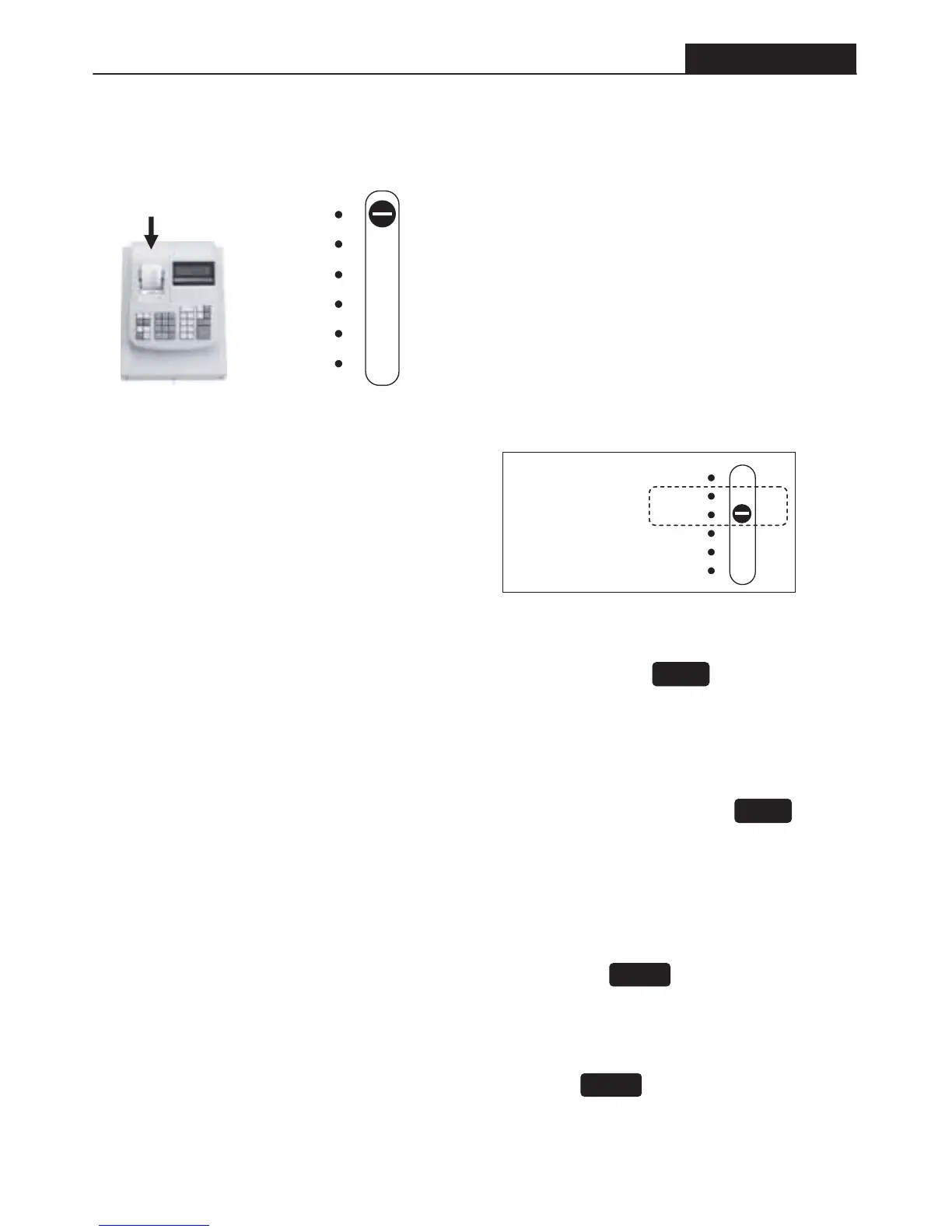
Locate the slide switch underneath the top cover in front of the printer to your left.
OFF
R1
R2
X
Z
PRG
Open this cover.
Switch machine off
Record transactions for journal
Record transactions & print customer receipt
Print reports without resetting totals to zero
Print reports & reset totals to zero
Programme machine to your requirements
Paid Out Operation
• Use for petty cash
• Use to pay invoices
Enter the amount to pay out. Press the [PO] paid out button. E.g. 49.99
Received On Account Operation
• Use for cash received where no item was sold
Enter the amount received. Press the [RA] received on account button. E.g. 50.00
Non-add Entry
• To record a number on the receipt that does not add to the transaction
• Use this in conjunction with the [PO] paid out key to record an invoice number
Enter number e.g.. 1234567 (seven digits maximum). Then press the button.
Opening The Drawer
• To open the drawer without completing a transaction. Press the button.
PO
RA
ST/#/NS
ST/#/NS
OFF
R1
R2
X
Z
PRG
All transaction is
performed with
the Control
Switch in the R1
or R2 position.


 To Next Page