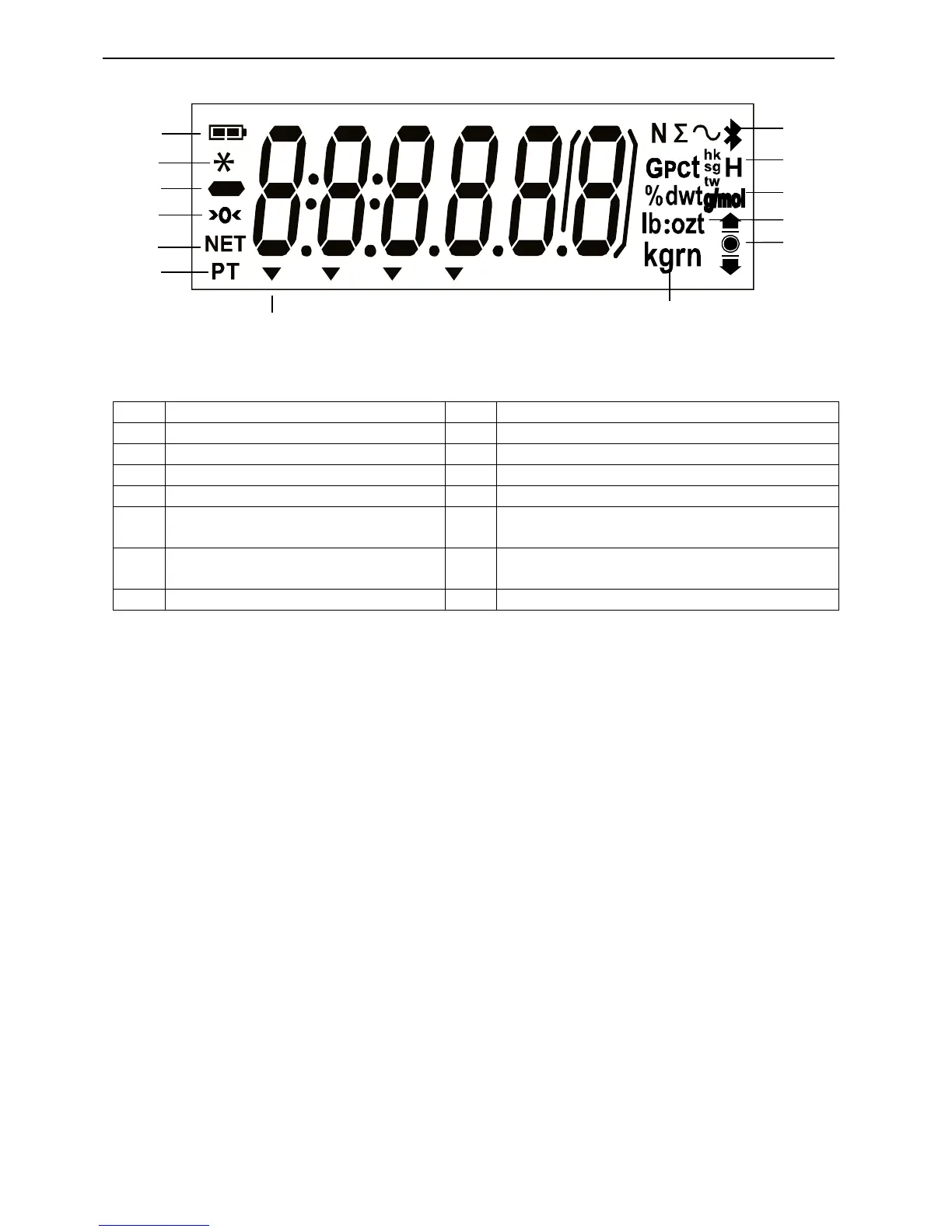
Gravity, Pieces, t hk, t sg, t tw, Hold
symbols
Note: * Some symbols might not be available depending on different models.
3.2 Turning Balance On/Off
To turn the balance on, press and hold the On/Zero Off button for 1 second. The balance
performs a display test, momentarily displays the software version, and then enters the active
weighing mode.
To turn the balance off, press and hold the On/Zero Off button until OFF is displayed.
3.3 Calibration Operation
When the balance is operated for the first time, a span calibration is recommended to ensure
accurate weighing results. Before performing the calibration, be sure to have the appropriate
calibration weights. Ensure that the Security switch is set to unlocked position.
Press and hold Menu until [mMeNU] (Menu) is displayed. When the button is released, the display
will show [C.A.L]. Press Yes to accept. [SpaN] will then be shown. Press Yes to begin the span
calibration.
[--C--] will be displayed while zero reading is stored. Next, the display shows the calibration
weight value (press No to toggle value). Place the specified calibration mass on the pan. [--C--]
will be displayed while the reading is stored. The display will show [done] if the calibration was
successful. The balance returns to the previous application mode and is ready for use.




 To Next Page