EasyManua.ls Logo

Ohmeda 3000 - Page 18

Default Icon
62 pages
Print Icon
To Next Page IconTo Next Page
To Previous Page IconTo Previous Page
Loading...
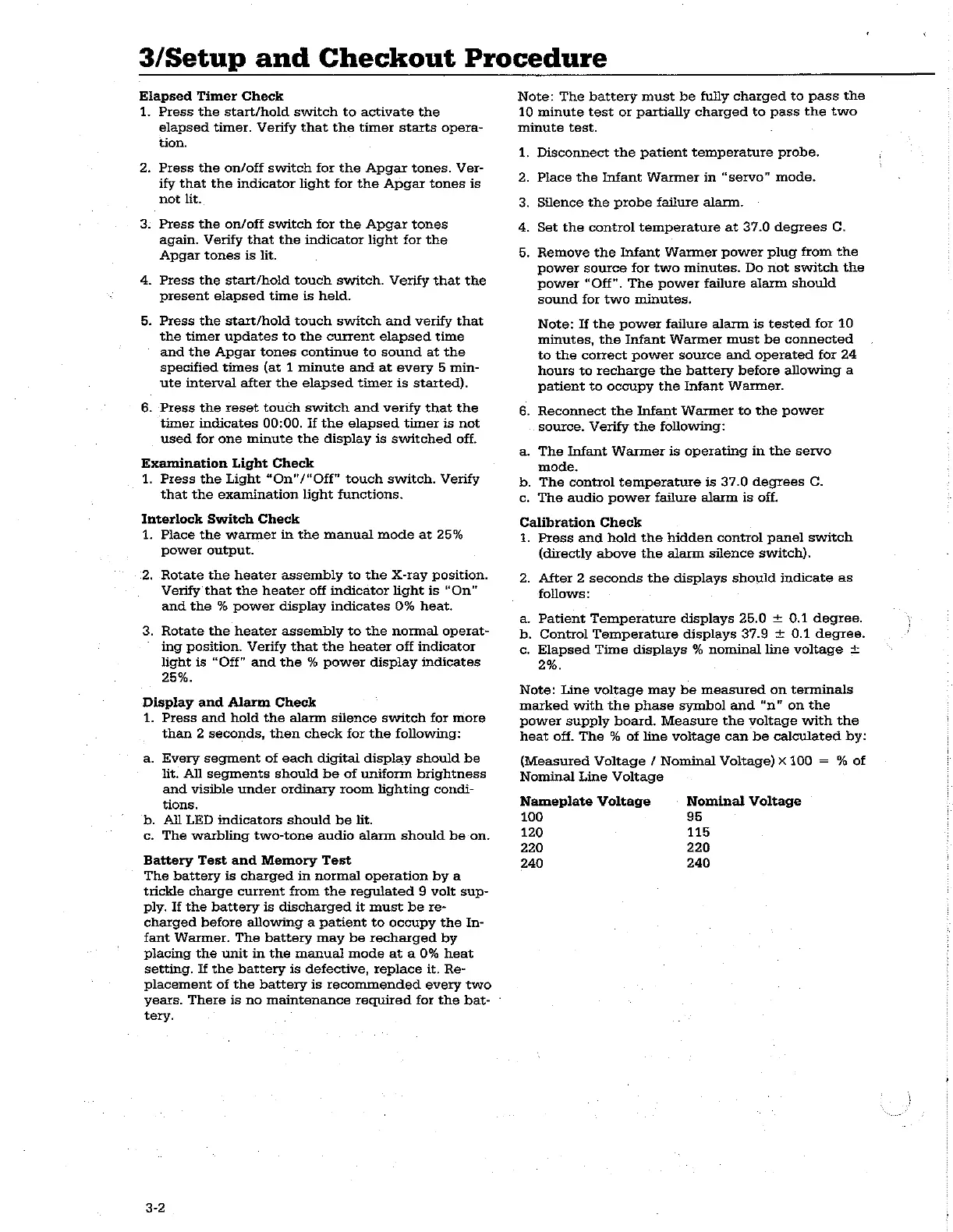
3/Setup
and
Checkout
Procedure
Elapsed
Timer
Check
1.
Press
the
start/hold
switch
to
activate
the
elapsed
timer.
Verify
that
the
timer
starts
opera-
tion.
2.
Press
the
on/off
switch
for
the
Apgar
tones.
Ver-
ify
that
the
indicator
light
for
the
Apgar
tones
is
not
lit.
3.
Press
the
on/off
switch
for
the
Apgar
tones
again.
Verify
that
the
indicator
light
for
the
Apgar
tones
is
lit.
4.
Press
the
start/hold
touch
switch.
Verify
that
the
present
elapsed
time
is
held.
5.
Press
the
start/hold
touch
switch
and
verify
that
the
timer
updates
to
the
current
elapsed
time
and
the
Apgar
tones
continue
to
sound
at
the
specified
times
(at
1
minute
and
at
every
5
min-
ute
interval
after
the
elapsed
timer
is
started).
6.
Press
the
reset
touch
switch
and
verify
that
the
timer
indicates
00:00.
If
the
elapsed
timer
is
not
used
for
one
minute
the
display
is
switched
off.
Examination
Light
Check
1.
Press
the
Light
“On"/“Off"
touch
switch.
Verify
that
the
examination
light
functions.
Interlock
Switch
Check
1.
Place
the
warmer
in
the
manual
mode
at
25%
power
output.
2.
Rotate
the
heater
assembly
to
the
X-ray
position.
Verify
that
the
heater
off
indicator
light
is
“On”
and
the
%
power
display
indicates
0%
heat.
3.
Rotate
the
heater
assembly
to
the
normal
operat-
ing
position.
Verify
that
the
heater
off
indicator
light
is
“Off”
and
the
%
power
display
indicates
25%.
Display
and
Alarm
Check
1.
Press
and
hold
the
alarm
silence
switch
for
more
than
2
seconds,
then
check
for
the
following:
a.
Every
segment
of
each
digital
display
should
be
lit.
All
segments
should
be
of
uniform
brightness
and
visible
under
ordinary
room
lighting
condi-
tions.
b.
All
LED
indicators
should
be
lit.
c.
The
warbling
two-tone
audio
alarm
should
be
on.
Battery
Test
and
Memory
Test
The
battery
is
charged
in
normal
operation
by
a
trickle
charge
current
from
the
regulated
9
volt
sup-
ply.
If
the
battery
is
discharged
it
must
be
re-
charged
before
allowing
a
patient
to
occupy
the
In-
fant
Warmer.
The
battery
may
be
recharged
by
placing
the
unit
in
the
manual
mode
at
a
0%
heat
setting.
If
the
battery
is
defective,
replace
it.
Re-
placement
of
the
battery
is
recommended
every
two
years.
There
is
no
maintenance
required
for
the
bat-
:
tery.
3-2
Note:
The
battery
must
be
fully
charged
to
pass
the
10
minute
test
or
partially
charged
to
pass
the
two
minute
test.
1.
Disconnect
the
patient
temperature
probe.
2.
Place
the
Infant
Warmer
in
“servo”
mode.
3.
Silence
the
probe
failure
alarm.
4.
Set
the
control
temperature
at
37.0
degrees
C.
5
.
Remove
the
Infant
Warmer
power
plug
from
the
power
source
for
two
minutes.
Do
not
switch
the
power
"Off".
The
power
failure
alarm
should
sound
for
two
minutes.
Note:
If
the
power
failure
alarm
is
tested
for
10
minutes,
the
Infant
Warmer
must
be
connected
to
the
correct
power
source
and
operated
for
24
hours
to
recharge
the
battery
before
allowing
a
patient
to
occupy
the
Infant
Warmer.
6.
Reconnect
the
Infant
Warmer
to
the
power
source.
Verify
the
following:
a.
The
Infant
Warmer
is
operating
in
the
servo
mode.
b.
The
control
temperature
is
37.0
degrees
C.
c.
The
audio
power
failure
alarm
is
off.
Calibration
Check
1.
Press
and
hold
the
hidden
control
panel
switch
(directly
above
the
alarm
silence
switch).
2.
After
2
seconds
the
displays
should
indicate
as
follows:
a.
Patient
Temperature
displays
25.0
+
0.1
degree.
b.
Control
Temperature
displays
37.9
+ 0.1
degree.
c.
Elapsed
Time
displays
%
nominal
line
voltage
+
2%.
Note:
Line
voltage
may
be
measured
on
terminals
marked
with
the
phase
symbol
and
“n”
on
the
power
supply
board.
Measure
the
voltage
with
the
heat
off.
The
%
of
line
voltage
can
be
calculated
by:
(Measured
Voltage
/
Nominal
Voltage)
x
100
=
%
of
Nominal
Line
Voltage
Nameplate
Voltage
-
Nominal
Voltage
100
95
120
115
220
220
240
240

Related product manuals