EasyManua.ls Logo

Ohmeda 3000 - Display Module Service

Default Icon
62 pages
Print Icon
To Next Page IconTo Next Page
To Previous Page IconTo Previous Page
Loading...
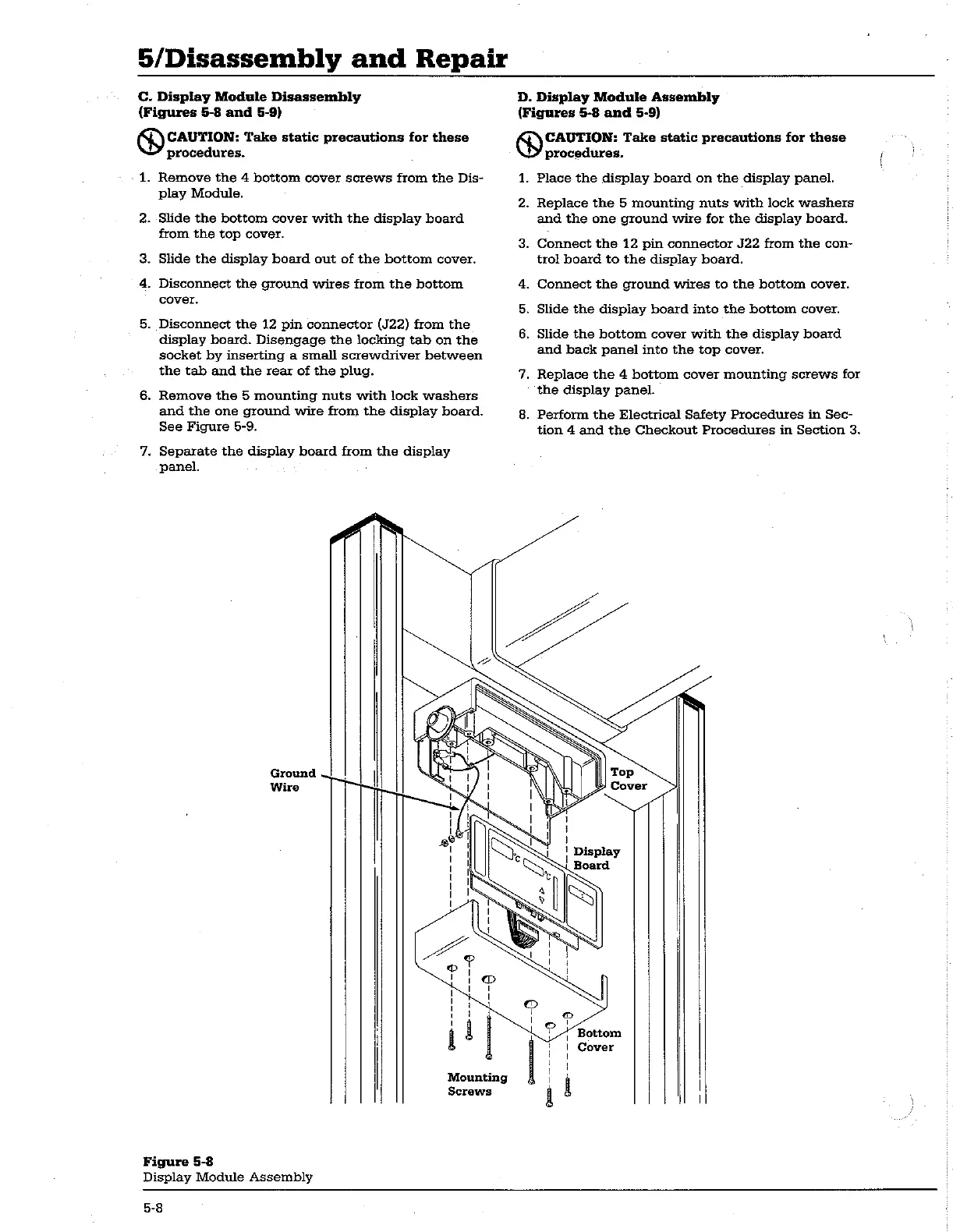
5/Disassembly
and
Repair
C.
Display
Module
Disassembly
(Figures
5-8
and
5-9)
CAUTION:
Take
static
precautions
for
these
procedures.
1.
Remove
the
4
bottom
cover
screws
from
the
Dis-
play
Module.
2.
Slide
the
bottom
cover
with
the
display
board
from
the
top
cover.
3.
Slide
the
display
board
out
of
the
bottom
cover.
4.
Disconnect
the
ground
wires
from
the
bottom
cover.
5.
Disconnect
the
12
pin
connector
(J22)
from
the
display
board.
Disengage
the
locking
tab
on
the
socket
by
inserting
a
small
screwdriver
between
the tab
and
the
rear
of
the
plug.
6.
Remove
the
5
mounting
nuts
with
lock
washers
and
the
one
ground
wire
from
the
display
board.
See
Figure
5-9.
7.
Separate
the
display
board
from
the
display
panel.
AN
Ground
~~
|
Wire
Tm
Mounting
Screws
Figure
5-8
Display
Module
Assembly
D.
Display
Module
Assembly
(Figures
5-8
and
5-9)
CAUTION:
Take
static
precautions
for
these
procedures.
1.
Place
the
display
board
on
the
display
panel.
2.
Replace
the
5
mounting
nuts
with
lock
washers
and
the
one
ground
wire
for
the
display
board.
3.
Connect
the
12
pin
connector
J22
from
the
con-
trol
board
to
the
display
board.
4.
Connect
the
ground
wires
to
the
bottom
cover.
5.
Slide
the
display
board
into
the
bottom
cover.
6.
Slide
the
bottom
cover
with
the
display
board
and
back
panel
into
the
top
cover.
7.
Replace
the
4
bottom
cover
mounting
screws
for
the
display
panel.
8.
Perform
the
Electrical
Safety
Procedures
in
Sec-
tion
4
and
the
Checkout
Procedures
in
Section
3.
|
Display
Board
Cover
5-8

Related product manuals