C9800 User’s Guide - 38
W
ATERMARKS
Note
This feature is not available with the PCL 6 driver.
A watermark is typically faint text that is superimposed on a
printed document. This can be used to indicate that the
document is “Draft”, or perhaps “Confidential”.
H
OW
TO
CREATE
A
NEW
WATERMARK
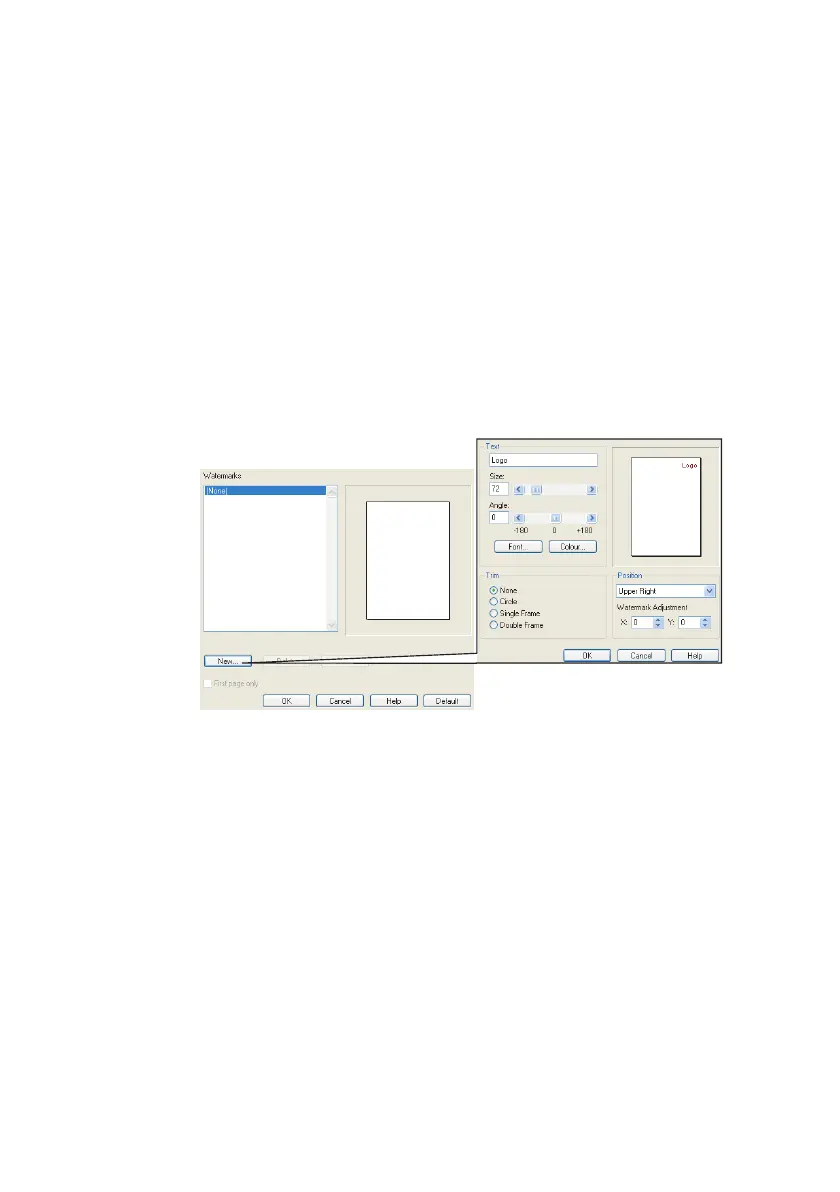
1. On the [Job Options] tab click [Watermarks...].
2. Click [New...] and enter the text for your watermark.
3. Adjust your watermark’s size, angle, font, color, position
and border (trim) if required.
4. Click [OK] to accept your changes. The new watermark is
now in the Watermark list.
H
OW
TO
CHOOSE
A
PREVIOUSLY
CREATED
WATERMARK
1. On the [Job Options] tab click [Watermarks...].
2. On the Watermarks window, select the watermark in the
list. A preview of the watermark is shown.
3. Select the [First page only] checkbox if required.



 To Next Page