DOLCECLIMA
SW1
SW2
SW3
SW4
SW5
SW7
SW8
SW6
S3
D1
D2
S1
S2
S12
S11
S10
S9
S8
S4
S5
S6
S7
B
S13
ENGLISH
EN - 21
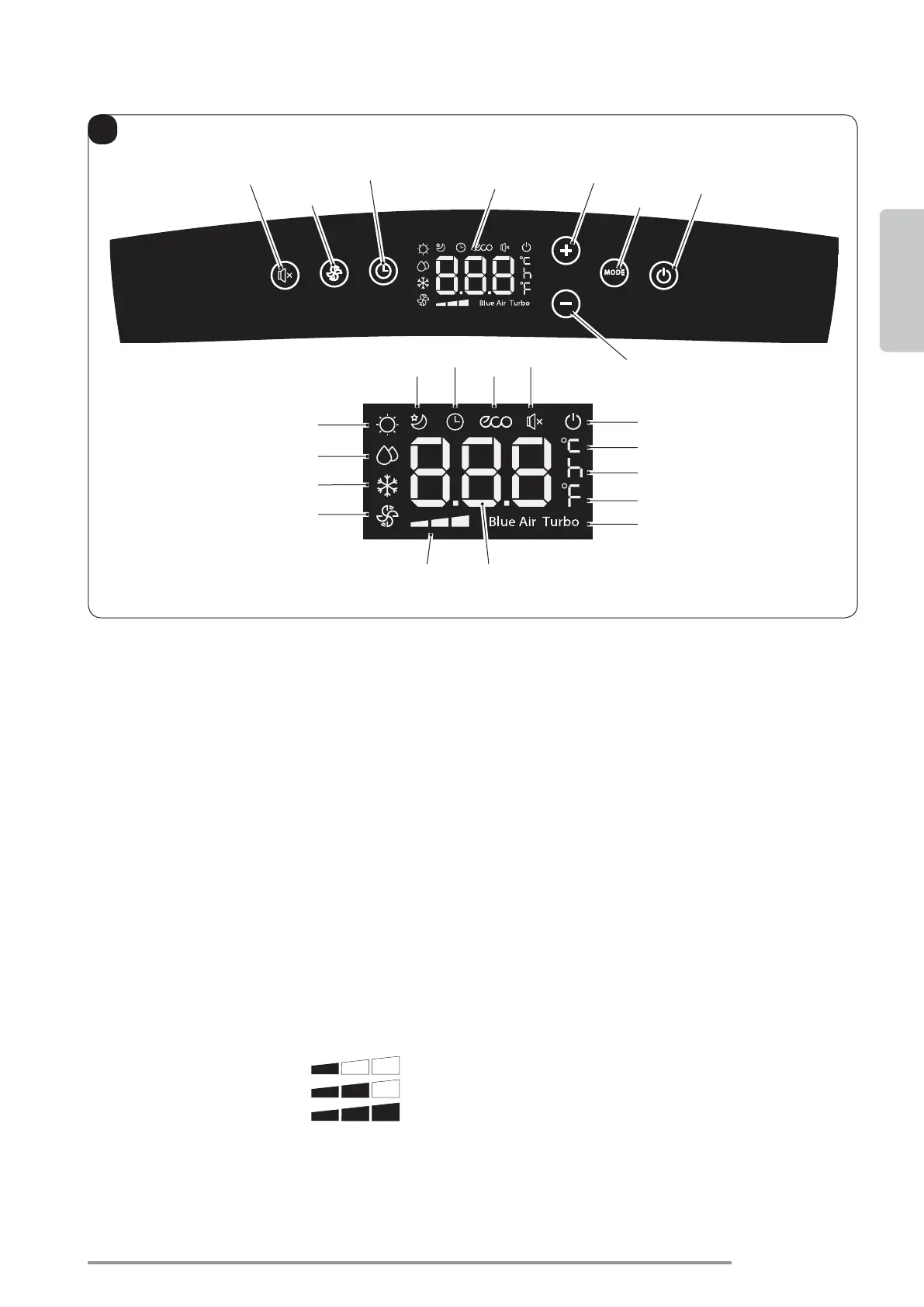
SW1: ON/Stand-by;
SW2: Operation mode selection
(active only in the version with heat pump)
SW3: Temperature/delay increase
SW4: Temperature/delay decrease
SW5: Display
SW6
off delay
SW7: Fan speed selection
Minimum speed
SW8: “SILENT” function selection (silent)
D1: Set temperature/Timer
D2: Fan speed indication (see “SW7”)
S1: Hour indicator
S2: Temperature indicator in °C
S3: Temperature indicator in F
S4: Fan only mode
S5: Cooling mode
S6
S7: Heating mode (active only in the version
with heat pump)
S8: Sleep mode
S9: Timer mode (programmed switching on/off)
S10: Automatic mode (ECO)
S11: “Silent” function active
S12: Appliance electrically powered indicator
S13: Turbo function
3.1 - CONTROL PANEL SYMBOLS AND KEYS (Fig.B)





 To Next Page