23.3.2005 Rev. 1.0
Operating instructions
9
4.2.2 Lighting the pilot flame
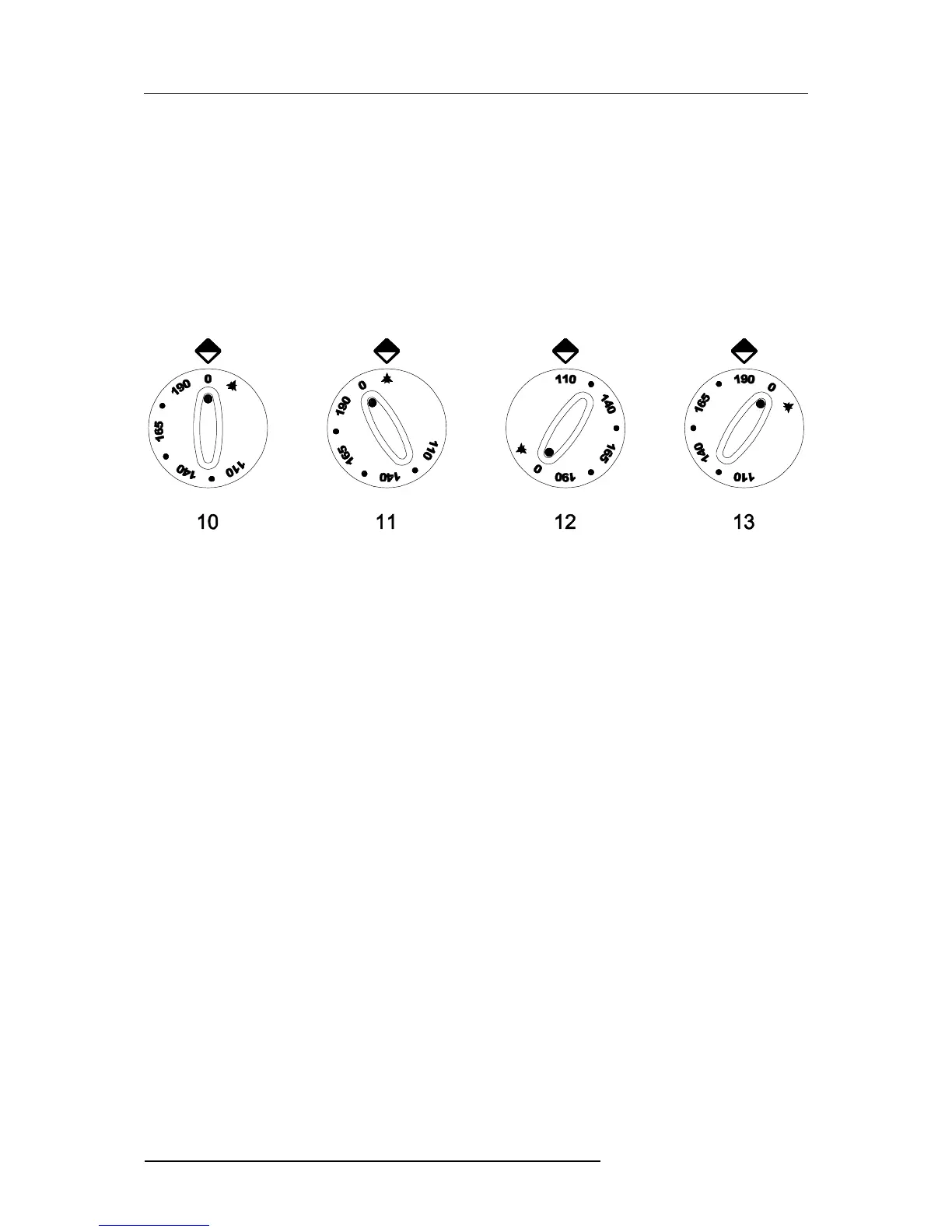
Push the knob and turn it towards the left to the position shown as item 11 in Fig. 3. Press
and hold down the knob and at the same time push the ignition button (item 2 in Fig. 1).
After lighting the pilot flame, hold the knob down for 15-20 seconds to allow the thermo-
couple to heat. If the pilot flame goes out, repeat the lighting process.
Proper pilot flame lighting can be checked through the viewing hole provided for that pur-
pose (item 4 in Fig. 1 further above).
Fig. 3
10. OFF position
11. Pilot flame lighting position
12-13. Temperature control range
4.2.3 Lighting the main tank burner
To light the main burner, exercise a slight pressure and turn the knob to the position cor-
responding to the desired temperature (item 12-13 in Fig. 3). Oil temperature will be kept
at the set value by means of a thermostat that automatically turns the main burner on and
off.


 To Next Page