EasyManua.ls Logo

Olivetti d-Copia 2500MF - Page 34

Olivetti d-Copia 2500MF
312 pages
Print Icon
To Next Page IconTo Next Page
To Previous Page IconTo Previous Page
Loading...
Copying Functions
ADVANCED OPERATION GUIDE 1-19
1
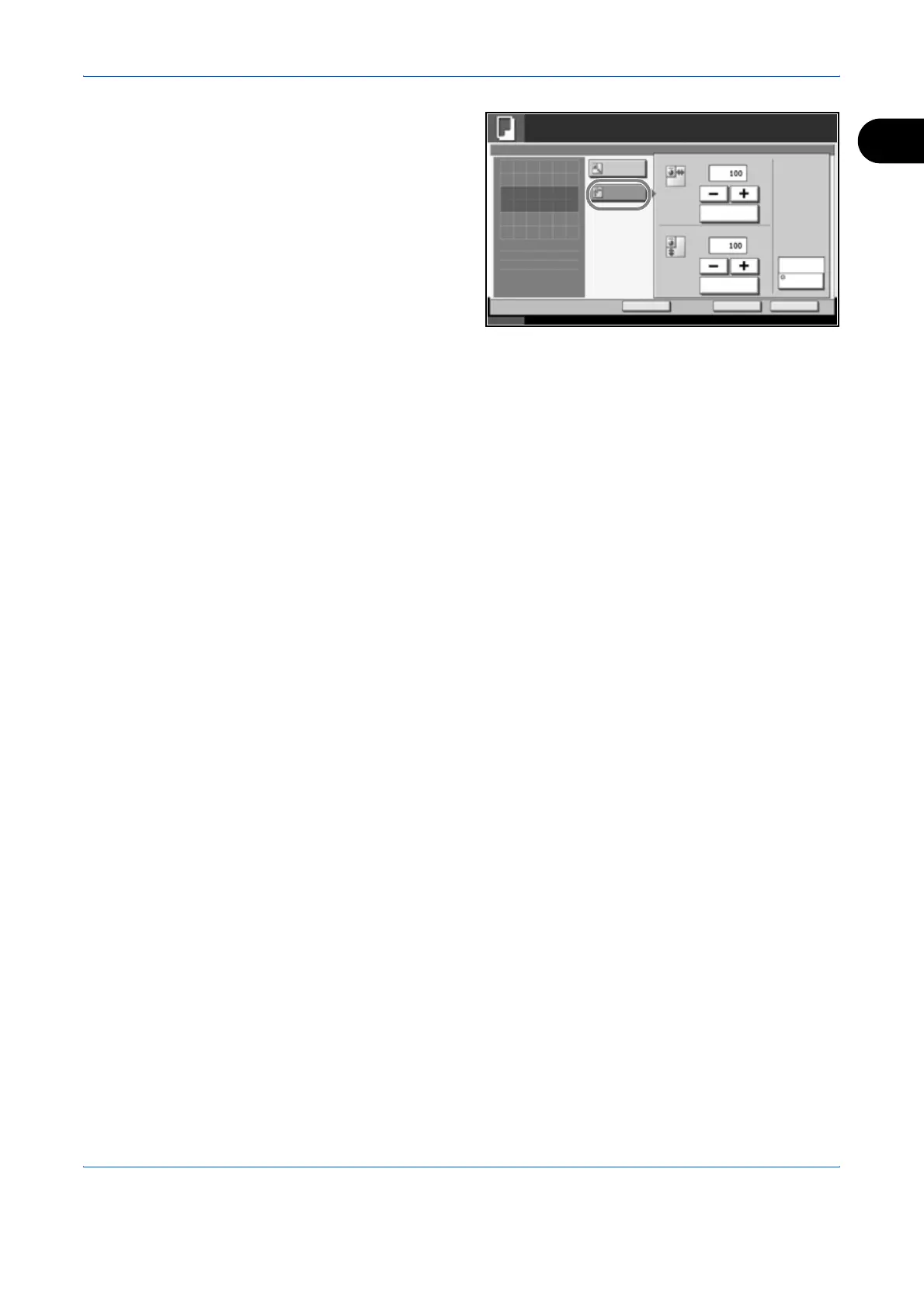
To use XY Zoom,
press [XY Zoom].
Press [+] or [–] to
change the
displayed
magnifications of X
(horizontal) and Y
(vertical). You can
also enter the
magnification
directly using the
numeric keys by
pressing [# Keys].
Press [Original Orientation] to choose orientation of the originals, either
[Top Edge Top] or [Top Edge Left]. Then press [OK].
5
Press [OK].
6
Press the Start key to start copying.
Status 10/10/2007 10:10
Ready to copy.
Copies
Cancel OK
Zoom
Press [OK] to display
Add Shortcut
X
Standard
Zoom
XY Zoom
%
(25 - 400)
Y (25 - 400)
%
# Keys
# Keys
Top Edge Top
Original
Orientation
1
the image.

Table of Contents