10
45ND-6, 45ND-25 Neutral density filter
45G-530, 45G-533, 45IF550 Green
45Y-48 Yellow
45O-560 Orange
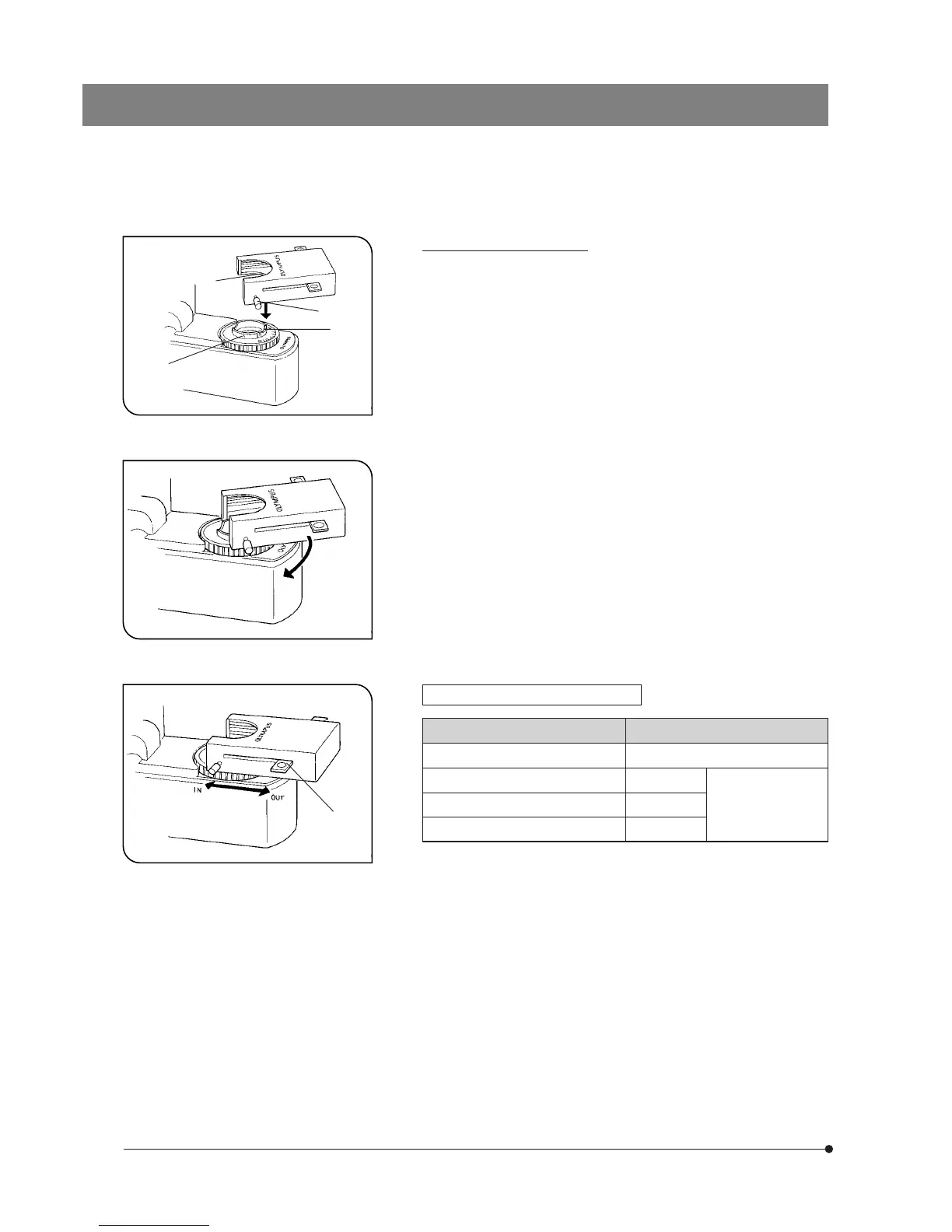
Fig. 8
Fig. 9
Fig. 10
Usable Filters Applications
B&W contrast filter
‡
†
Š
‰
‹
Mounting the Filter Cassette
1. Fully loosen the filter cassette clamping screw †. (Fig. 8)
2. Align the key ‡ on the bottom surface of the filter cassette with the
positioning slot Š on the filter mount, then snap the filter cassette into
place from above.
3. Rotate the filter cassette to align its sides with the base. (Fig. 9)
4. Align the clamping screw † with the positioning hole ‰ on the filter
mount, then tighten the screw to fasten the filter cassette.
#When the filter cassette is installed, the stage may hit it when low-
ered. Therefore, exercise caution when lowering the stage with the
filter cassette installed.
Using the Filter Cassette (Fig. 10)
Up to three of the above filters can be loaded in the filter cassette. Mov-
ing the levers ‹ on the left and right sides of the cassette to the IN
position brings the corresponding filter into the light path.



 To Next Page