4
Setting timer recording [Timer Rec]
81
EN
Setting timer recording [Timer Rec]
8
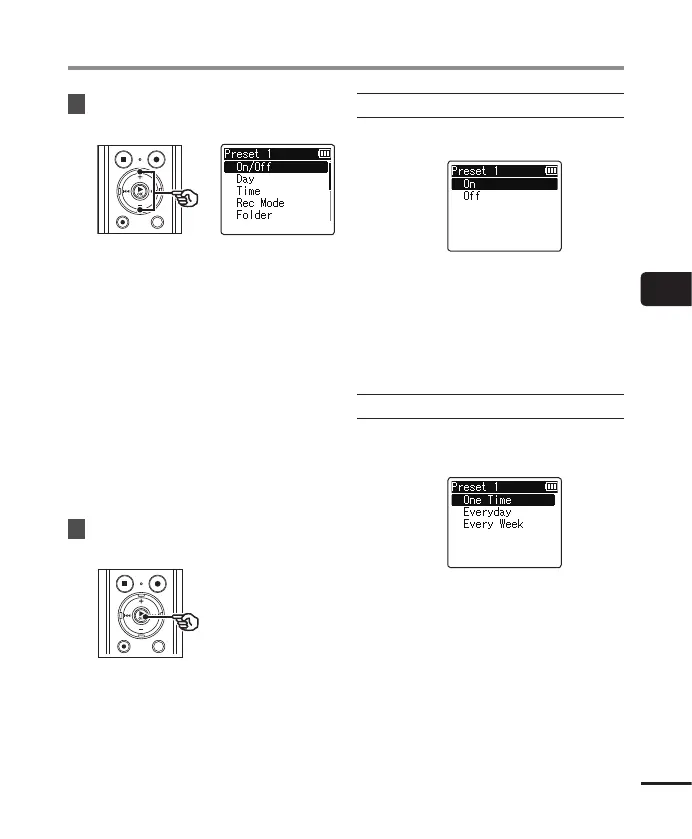
Press the
+
or
–
button to select
the desired setting item.
[On/Off]:
Turns the selected reservation on or
off.
[Day]:
Sets the repeat interval of the
reservation.
[Time]:
Sets the start time and end time of the
reservation.
[Rec Mode]:
Sets the recording format.
[Folder]:
Sets the save destination folder for
timer recording (Folder A to Folder E).
[Rec Level]:
Sets the recording level.
9
Press the `
OK
button to continue
to the next setting.
When [
On/Off
] was selected
1 Press the + or – button to select [On]
or [Off].
[On]:
Timer recording is performed
according to the registered settings.
[Off]:
Timer recording is not performed.
2 Press the `OK button to exit the
selection screen.
When [
Day
] was selected
1 Press the + or – button to select
[One Time], [Every Day] or [Every
Week].
[One Time]:
Records at the specified date and time
and ends.
[Every Day]:
After recording on the specified date
and time, repeats recording at the
same time every day.
[Every Week]
*1
:
After recording on the specified date
and time, repeats recording at the
same time each week.



 To Next Page