136
EN
Information
12
Menu directory
*1: Can be added to [Myset].
*2: Default can be restored by selecting [Full] for [Reset].
*3: Default can be restored by selecting [Basic] for [Reset].
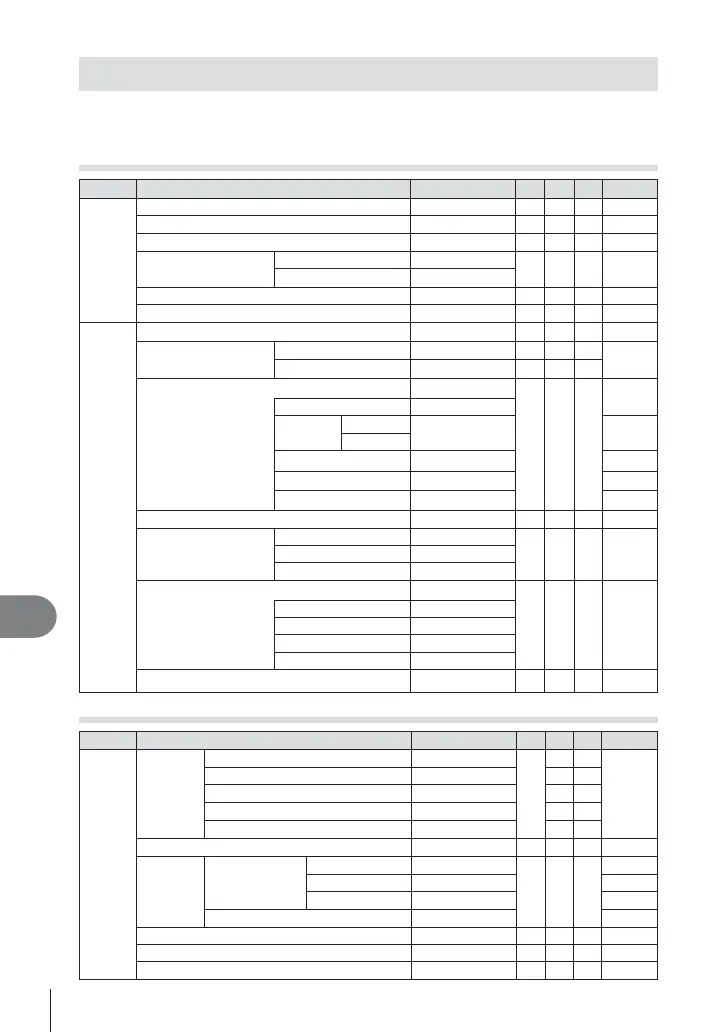
K Shooting Menu
Tab Function Default *1 *2 *3
g
W
Card Setup ― 72
Reset/Myset ―
D
73
Picture Mode
jNatural
DDD
60
K
Still Picture
YN
DDD
63
Movie
X
Image Aspect 4:3
DDD
62
Digital Tele-converter Off
DDD
81
X
j/Y o
DDD
61
Image Stabilizer
Still Picture S-IS AUTO
DDD
57
Movie M-IS On
DDD
Bracketing
Off
DDD
76
AE BKT 3f 1.0EV
WB BKT
A – B
― 77
G – M
FL BKT ― 77
ISO BKT ― 77
ART BKT ― 77
HDR Off
DDD
78
Multiple Exposure
Frame Off
DD
79Auto Gain Off
Overlay Off
Time Lapse Settings Off
DD
80
Frame 99
Start Waiting Time 00:00:01
Interval Time 00:00:01
Time Lapse Movie Off
# RC Mode
Off
DDD
124
q Playback Menu
Tab Function Default *1 *2 *3
g
q
m
Start ―
55
BGM Joy
DD
Slide All
DD
Slide Interval 3 sec
D
Movie Interval Short
D
R
On
DD
81
Edit
Sel. Image
RAW Data Edit ― 82
JPEG Edit ― 82
R
― 83
Image Overlay ― 83
Print Order ― 113
Reset Protect ― 83
Connection to Smartphone ― 105


 To Next Page