46
EN
Setting the fi ring angle (ZOOM)
Press the ZOOM button to highlight ZOOM. Then, turn the dial to adjust the
setting.
• When you select A (auto), an automatic setting takes effect. The automatic
setting ranges from 12 mm to 75 mm.
• When the fl ash window is adjusted for bounce fl ash photography, you cannot
select A (auto).
• When you select M (manual), you can set a fi ring angle from 12 mm to 75 mm.
Press the OK button.
Setting the fl ash intensity (RATIO)
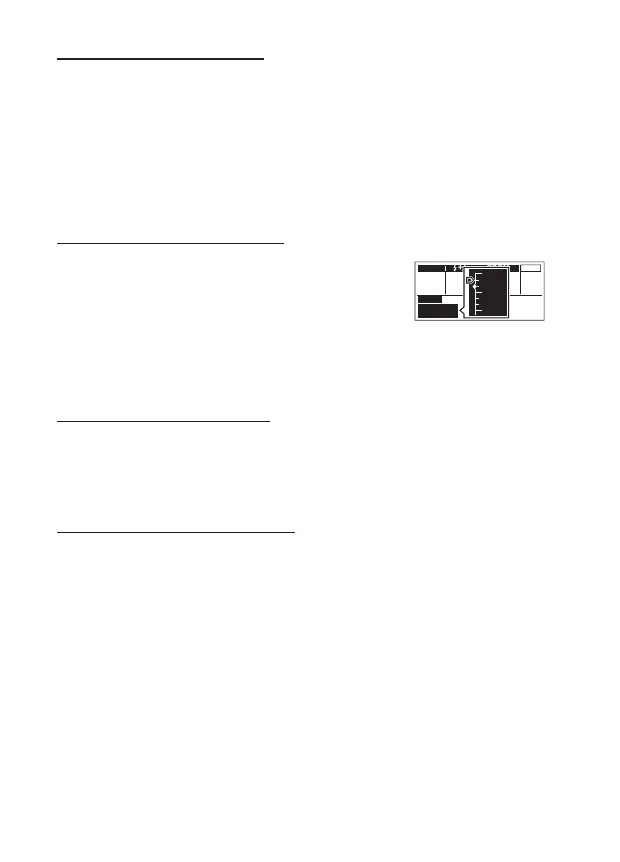
Press the a button to highlight RATIO. Then, turn
the dial to adjust the setting.
• You can set a fl ash ratio from 1/4 to 1/128.*
1
Scale display*
2
MODE LEDZOOM
A
mm25
–
Off
M
RATIO
1/100
DISTANCE
2.5
m
MULTI
1/32
1/64
1/128
*1 You can select 1/2 EV or 1/3 EV for the adjustment
increment. (P. 60)
*2 On the scale display, t is the current selection. u is the
previous setting.
Press the OK button.
Setting the fi ring frequency (Hz)
Press the MODE button. Then, press HI on the arrow pad to highlight Hz.
Turn the dial to adjust the setting.
• You can set a frequency from 1 to 100.
Press the OK button.
Setting the number of fi rings (TIME)
Press the MODE button. Then, press HI on the arrow pad to highlight
TIME. Turn the dial to adjust the setting.
• The maximum setting for number of fi rings varies according to the setting for
fl ash intensity (RATIO).
Press the OK button.


 To Next Page