52
EN
Radio Wireless Shooting
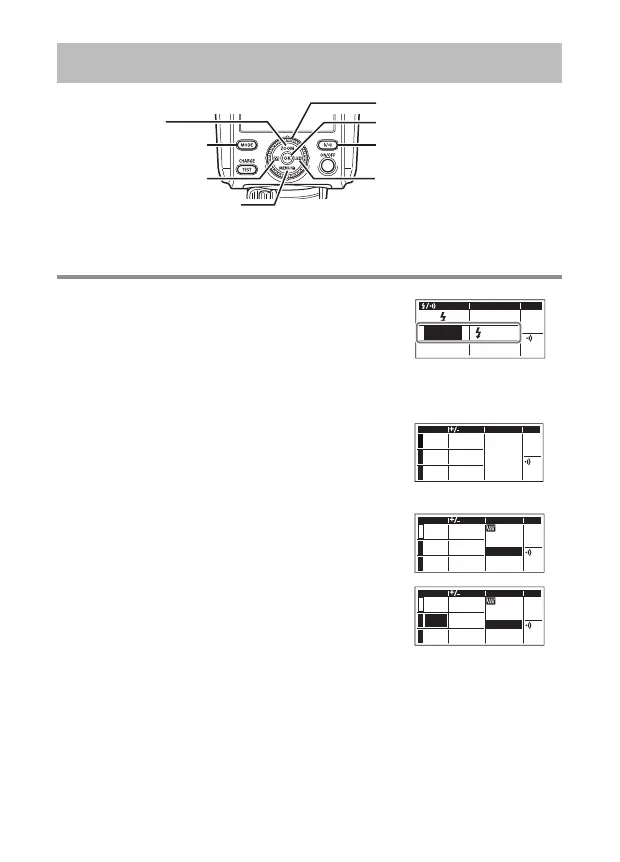
I on the arrow pad
OK button
Dial
ZOOM/F
button
#/l button
G on the arrow pad
a/H button
MODE button
Using the fl ash as a radio wireless commander/ Using the fl ash as a radio wireless commander/
commander fl ashcommander fl ash
1
Press the #/l button. Then, turn the dial to
select an operating mode. Press the OK button
to confi rm.
• The CHARGE/TEST button will light up in green.
RCV
CMD
X-RCV
CMD
When you select
the operating mode
CMD mode
• You can use the fl ash as a radio wireless
commander. (The fl ash does not fi re.)
MODE
A
B
C
FP CH
0.0
1
RATIO
0.0
1/128
TTL
TTL
M
Off
#CMD mode
• You can use the fl ash as a radio commander
fl ash. (Group A is set for the fl ash.)
MODE
A
B
C
ZOOM CH
A
mm75
0.0
1
FP
RATIO
0.0
1/8
TTL
TTL
M
Off
2
Press the MODE button. Then, press FG on
the arrow pad. Highlight MODE (fl ash control
mode) for a group to set the group’s fl ash
control mode.
MODE
A
B
C
ZOOM CH
A
mm75
0.0
1
FP
RATIO
0.0
1/8
TTL
TTL
M
Off
3
Turn the dial to select a fl ash control mode, and then press the OK
button.
• For details, refer to the explanations of the fl ash control modes (P. 43 to
46).
x
If you do not want to use a particular group, select “Off.”
4
Adjust the settings.


 To Next Page