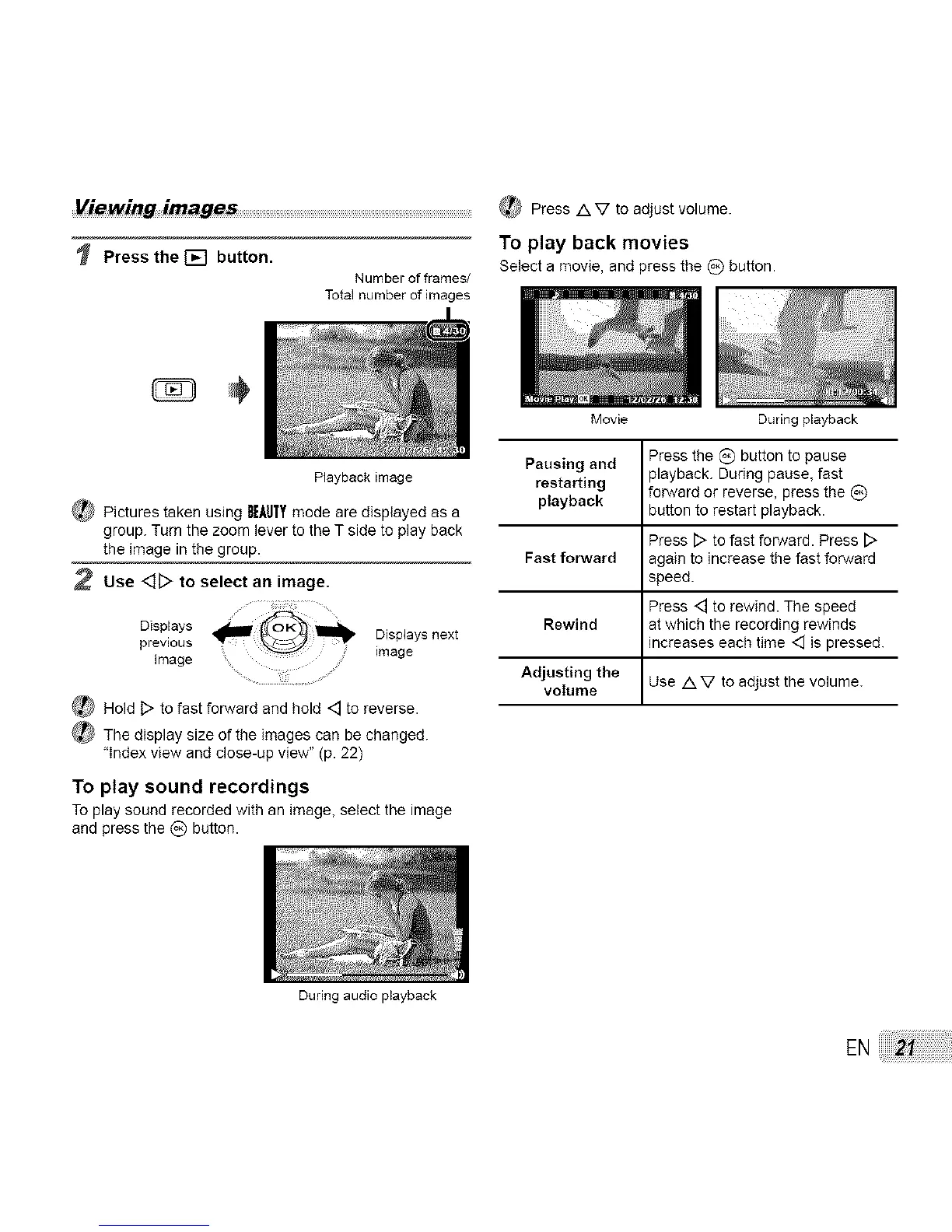
Press the [] button.
Number of frames/
Total number of images
_ Press /XV to adjust volume.
TO play back movies
Select a movie, and press the (_) button.
Playbackimage
_ Pictures taken using BEAUfYmode are displayed as a
group. Turn the zoom lever to the T side to play back
the image in the group.
2 Use <_D to select an image.
previous Displays next
,mag.............. ..............ge
_ Hold D to fast forward and hold <_ to reverse.
_ The display size of the images can be changed.
"Index view and close-up view" (p. 22)
To play sound recordings
To play sound recorded with an image, select the image
and press the _) button.
During audio playback
Movie During playback
Pausing and Press the C) button to pause
playback. During pause, fast
restarting forward or reverse, press the (_)
playback button to restart playback.
Press [::>to fast forward. Press [>
Fast forward again to increase the fast forward
speed.
Press <_ to rewind. The speed
Rewind at which the recording rewinds
increases each time <] ispressed.
Adjusting the
volume Use /XV to adjust the volume.
EN


 To Next Page