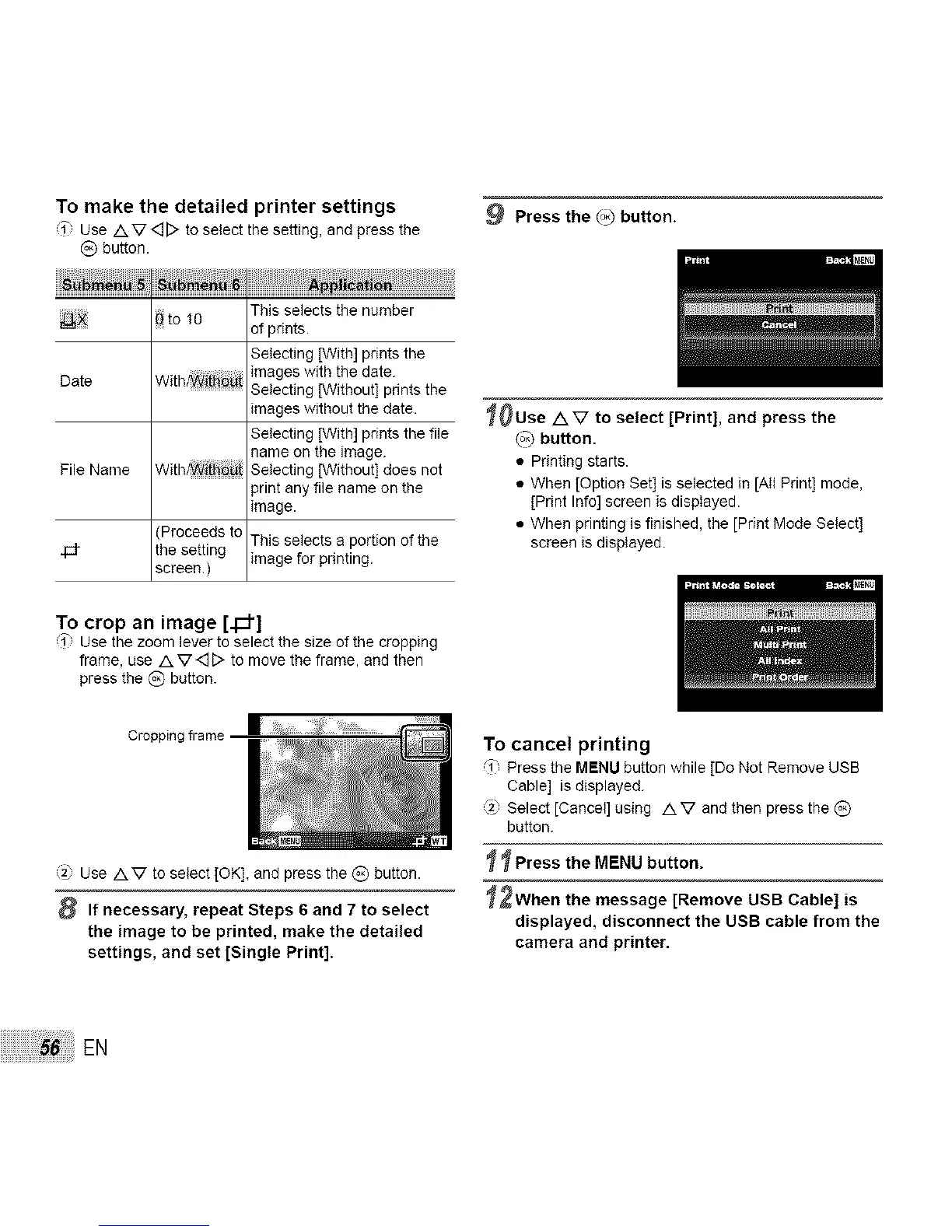
To make the detailed printer settings
i" Use Av<_D to select the setting, and press the
(_) button.
_ to 10 This selects the number
of prints.
Selecting [With] prints the
images with the date.
Date With_i_:i Selecting [Without] prints the
images without the date.
Selecting [With] prints the file
name on the image.
File Name With_i_i Selecting [Without] does not
print any file name on the
image.
4d-
[Proceeds to
the setting
screen.)
This selects a portion of the
image for printing.
To crop an image [._']
i" Use the zoom lever to select the size of the cropping
frame, use A V<_[> to move the frame, and then
press the (_) button.
Cropping frame
'_ Use AV to select [OK], and press the _) button.
8 If necessary, repeat Steps 6 and 7 to select
the image to be printed, make the detailed
settings, and set [Single Print].
9 Press the (_ button.
_0Use AV to select [Print], and press the
(o_button.
• Printing starts.
• When [Option Set] is selected in [All Print] mode,
[Print Info] screen is displayed.
• When printing is finished, the [Print Mode Select]
screen is displayed.
To cancel printing
_1" Press the MENU button while [Do Not Remove USB
Cable] is displayed.
Select [Cancel] using A V and then press the (_)
button.
_ Press the MENU button.
_2When the message [Remove USB Cable] is
displayed, disconnect the USB cable from the
camera and printer.
EN


 To Next Page