This document serves as an instruction manual for the Olympus Light Guide Illumination System, specifically detailing the U-HGLGPS light source unit, along with associated modules like the U-LLG150/300 liquid light guide and the U-LLGAD liquid light guide adapter. It is designed to ensure safe operation, optimal performance, and comprehensive understanding of the system's use. Users are strongly advised to read this manual thoroughly before operating the equipment and to keep it in an easily accessible location for future reference.
The U-HGLGPS light source unit is primarily designed for fluorescence illumination. A key feature of this system is that it does not require centering adjustments, ensuring stable and even illumination when combined with a microscope. This simplifies setup and provides consistent lighting for various applications.
Safety Precautions and Getting Ready:
Before operating the U-HGLGPS, several critical safety precautions must be observed. It is imperative not to turn on the lamp without first attaching both the liquid light guide and the liquid light guide adapter to the microscope. The lamp emits UV light, which can cause eye damage if viewed directly and poses a fire risk. When replacing the lamp, always ensure the power switch is set to O (OFF), unplug the power cord from the outlet, and allow the lamp replacement cover and the lamp itself to cool completely for at least 40 minutes to prevent electric shock or burns.
The light source unit should be installed on a sturdy, level table or bench. It must be placed on a flat surface that does not obstruct the ventilation opening on the bottom panel, and soft materials like paper or cloth should not be placed underneath, as this could lead to fire. Sufficient space, at least 10 cm, must be maintained around the equipment for proper ventilation to dissipate heat. Metallic objects should never be allowed to enter the ventilation openings, as this could cause fire or electric shock.
To prevent damage to the liquid light guide, its bend radius must always be greater than 40 mm. The liquid light guide should not be twisted excessively or pulled with more than 3kg of tension. In the event of a liquid light guide breakage, solvent may leak out. While the solvent is not severely toxic, hands and eyes should be thoroughly washed with water if contact occurs.
Always use the power cord provided by Olympus. If a power cord is not supplied, users must select a proper power cord as specified in the "PROPER SELECTION OF THE POWER CORD" section of the manual to ensure product safety performance. The power cord should be routed away from heat sources, such as the lamp replacement cover. The light should never be turned on while the lamp replacement cover is open, as this can lead to electric shock, burns, unit failure, or light guide deterioration. It is crucial to connect the power cord to a grounded outlet; otherwise, Olympus cannot guarantee the electrical safety and performance of the equipment. The power plug should never be touched during a thunderstorm. The AC inlet, located on the rear of the equipment, is the main disconnecting device, so the light source must be positioned to allow easy access to it.
The system is a precision unit and must be handled with care to avoid sudden impacts. It is not waterproof and should not be used in environments exposed to direct sunlight, dust, steam, or vibration. Highly flammable organic solvents, such as dehydrated alcohol, must be kept away from the light source unit while it is on or immediately after it has been turned off, as they can cause fire.
Assembly:
The assembly process involves mounting the liquid light guide and connecting the power cord.
To mount the liquid light guide, first hold the connector of the light guide and insert it into the light guide socket of the light source unit. Next, loosen the light guide fixing screws using the Allen screwdriver provided with the microscope. Ensure the screws are loosened sufficiently to prevent the light guide connector from hitting them during insertion. Insert the other end of the liquid light guide connector into the liquid light guide adapter. Firmly tighten the light guide fixing screws with the Allen screwdriver. Failure to tighten these screws securely could cause the light guide to slip out and potentially lead to fire. Finally, mount the liquid light guide adapter to the illuminator and tighten its fixing screw with the microscope's Allen screwdriver. It is important to avoid excessive bending or twisting of cords and liquid light guides, as they are susceptible to damage.
For power connection, insert the power cord into the socket on the back of the light source unit, then plug the other end into a wall-mounted outlet. Before connecting, always ensure the main switch is set to O (OFF). As mentioned, only Olympus-provided power cords or those selected according to the manual's guidelines should be used. Proper grounding of the power cord and wall outlet is essential for electrical safety and system performance.
Operation:
Operating the U-HGLGPS involves turning the lamp ON and OFF, adjusting brightness, and monitoring the counter and lighting display LED.
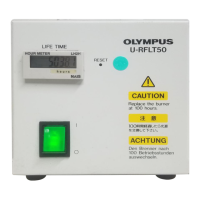
To turn on the lamp, first switch the power switch on the back of the light source unit to I (ON). The counter will display the software version for approximately 3 seconds, followed by the accumulated lighting time of the lamp. Once the accumulated lighting time appears, all switches become operable. Before lighting the lamp, always confirm that the lamp replacement cover is completely closed. Next, press the lamp switch on the front of the light source unit. The lighting display LED will illuminate in blue, indicating the lamp is on. If the lamp does not turn on, the LED will be red, and troubleshooting steps should be followed. The lamp's light volume stabilizes approximately 90 seconds after being turned on, but for more stable light volume, it is recommended to wait about 5 minutes. If the lamp switch is pressed to turn off the lamp within 2 minutes of turning it on, the lighting display LED will blink blue, the lamp will turn off after 2 minutes, and the LED will stop blinking.
To turn off the lamp, press the lamp switch on the front of the light source unit for approximately 0.5 seconds. After the lamp turns off, the counter will display a 300-second countdown for cooling time. All button operations are locked during this countdown. Once the countdown reaches "0", turn the power switch on the light source to O (OFF). Note that the lamp becomes very hot immediately after being turned off, making it difficult to turn on again. If the lamp needs to be turned on again, wait approximately 10 minutes to allow it to cool; turning it on while hot can shorten its lifespan. The cooling fan automatically stops 60 seconds after the lamp switch has been pressed.
Brightness adjustment is performed by rotating the light volume adjustment dial. The light volume can be adjusted across 7 levels, with each numerical indicator representing a percentage (0-100%) of the maximum light volume. The dial should be rotated slowly, level by level.
The counter display provides important information. When the power switch is turned ON, the counter initially shows the software version for 3 seconds, then displays the accumulated lighting time of the lamp in hours. When the lamp is turned OFF, it shows a 300-second cooling time countdown. If the accumulated lighting time exceeds 1900 hours, the counter will blink every second while the lamp is on, indicating the end of the lamp's lifetime is approaching. If the display is disabled due to abnormal EEPROM data, "Err" will be displayed.
The lighting display LED indicates the lamp's status. It is off when the lamp is in stand-by or turned off. It lights blue when the lamp is turned on properly. It lights red if the lamp fails to turn on, turns off abnormally, or if the body temperature rises abnormally due to cooling system deterioration. If the lamp switch is pressed for a short period (approx. 0.5 seconds) within 2 minutes of turning the lamp on, the LED will blink blue, then turn off when the lamp turns off after 2 minutes.
Maintenance and Storage:
Regular maintenance is crucial for the longevity and safe operation of the U-HGLGPS. The unit should be cleaned periodically, approximately every 100 hours. Before cleaning, unplug the power plug and wipe the unit with a fluff-free, soft, dry cloth. If the light source unit and liquid light guide are very dirty, a soft cloth lightly dampened with diluted detergent can be used. For dusty liquid light guide edge surfaces, blow off the dust with clean air; if dust persists, clean with a cotton swab or lens paper containing alcohol.
Dust around the ventilation openings on the bottom and sides of the light source should be vacuumed periodically, about every 6 months. Continuous operation with dusty equipment can lead to fire or failure. Users should never disassemble or remodel the equipment beyond what is described in this manual, as this can impair performance or cause incidents.
When the equipment is not in use, ensure the power switch is O (OFF) and the power cord is unplugged. After confirming the equipment has cooled completely, store it with a dust prevention cover.
Lamp replacement is necessary when the "lighting time" blinks, indicating the end of the lamp's lifespan. The mercury lamp inside contains high-pressure gas, and extreme use beyond its lifetime can cause the glass tube to burst due to accumulated strain. Used mercury lamps must be disposed of as industrial waste, following local government regulations. If self-disposal is not possible, contact an Olympus sales office.
In the event of a lamp burst, immediately unplug the power cord, ventilate the area for at least 30 minutes, and after the lamp and lamp housing have cooled, collect any remaining mercury with packing tape, paper, or a dropper. The collected mercury and tools must be sealed in a nonmetallic container and disposed of by a waste disposer. If mercury vapor is inhaled, seek immediate medical attention.
Lamp Replacement:
When replacing the lamp, first ensure the power switch is O (OFF) and the power cord is unplugged. Wait at least 40 minutes for the lamp replacement cover and lamp to cool sufficiently to prevent burns or damage. Protective gloves and glasses should be worn. Use a coin or similar tool to unlock and remove the lamp replacement cover. Unplug the lamp connector. Gently raise the lamp slowly upward by holding its black frame. Exercise extreme caution when replacing the lamp, as dropping it can break the glass and cause injury. Avoid touching the glass area (front glass or reflector) of the lamp with bare hands, as dirt or fingerprints can affect performance. Insert the new lamp into the light source unit along the slide rail. Reconnect the lamp connector. Mount the lamp replacement cover and lock it with a coin or similar tool. Finally, press the reset switch for 2 seconds to reset the accumulated lighting time to "0".
Fuse Replacement:
To replace the fuse, turn the power switch of the light source unit to O (OFF) and unplug the power cord. Use a flat-blade screwdriver to remove the fuse box. Replace the fuse with a new one (T3.15A(H)250V LITTELFUSE 02153.15XP). Using a non-specified fuse can cause a fire hazard. After replacement, return the fuse box to its original position and secure it with a flat-blade screwdriver.
Troubleshooting:
The manual includes a troubleshooting guide for common issues. If the equipment does not turn on, check the power cord connection and the built-in fuse. If the lamp cannot be turned on and the cooling fan has stopped, the fan or power supply may have failed, requiring contact with an Olympus representative. If the lamp cannot be turned on but the cooling fan is operating, check if the lamp's life has expired, if it's mounted properly, or if ventilation openings are blocked. If the lamp turns on but is unstable or dark, check the lamp's life, mounting, light guide mounting, and the light volume adjustment dial setting. If the lamp turns off during use, check the lamp's life, the built-in fuse, or if the light source is overheating due to dirt/dust in the ventilation opening. For any issues, users are advised to follow the provided remedies or contact their local Olympus representative if the problem persists.
Lamp Housing Inspection Sheet:
A lamp housing inspection sheet is provided to encourage periodic inspections, ideally every time the lamp is replaced and at least every 6 months. This sheet lists check items such as the age of the unit, illumination flickering, lamp cable temperature, burning odors, deformation or looseness of the lamp housing, discoloration or cracking, melting or cracking of the lamp cable, and increased servicing frequency. If any issues are noted, users are instructed to stop using the product and contact Olympus for detailed inspections or replacement of the lamp housing.



 To Next Page
 General