Erasing (ERASE)
Erasing a single message (ERASE)
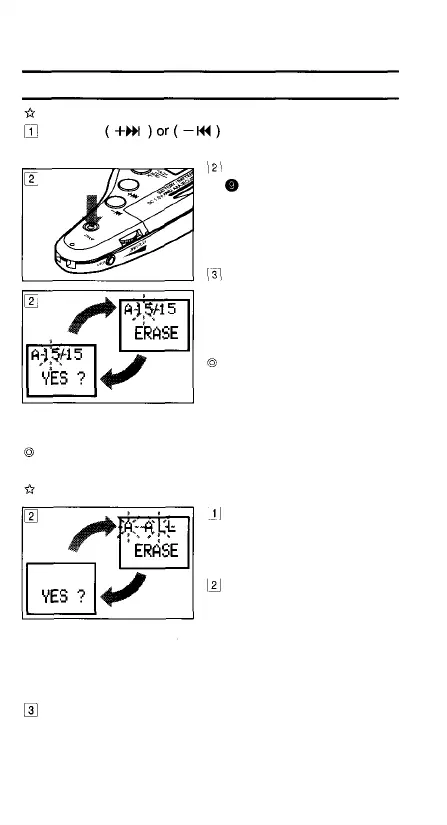
button in the Stop mode toPress the
select the message number to be erased.
Press the ERASE button
for less than 2 seconds.
The displayed message
No. blinks and the LCD
also shows [ERASE] and
[YES?] alternately.
Press the ERASE button
again within 4 seconds.
The LCD shows [ERASE]
and the selected message
will be erased.
Performing this operation
during playback, fast
playback or playback-
pause will erase the
message being played.
After a message has been erased, the message number
of subsequent messages will be decreased by 1.
Erasing all messages in a folder (ALL ERASE)
Press the FOLDER/MENU
button to select the folder
to be erased (see page
15).
In the Stop mode, press
and hold the ERASE
button for more than 2
seconds. The folder name
and [ALL] blink. The LCD
also shows [ERASE] and
[YES?] alternately.
Press the ERASE button again within 4 seconds. The
LCD shows [WAIT] and all of the messages in the
selected folder will be erased.
13



 To Next Page