EasyManua.ls Logo

Olympus VANOX-T - Page 18

Olympus VANOX-T
41 pages
Print Icon
To Next Page IconTo Next Page
To Previous Page IconTo Previous Page
Loading...
OPERATING
THE
MICROSCOPE
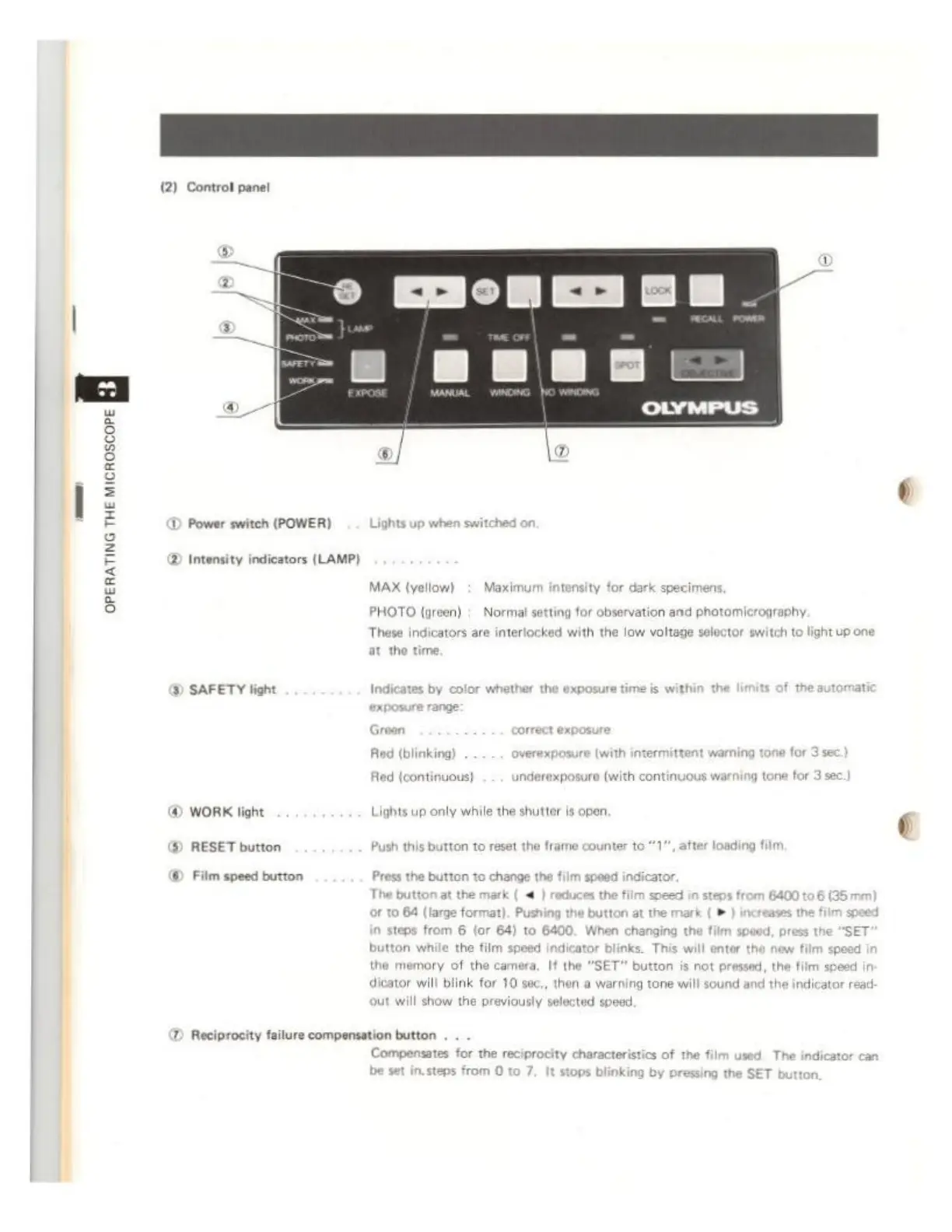
(2)
Controt
pane!
D
Power
switch
(POWER)
Lights
up
when
switched
©
Intensity
indicators
(LAMP)
МАХ
(yellow):
Maximum
intensity
for
dark
specimens,
PHOTO
(green) :
Norma!
si
These
indicators
are
interlocked
with
the
low
voltage
selector
switch
to
light
up
one
at
the
time,
ting
for
observation
and
photomicrography.
Y)
SAFETY
light
Indicates
by
color
whether
the
exposure
time
is
withi
mat
J
(blinking)
overexposure
[with
intermittent
warning
tone
for
3
e
ed
{continuous}
.
.
.
underexposure
(with
continuous
warning
tone
for
3
sec.)
©
WORK
light
Lights
up
only
while
the
shutter
is
open.
$)
RESET
button
Push
this
button
to
reset
the
frame
counter
to
*1",
after
l
m,
©
Film
speed
button
Press
the
button
to
change
the
film
speed
indica.
The
button
at
the
mark
(
<
|
reduces
the
film
speed
in
steps
from
6400
to
6
or
to
64
(large
t
steps
from
6
(or
64)
button
while
the
film
speed
indicator
blinks.
T
6400.
When
changing
the
film
speed,
press
the
“SET
m
speed
SET"
button
is
not
pressed,
the
film
speed
in
dicator
will
blink
for
10
sec,,
then
a
warning
tone
will
sound
and
th
the
memory
of
the
camera,
If th
indicator
read:
out
will
show
the
pr
viously
selected
speed.
D
Reciprocity
failure
compensation
button
Compensates
for
the
reciprocity
characteristics
of the
film
used.
The
pressing
the
SET