EasyManua.ls Logo

Olympus VANOX-T - Page 19

Olympus VANOX-T
41 pages
Print Icon
To Next Page IconTo Next Page
To Previous Page IconTo Previous Page
Loading...
®
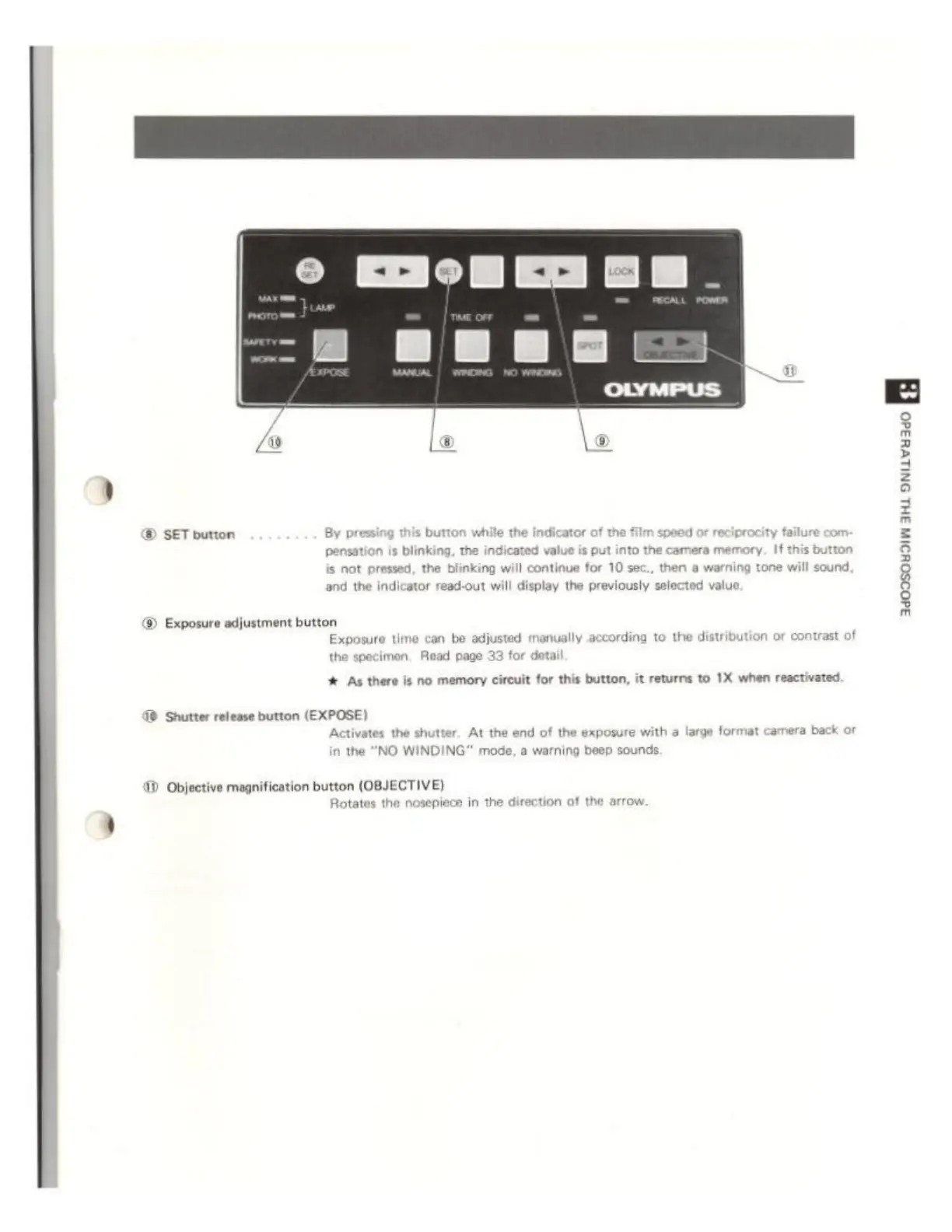
SET
button
By
pressing
this
b
pensation
is
blinking,
the
indicated
value
is
put
into
the
camera
memory.
If
this
but
is
not pressed,
the
blinking
will
continue
for
10
sec.,
then
a
warning
tone
will
sound.
and
the
indicator
read-out
will
display
the
previously
selected
value
D
Exposure
adjustment
button
Exposure
time
can
be
adju
the
specimen,
Read
page
33
for
detail
ed
manually
according
to
the
distribution
or
contrast
of
# As
there
is
no
memory
circuit
for
this
button,
it
returns
to
1X
when
reactivated
db
Shutter
release button
(EXPOSE)
Activates
the
shutter.
At
the
end
of
the
exposure
with
a
large
format
camera
back
or
in
the "NO
WINDING"
mode,
a
warning
beep
sounds.
Objective
magnification button
(OBJECTIVE)
Rotates
the
nosepiece
in
the
direction
ot
the
arrow.