EasyManua.ls Logo

Olympus VANOX-T - Page 20

Olympus VANOX-T
41 pages
Print Icon
To Next Page IconTo Next Page
To Previous Page IconTo Previous Page
Loading...
ーー
OPERATING
THE
MICROSCOPE
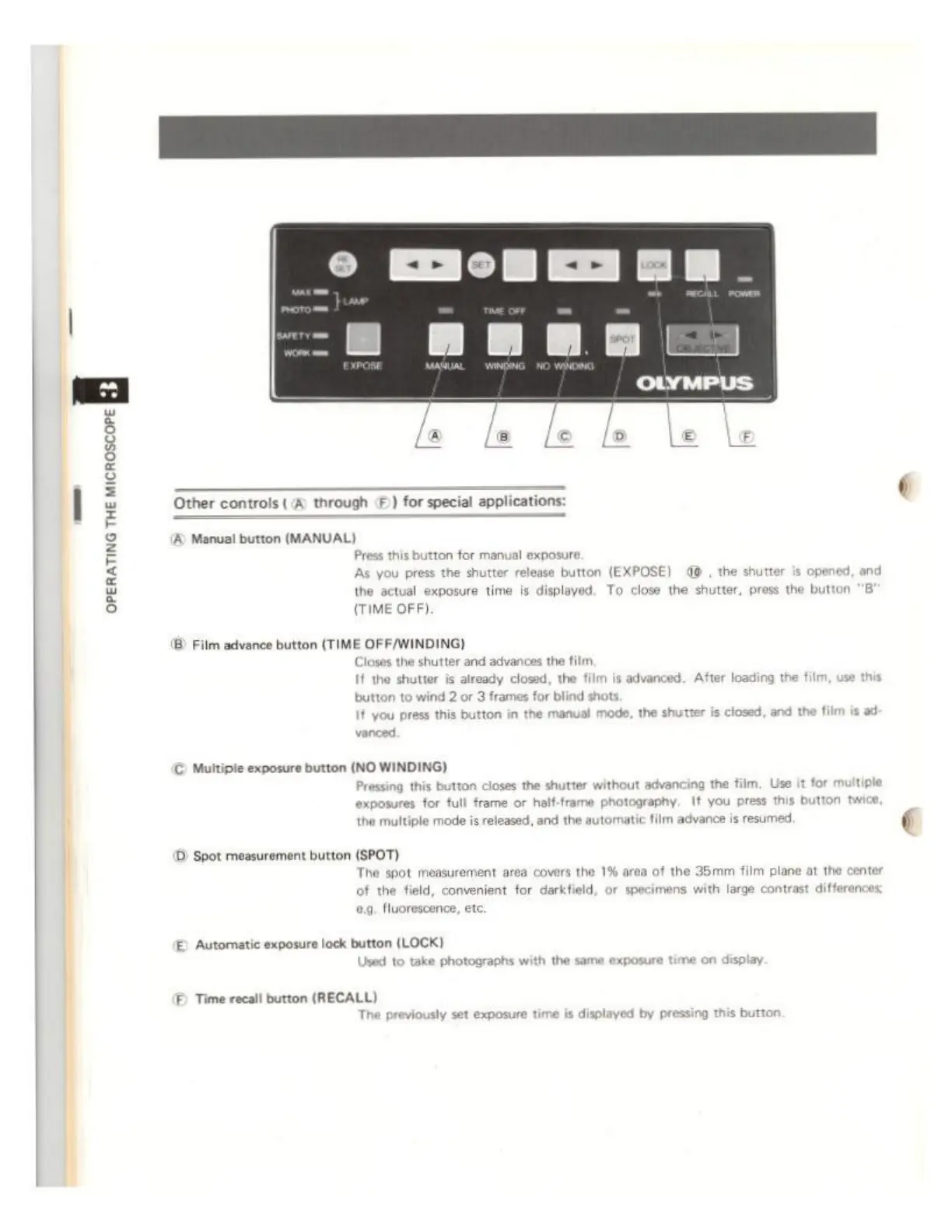
Other
controls
(A
through
©)
for
special
appli
A
Manual
button
(MANUAL)
Press
this
button
for
manual
exposure
As
you
press the
shutter
release
button
(EXPOSE)
40
,
the
shutter
is
of
the
actual
exposure
time
is
displayed. To close
the
shutter,
press
the but
(TIME
OFF).
®
Film
advance
button
(TIME
OFF/WINDING)
Closes
the
shutter
and
advances
the
film
I
the
shutter
is
already
closed,
the
film
is
advanced.
After
loading
the
film,
use
this
button
to
wind
2
or
3
frames
for
blind
shots
It
you
press
this
button
in
the
manual
mode,
the
shutter
is
closed,
and
the
film
is
ad
Multiple
exposure
button
(NO
WINDING)
Pressing
this
button
closes
the
shutter
without
advancing
the
film,
Use
it
for
multiple
exposures
for
full
frame
or
half-frame
photography.
It
you
press
this
button
twice,
the
multiple
mode
is
released,
and
the
automatic
film
advance
is
resumed.
D
Spot
measurement
button
(SPOT)
The
spot
measurement
area
covers
the
1%
area
of
the
35mm
film
plane
at
the
center
of
the
field,
convenient
for
darkfield,
or
specimens
with
large
contrast
differences
0g.
fluorescence,
etc
E)
Automatic
exposure
lock
button
(LOCK)
Used
to
take
photographs
with
the
same
exposure
time
on
display
F
Time
recall
button
(RECALL)
The
previously
set
exposure
time
is
displayed
by
pressing
s
button.