EasyManua.ls Logo

Olympus VANOX-T - Page 23

Olympus VANOX-T
41 pages
Print Icon
To Next Page IconTo Next Page
To Previous Page IconTo Previous Page
Loading...
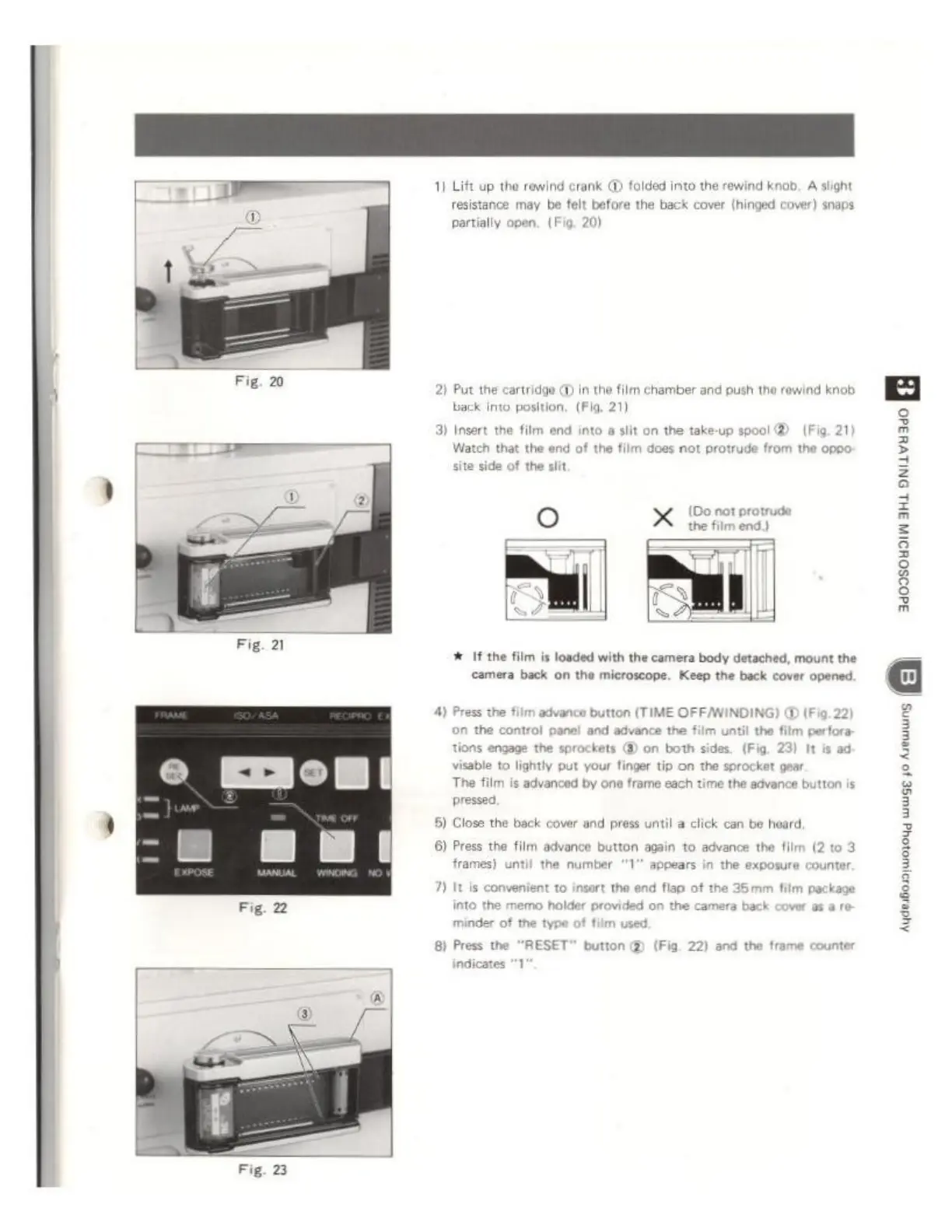
Fig.
20
1)
Lift
up
the
rewind
crank
@
folded
into
the
rewind
knob,
A
slight
resistance
may
be
felt
before
the
back
cover
(hinged
cover)
snaps
partially
open,
(Fig,
20)
2)
Put
the
cartridge
QD
in
the
film
chamber
and
push
the
rewind
knob
back
into
position,
(Fig.
21)
3)
Insert
the
film
end
into
a
slit
on
the
take-up
spool
©
(Fig.
21
Watch
that
the
end
of
the
film
di
site
side
of
the
slit
es
not
protrude
from
the
oppo
(Do
not
protrude
the
film
end.)
#
If
the
film
is
loaded
with
the
camera
body
detached,
mount
the
camera
back
on
the
microscope.
Keep
the
back
cover
opened,
4)
Press
the
film
advance
button
(TIME
OF
FWINDING)
@
(Fig
in
the
control
panel
and
advance
the
film
until
the
film
perfora:
oe
the
sprockets
GD
on
both
sides,
(Fig,
23)
It
is
ad:
visable
to
lightly
put
your
finger
tip
on
the
sprocket
gear
The
film
is
advanced
by
one
frame
each
time
the
advance
b
pressed,
5)
Close
the
back
cover
and
press
until
a
click
can be
heard,
6)
Press
the
film
advance
button
again
to
advance
the
film (2 to
3
frames)
until
the
number
"1"
appears
in
the
exposure
counter.
7)
It
is
convenient
to
insert
the
into
the
memo
holder
provide
minder
of
the
type
of
film
used.
flap
of
the
35mm
film
package
on
the
camera
ba
8)
Press
the
“RESET”
button
@
(Fig.
22)
and
the
frame
counter
indicates
"1
5
3
z
á
=
2
8
S