EasyManua.ls Logo

Olympus VANOX-T - Page 24

Olympus VANOX-T
41 pages
Print Icon
To Next Page IconTo Next Page
To Previous Page IconTo Previous Page
Loading...
OPERATING
THE
MICROSCOPE
:
:
3
Е
OLYMPUS
|
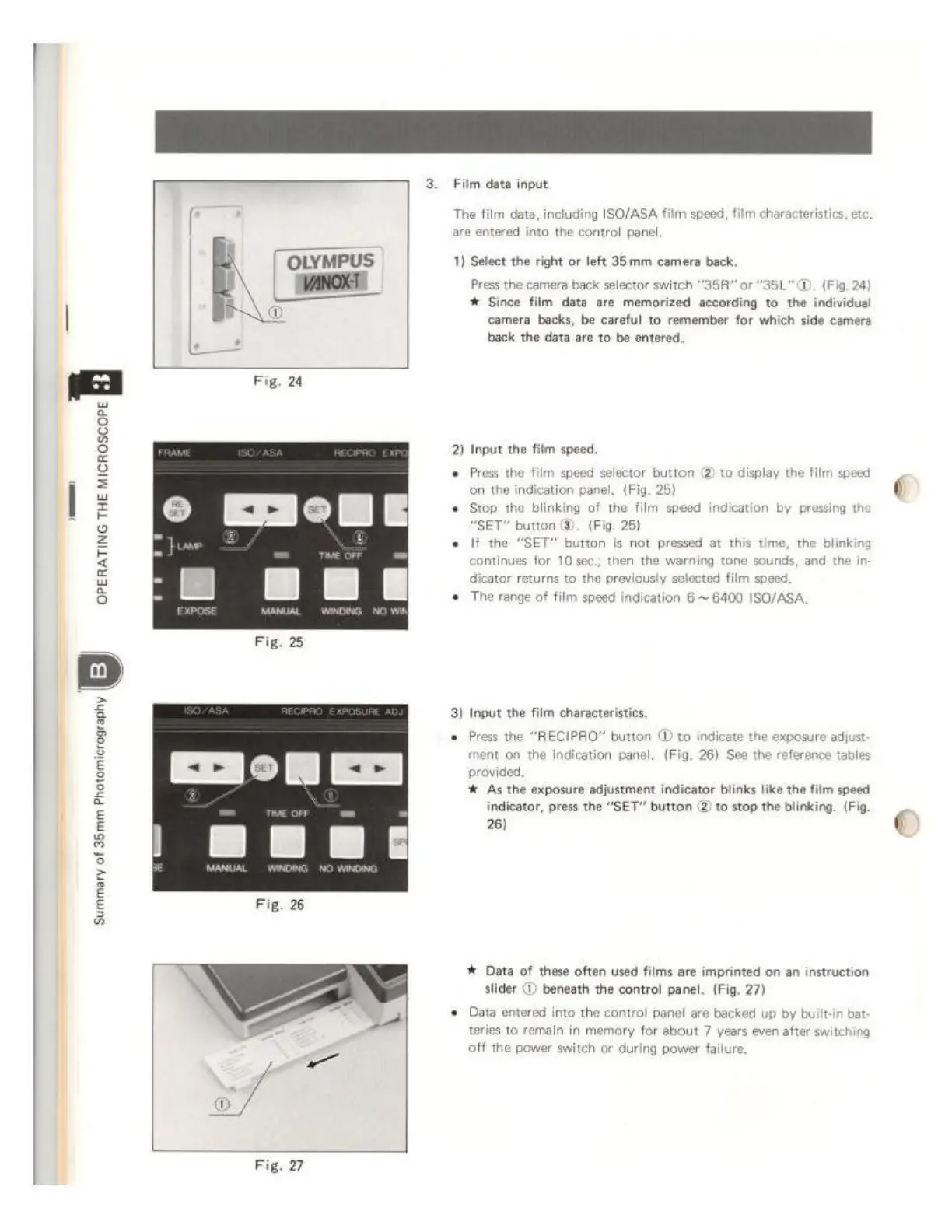
Fig,
24
Fig.
27
Film data
input
The
film
data,
including
ISO/ASA
film
speed,
film
characteristics,
et
ara
entered
into
the
control
panel.
1)
Select
the
right
or
left
35mm
camera
back,
Press
the
camera
back
selector
switch
"35R"
or
"35L"
CD.
(Fig,
24)
*
Since
film
data
are
memorized
according
to
the
individual
camera
backs,
be
careful
to
remember
for
which
side
camera
back
the data
are
to be
entered.
2)
Input
the
film
speed.
+
Press
the
film
speed
selector
button
@
to
display
the
film
speed
on
the
indication
panel.
(Fig.
25)
+
Stop
the
blinking
of
the
film
speed
indication
by
pressi
SET"
button
©.
(Fio,
25)
If
the
“SET”
button
is
not
pressed
at
this
time,
the
blinking
continues
for
10
sec;
then
the
warning
tone
sounds, and
the
in
dicator returns
to
the
previously
selected
film
speed.
+
The
range
of
film
speed
indication
6
~
6400
ISO/ASA,
3)
Input
the
film
characteristics,
©
Press
the
“RECIPRO”
button
@
to
indicate
the
exposure
adjust
ment
on
the
indication
panel.
(Fig.
26)
See
the
reference
tables
provided,
4
As the
exposure
adjustment
indicator
blinks
like
the
film
speed
indicator,
press the
“SET”
button
(2)
to
stop
the
blinking.
(Fig
26)
k
Data
of
these
often
used
films
are
imprinted
on
an
instruction
slider
(1)
beneath
the
control
panel.
(Fig.
27)
+
Data
entered
into
the
control
panel
are
backed
up
by
built-in
ba
tories
to
remain
in
memory
for
about
7
уе
off
the
power
switch
or
during
power
failure
S
even
after
switching