EasyManua.ls Logo

Olympus VANOX-T - Page 25

Olympus VANOX-T
41 pages
Print Icon
To Next Page IconTo Next Page
To Previous Page IconTo Previous Page
Loading...
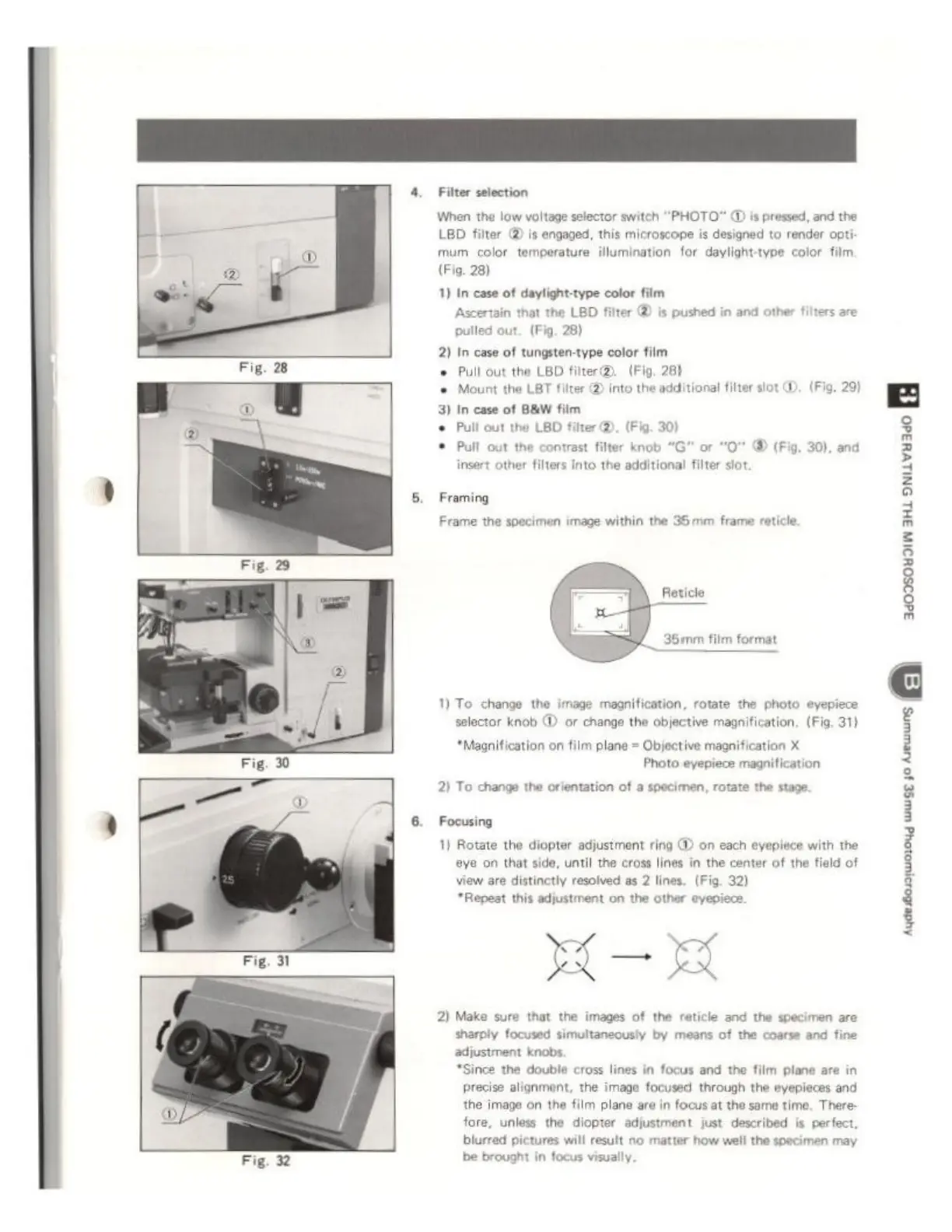
Fig.
32
Filter
selection
When
the
low
voltage
selector
switch
“PHOTO”
@
is
pressed,
and
the
LED
filter
@
is
engaged,
this
microscope
is
designed
to
render
opt
mum
color
temperature
illumination
for
daylight-type
color
film,
(Fig.
28)
1) In
case
of
daylight-type
color
film
Ascertaîn
that
the
LBD
filter
©
is
pushed
in
and
other
filters
are
pulled
out.
(Fig.
28)
2) In
case
of
tungsten-type
color
film
©
Pull
out
the
LBD
fiter(D.
(Fig.
28)
©
Mount
the
LBT
filter
@
into
the
additional
filter
slot
DD.
(Fig.
29)
3)
In
case
of
B&W
film
+
Pull
out
the
LBD
filter
©).
(Fig.
30)
+
Pull
out
the
contrast
filter
knob
"G"
or
"0"
©
(Fig,
30),
and
insert
other
filters
into the
additional
filter
slot.
Framing
Frame
the
specimen
image
within
the
35mm
frame
reticle
Reticle
36mm
film
format
1)
To
change
the
image
magnification,
rotate
the
photo
eyepiece
selector
knob
D
or
change
the
objective
magnification.
(Fig.
31)
‘Magnification
on
film
plane
=
Objective
magnification
X
Photo
eyepiece
magnification
2)
To
change
the
orientation
of
a
specimen,
rotate
the
stage.
Focusing
1)
Rotate
the
diopter
adjustment
ring
@
on
each
eyepiece
with
the
eye
on
that
side,
until
the cross
lines
in
the
center
of
the
field
of
view
are
distinctly
resolved
as
2
lines.
(Fig.
32)
*Repest
this
adjustment
on
the
other
eyepiece.
X—
HA
2)
Make
sure
that
the
images
of
the
reticle
and
the
specimen
are
sharply
focused
simultaneously
by
means
of
the
coarse
and
fine
adjustment
knobs.
“Since
the
double
cross
lines
in
focus and
the
film
plane
are
in
precise
alignment,
the
image
focused
through
the
eyepieces
and
the
image
on
the
film
plane
are
in
focus
at
the
same
time.
There
fore,
unless
the
diopter
adjustment
just
described
is
perfect,
blurred
pictures
will
result
no
matter
how
well
the
specimen
may
be
brought
in
focus
visually
seston
le