EasyManua.ls Logo

Olympus VANOX-T - Page 31

Olympus VANOX-T
41 pages
Print Icon
To Next Page IconTo Next Page
To Previous Page IconTo Previous Page
Loading...
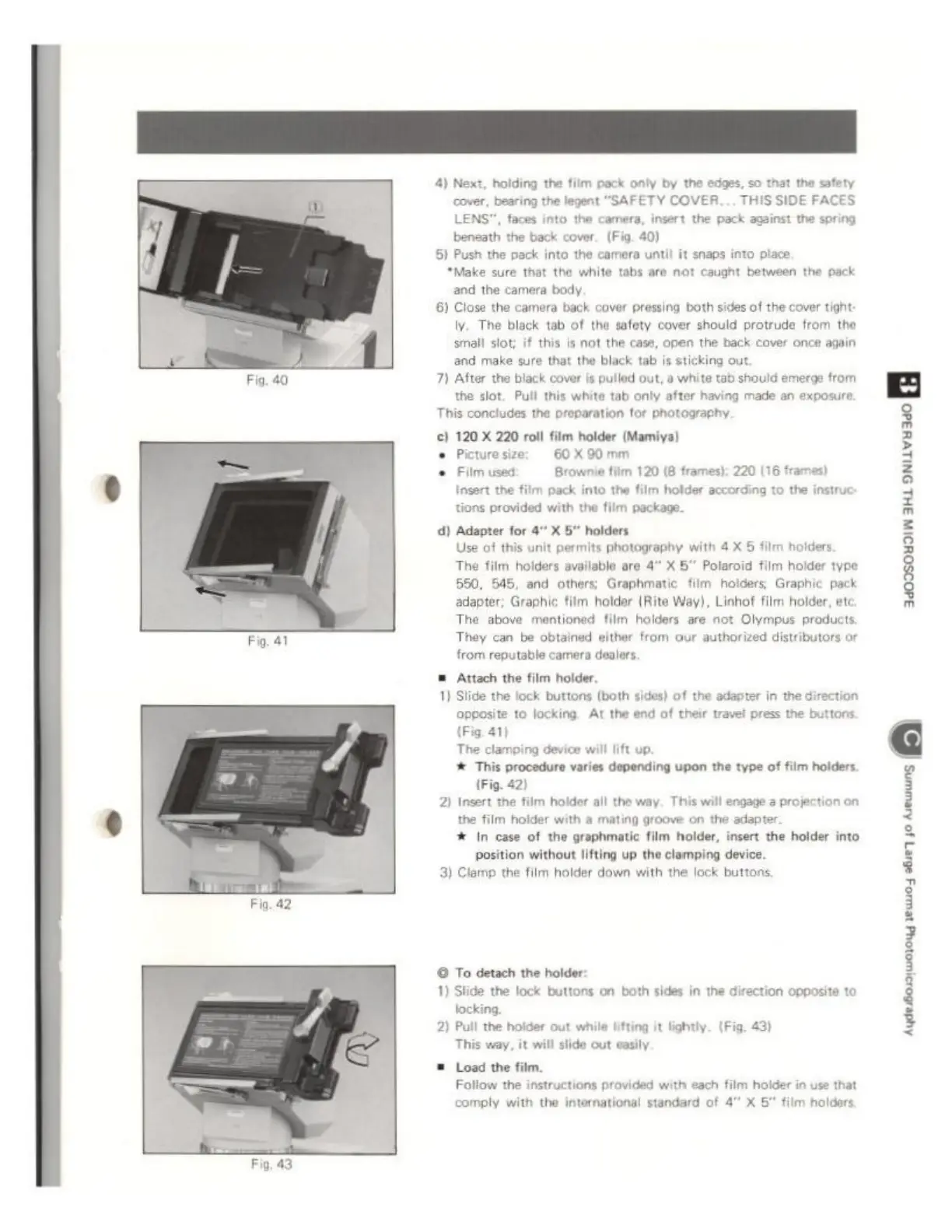
Fig.
42
Fig,
43
4)
Next,
holding
the
film
pack only
by
the
edges,
so
that
the
safety
cover,
bearing
the
legent
“SAFETY
COVER...
THIS
SIDE
FACES
LENS",
faces into
the
camera,
insert
the
pack
against
the
spring
beneath
the
back
cover.
(Fig.
40)
6)
Push
the
pack
into
the
camera
until
it
snaps
into
piace.
“Make
sure
that
the
white
tabs
are
not
caught
between
the
pack
and
the
camera
body,
6)
Close
the
camera
back
cover
pressing
both
sides
of
the
cover
tight
iy.
The
black
tab
of
the
safety
cover
should
protrude
from
the
small
slot;
if
this
is
not
the
case,
open
the
back
cover
once
again
and
make
sure
that
the
black
tab
is
sticking
out.
7)
After
the
black
cover
is
pulled
out,
a
white
tab
should
emerge
from
the
slot.
Pull this
white
tab
only
after
having
made
an
exposure
This
concludes
the
preparation
tor
photography.
€)
120
X
220
roll
film
holder
(Mamiya)
Picturesize:
60X90mm
Fiim
used:
Brownie
film
120
(8
frames):
220
(16
fr
Insert
the
film
pack
into
the
film
holder
according
to
the
instruc
ions
provided
with
the
film
package.
d)
Adapter
for
X
holders
Use
of
this
unit
permits
photography
with
4 X 5
film
holders
The
film
holders
available
are
4"
X
5"
Polaroid
film
holder
type
550,
545,
and
others:
Graphmatic
film
holders
Graphic
pack
adapter;
Graphic
film
holder
(Rite
Way),
Linhof
film
holder,
etc
The
above
mentioned
film
holders
are
not
Olympus
products,
They
can
be
obtained
either
from
aur
authorized
distributors
or
from
reputable
camera
dealors,
=
Attach
the film holder.
1)
Slide the
lock
buttons
(both
sides)
of
the
adapter
in
the
direction
Opposite
to
locking.
At
the
end
of
their
travel
press
the
buttons
(Fig.
41)
The
clamping
device
will
lift
up.
‘&
This
procedure
varies
depending
upon
the
type
of
film
holders.
(Fig.
42)
2)
Insert
the
film
holder
all
the
way.
This
will
engage
à
projection
on
the
film
holder
with
a
mating groove
on
the
adapter
*
In
case
of
the
graphmatic
film
holder,
insert
the
holder
into
position
without
lifting
up
the
clamping
device.
3)
Clamp
the
film
holder
down
with
the lock
buttons
©
To
detach
the holder:
1)
Slide
the
lock
buttons
on
both
sides
in
the
direction
opposite
to
locking,
2)
Pull
the
holder
out
while
lifting
it
tightly.
(Fig.
43)
This
way,
it
will
slide
out
easily
©
Load
the
film.
Follow
the
instructions
provided
with
each
film
holder
in
use
that
comply
with
the
international
standard
of
4”
X
5
film
holders.
zs
DI
jr
О