EasyManua.ls Logo

Olympus VANOX-T - Page 35

Olympus VANOX-T
41 pages
Print Icon
To Next Page IconTo Next Page
To Previous Page IconTo Previous Page
Loading...
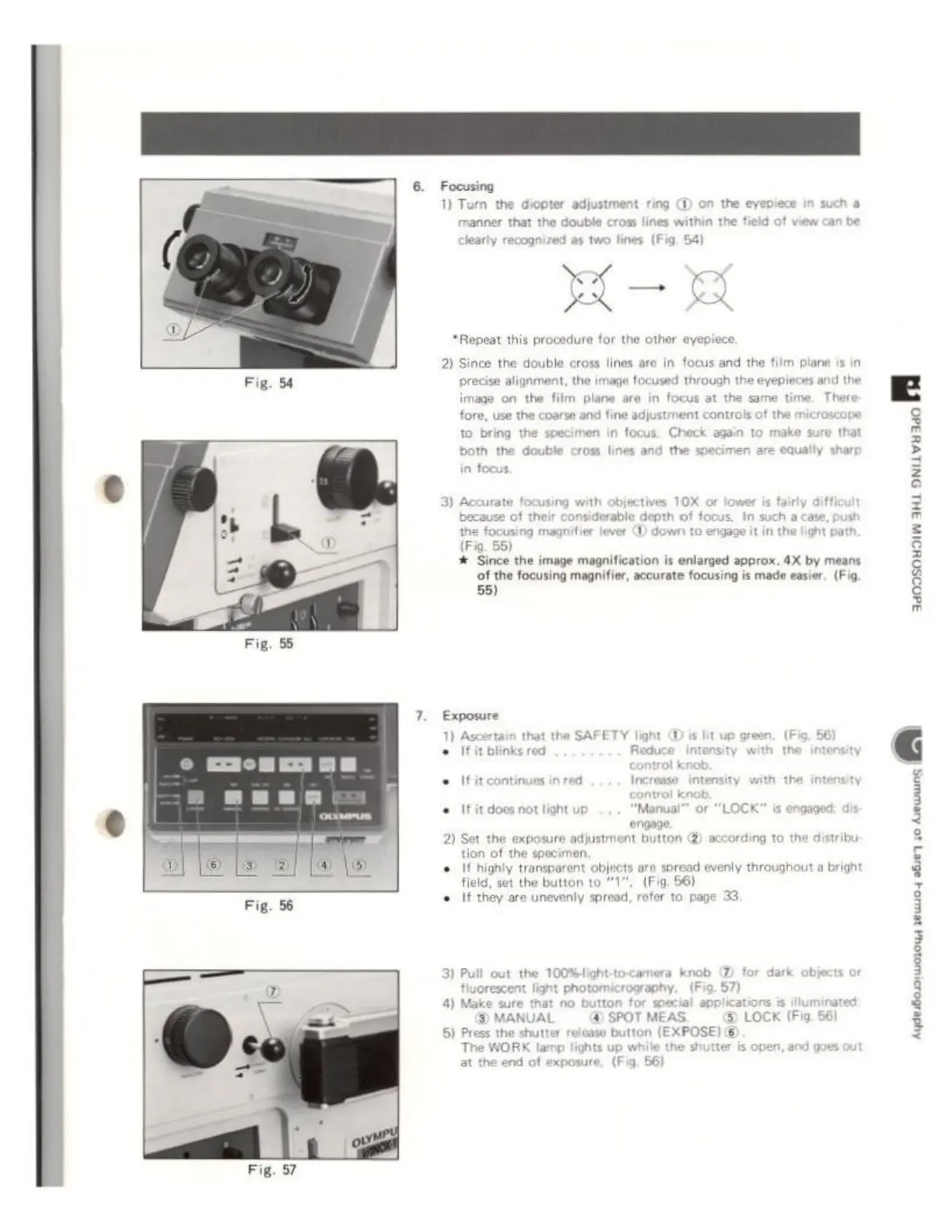
Fig.
54
Fig.
55
Focusing
1)
Tum
the
diopter
a
the
manner
that
the
double
cross
lines
within
the
field
of
view
can
be
Jearly
recognized
as
two
lines
(Fig,
54)
A
ES
HR-
A
*Repeat
this
procedure
for
the
other
eyepiece
justment
ring
E
piece
in
such
a
2)
Since
the
double
cross
lines
are
in
focus
and
the
film
piane
is
in
precise
alignment,
the
image
focused through
the
eyepieces
and
1
image
on
the
fil
fore,
use
the
coarse
and
f
to
bring
the
s
plane
are
in
focus
at
the
same
time,
There
en
in
focus.
Check
again
to
make
sure
that
both
the
double
cross
lines
and
the
speci
in
focus,
using
with
objectives
10X
or
lower
is
fairy
di
because
of
their
considerable
depth
of
focus.
In
such
a
case
ocusing
magnifier
lever
(D
down
to
engage
it
in
the
light
path
(Fig.
55)
+
Since
the
image
magnification
is
enlarged
approx.
4X
by
means
of
the
focusing
magnifier,
accurate
focusing
is
made
easier.
(Fig
55)
Exposure
1)
Ascertain
that
the
SAFETY
light
©
is
e
fit
blinks
red
Reduce
intensi
+
Ifitcontinues
in
red
Increase
intensity
with
the
intensity
+
If
it
does
not
light
up
Manual”
or
“LOCK”
is
engage
engage.
2)
Set
the
exposure adjustment
button
(2)
according
to the
tion
of
the
specimen,
+ If
highly
transparent
objects
are
spread
evenly
throughout
a
bright
field,
set
the
button
to “1”,
(Fig.
56)
+
If
they
are
unevenly
spread,
refer
to
page
33.
tribu:
3)
Pull
out
the
100%light-to-camera
knob
@
for
dark
fluorescent
light
photomicrography.
(Fia.
57)
4)
Make
sure
that
no
button
for
special
applic
DMANUAL
@
SPOT
MEAS.
5)
Press
the
shutter
release
button
(EXPOSE)
@
The
WORK
lamp
lights
up
while
the
shutter
is
open,
and
goes
at
the
end
of
exposure,
(Fig.
56)
işiyle
ci