EasyManua.ls Logo

Olympus VANOX-T - Page 34

Olympus VANOX-T
41 pages
Print Icon
To Next Page IconTo Next Page
To Previous Page IconTo Previous Page
Loading...
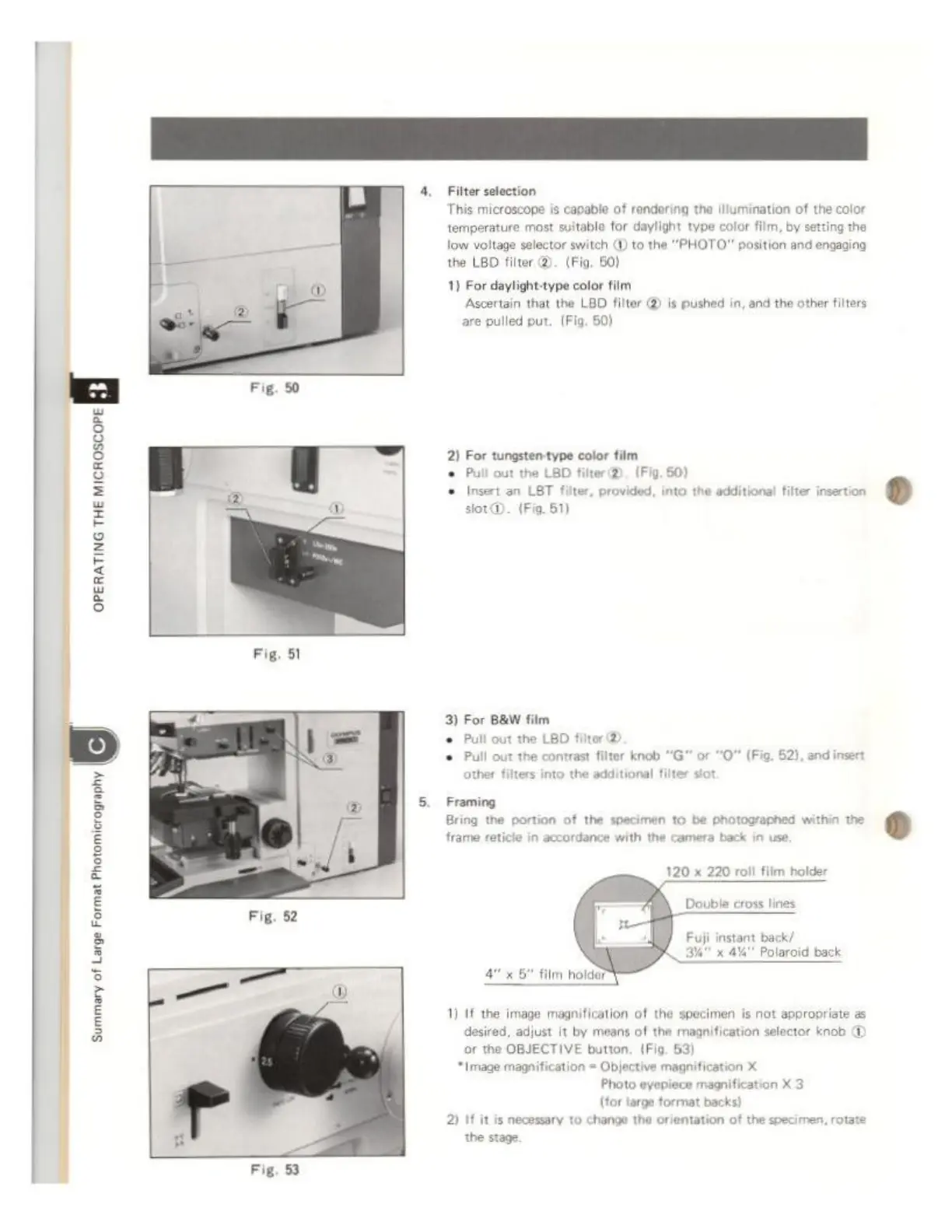
4.
Filter
selection
This
microscope
is
capable
of
rendering
tha
Illumination
of
the
color
temperature
most
suitable
for
daylight
type
color
film,
by
setting
the
low
voltage
selector
switch
(D
to
the
"PHOTO"
position
and
engaging
the
LBO
filter
@).
(Fig.
50)
1)
For
daylight-type
color
film
Ascertain
that
the
LBD
filter
@
is
pushed
in,
and
the
other
filters
are
pulled
put.
(Fig.
50)
2
Forge
ape
lr
hm
OPERATING
THE
MICROSCOPE
3)
For
B&W
film
+
Pull
cut
the
LBD
filter
©
+
Pull
out the
contrast
filter
knob
“G”
or
O
(Fig.
52),
and
insert
5.
Framing
Bring
the
portion
of
the
specimen
to
be
photographed
within
the
frame
reticle
in
accordance
with
the
camera
back
in
use,
120
x
220
roll
film
holder
Double
cross
in
Fuji
instant
back/
Y
Polaroid
back
x
67
film
holder
re
®
1)
If
the
image
magnification
of
the
specimen
is
not
appropriate
as
desired,
adjust
it
by
means
of
the
magnification
selector
knob
or
the
OBJECTIVE
button.
(Fig.
53)
‘Image
magnification
=
Objective
magnification
X
Photo
eyepiece
magnification
X
3
(tor
large
format
backs)
2)
If
itis
necessary
to
change
the
or
я
the
stage
Summary
of
Large
Format
Photomicrography
entation
of
the
specimen,
rotate
Fig.
53