EasyManua.ls Logo

Olympus VANOX-T - Page 6

Olympus VANOX-T
41 pages
Print Icon
To Next Page IconTo Next Page
To Previous Page IconTo Previous Page
Loading...
J
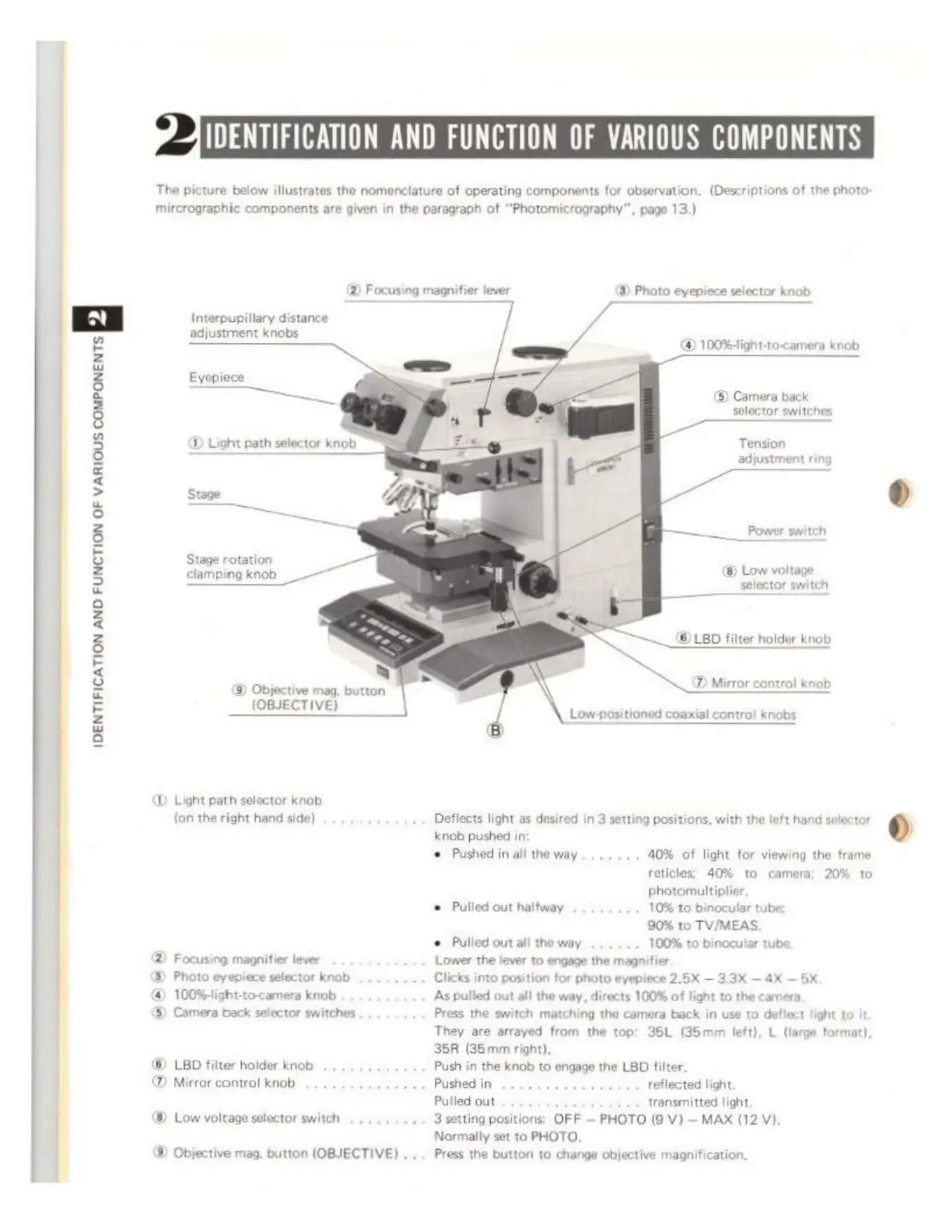
IDENTIFICATION
AND
FUNCTION
OF
VARIOUS
COMPONENTS
The
picture
below
illustrates
the
nomenclature
of
operating
components
for
observation.
(Descriptions
of
the
photo:
mircrographic
components
are
given
in
the
paragraph
of
"Photomicrography“,
page
13.)
2)
Focusing
magnifier
lever
8)
Photo eyepiece
selector
knob
Interpupillary
distance
adjustment
knobs
D
100%-light-to-camera
knob
Eyepiece
=
©
Camera
back
selector
switches
Es
Tension
adjustment
ring
Power
switch
Stage
rotation
mpingknob
@
Low
voltage
selector
switch
©
LED
filter
holder
knob
SD
Mirror
contro!
knob
Low
-positioned
coaxial
contro!
knobs
Objective
mag.
button
_
(OBJECTIVE)
d
D
Light
path
selector
knob
{on the
right
hand
side)
Defiects
light
as
desired
in
3
setting
positions,
with
the
left
hand
selector
knob
pushed
in
+
Pushed
in
all
the
way
40%
of
light
for
viewing
the
frame
reticles:
40%
to
camera;
20%
to
photomultiplier
©
Pulled
out
halfway
10%
to
binocular
tube;
90%
to
TV/MEAS.
è
Pulled
out
all
the
way
100%
to
binocular
tube
®
Focusing
magnifier
lever
Lower
the
lever
to
engage
the
magnifier
3)
Photo
eyepiece
selector
knob
Clicks
into
position
for
photo
eyepiece
2.6%
3.3X
4X
5
@
100%ight-to-camera
knob
‘As
pulled
out all
the
way,
directs
100%
of
light
to
the
camera,
(©)
Camera
back
selector
switches
Press
the
switch
matching
the
camera
back
in
use
to
deflect
light
to
it
They
are
arrayed
from
the
top:
35L
(35mm
left),
L
(large
format),
35R
(35mm
right).
LED
filter
holder
knob
'
Push
in
the
knob
to
engage
the
LBD
filter.
Mirror
control
knob
Püshedin
.........
reflected
light,
Pulled
out
transmitted
light
®
Low
voltage
selector
switch
+
3
setting
positions:
OFF
PHOTO
(9
V)
MAX
(12
VI.
Normally
set
to
PHOTO,
®
Objective
mag.
button
(OBJECTIVE)
.
...
Press
the
button
to
change
objective
magnification,