1
Setup
7
EN
Setup
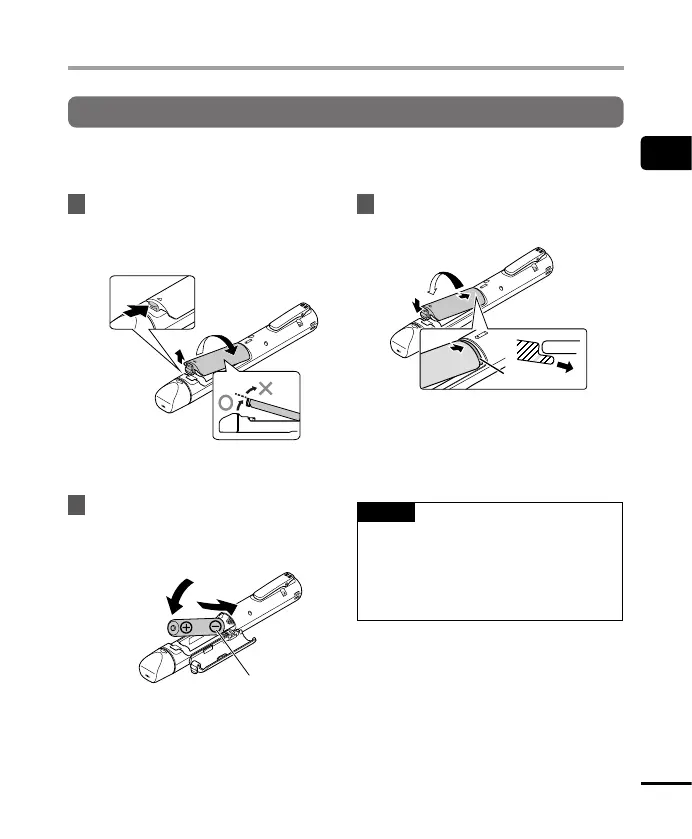
Inserting the battery
Before using the voice recorder, insert the battery in the battery compartment of the voice
recorder.
1
Open the battery cover while
pressing the cover lock knob in
the direction of the arrow.
2
3
a
a Do not attempt to open the battery
cover by force.
2
Insert an AAA battery, making
sure its positive and negative
terminals are placed correctly.
2
1
Insert the battery’s
negative terminal first.
3
Close the battery cover until it is
completely closed.
1
3
2
b
c
Cross section
b Tab
c When attaching the cover, slide the
tab of the battery cover under the
outer shell of the recorder.
NOTE
• Be sure to firmly close the battery
cover (close until the battery cover lock
clicks).
• Be sure to charge the battery before
you start recording.


 To Next Page