EasyManua.ls Logo

Olympus WS-811 - User Manual

Olympus WS-811
2 pages
Print Icon
To Next Page IconTo Next Page
Loading...
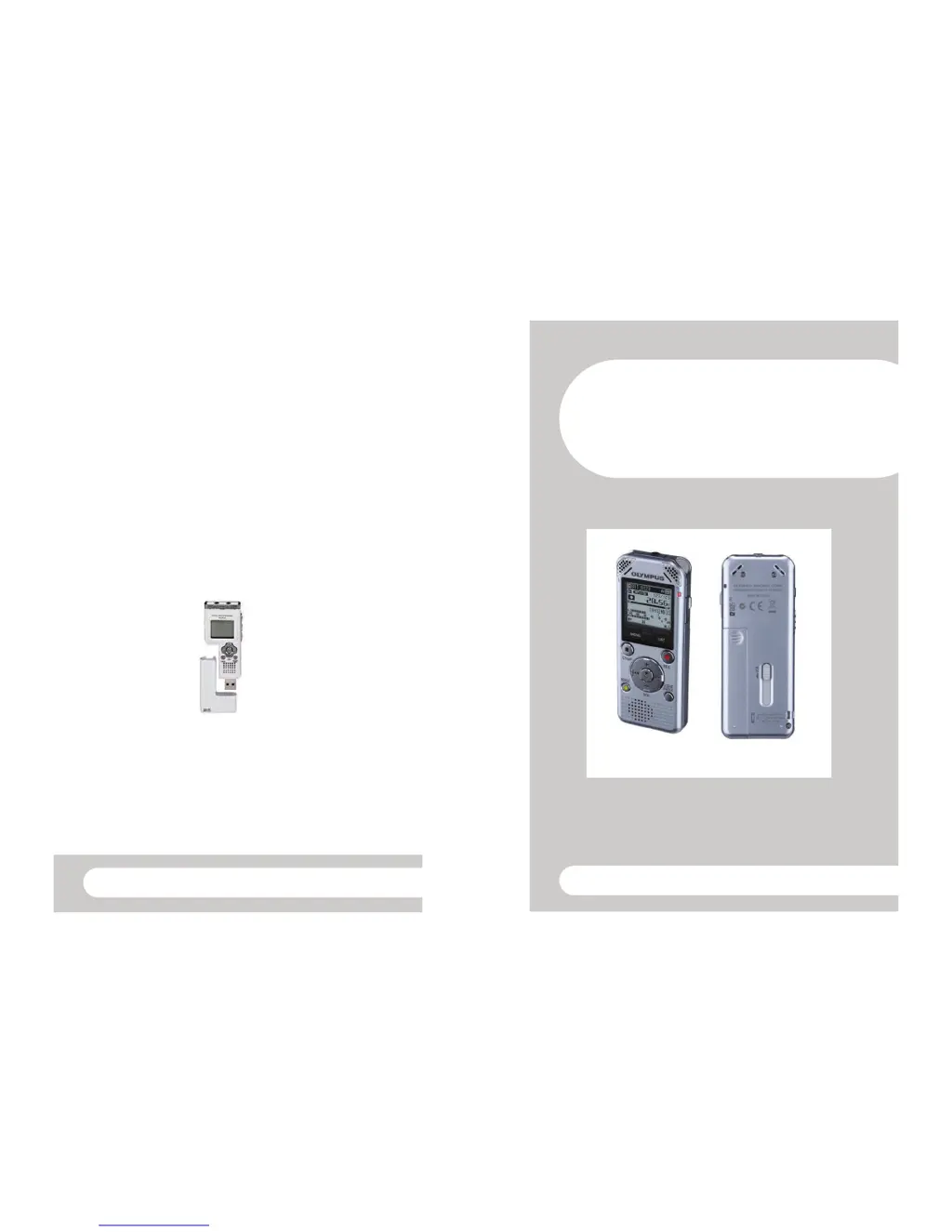
Transferring files onto your PC
1. Turn the digital recorder on by sliding the HOLD button.
2. Slide down the USB button to release the USB connector.
3. Insert the digital recorder to the PC's USB port. 'Remote Storage' will be
displayed on the recorder’s screen when it is connected.
4. Open 'My Computer', locate the digital recorder and double click to open.
Open the RECORDER folder.
5. Open the folder that contains your audio files to find your Windows Media
Audio files (WMA).
6. Select the files you wish to copy and copy and paste them to a location on
your PC.
Dictaphone user guide
HWB Technical Services
Dictaphone User
Guide WS-811
HWB Technical Services

Other manuals for Olympus WS-811

Questions and Answers

  • M
    Matthew SpencerSep 2, 2025
    How to find recorded voice file on Olympus WS-811 Voice Recorder?
    • M
      Maria TaylorSep 2, 2025
      If you cannot find the recorded voice file on your Olympus Voice Recorder, you may be in the wrong folder. Switch to the correct folder to locate your file.
  • D
    Dr. Stephen Silva MDAug 31, 2025
    How to fix Olympus WS-811 when voice files are not recorded in stereo?
    • K
      Karen CamposAug 31, 2025
      If your Olympus Voice Recorder isn't recording voice files in stereo, it could be due to a monaural external microphone being connected, [Rec Mode] being set to a monaural recording mode, or, if you are using WS-813, [Zoom Mic] being set to the + side. Try using a stereo microphone, setting [Rec Mode] to the stereo recording mode, or setting [Zoom Mic] to [Off].
  • H
    hthompsonAug 29, 2025
    How to fix Olympus WS-811 when recording level is too high?
    • G
      Glenn HallAug 29, 2025
      If the recording level on your Olympus Voice Recorder is too high, especially on the WS-813 model, try adjusting the recording level. If the issue persists, adjust the output level for any connected external devices.
  • J
    Jessica BurtonAug 28, 2025
    Why Olympus WS-811 Voice Recorder recording level is too low?
    • D
      dcombsAug 28, 2025
      If the recording level on your Olympus Voice Recorder is too low, it might be because the microphone sensitivity is set too low or the output level for connected external devices is too low. Try setting [Rec Level] to [High] or [Middle] and adjusting the output level for the connected devices.
  • E
    Ebony PowellAug 26, 2025
    How to fix Olympus Voice Recorder when no playback sound is heard?
    • O
      oserranoAug 26, 2025
      If you can't hear any playback sound on your Olympus Voice Recorder, check if earphones are connected and unplug them to use the built-in speaker. Also, ensure that [Speaker] is set to [On] and adjust the volume level if it is set to [00].
  • A
    adavisAug 25, 2025
    How to fix Olympus WS-811 when nothing appears on the display?
    • C
      craigbarbaraAug 25, 2025
      If nothing appears on the display of your Olympus Voice Recorder, it could be due to the battery not being loaded properly, low battery power, or the power being off. Verify that the battery polarities are correct, charge or replace the battery, or turn the power on.
  • J
    Jeffrey PerryAug 22, 2025
    What to do if Olympus WS-811 doesn't record?
    • B
      barnettteresaAug 22, 2025
      If your Olympus Voice Recorder is unable to record, it might be due to low remaining memory, reaching the maximum number of files, or incorrect settings. Try erasing unnecessary files, changing to another folder, or, if you are using WS-813, ensure that [Output] in the [FM Radio] settings is set to [Earphone].

Olympus WS-811 Specifications

General IconGeneral
Recording FormatWMA
Storage Capacity4 GB
MicrophoneBuilt-in stereo microphone
Internal Memory4 GB
Display TypeLCD
PC InterfaceUSB
Battery2 x AAA batteries
Playback Featuresfast forward, rewind
ConnectivityUSB

Related product manuals