Output
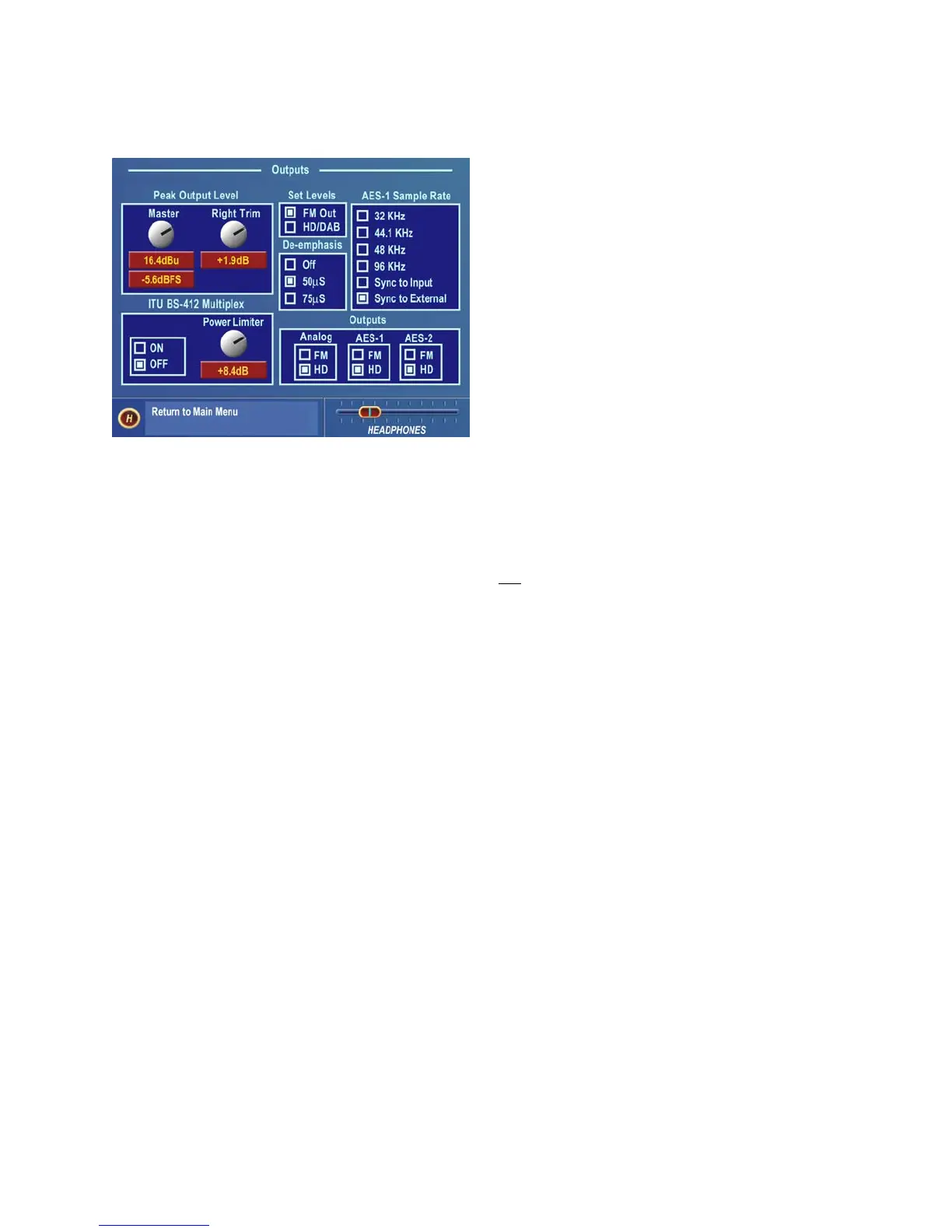
There are six settings under this menu item:
• Peak Output Level
• Set Levels
• AES-1 Output Sample Rate
• De-Emphasis
• ITU BS-412 Multiplex Power Limiter
• Outputs (Limiter Routing)
Output Submenu
Peak Output Level
The peak output level adjustment is done using the Master output control. This sets both the Left/Right outputs in
tandem. If there is a variance in output level between the Left/Right channels, the Right Trim is used to balance the
peak output levels. These level settings take place in the digital domain and before any D/A converters. Therefore,
the output level settings affect the digital (AES/EBU) outputs
and the analog outputs, including the headphones (but
not the Composite MPX outputs). Conventional FM and HD/DAB levels are adjusted separately. (See Set Levels
below) The control range is from –2.0 dBu (-24 dBFS) to +22 dBu (0dBFS) peak output level in precise 0.1 dB
steps. Since the Omnia defines the absolute peak levels prior to this control, this level control is normally set to the
maximum acceptable input level, or just below it, of the device that Omnia-6 is driving (STL, transmitter, etc). No
offset for headroom in the following system is required.
Set Levels
This function determines which output the Peak Output Level controls operate. When FM Out is selected, the
controls set the conventional FM output levels. This level is also sent to the Output Bargraphs on the Left LCD
screen. When HD/DAB is selected, the adjustment controls and bargraphs are set to adjust and monitor the output of
the Look Ahead limiter.
AES-1 Sample Rate
One of four standard digital sample rates (32, 44.1, 48 and 96 kHz) can be selected for the AES-1 digital output. The
output sample rate can also follow the incoming sample rate on the digital input, or lock to the External AES Sync
Input sample rate.
Note: The output sample rate for the AES-2 digital output is also adjustable by using hardware jumpers on the
internal SRC (Sample Rate Converter) board. The factory default is 44.1 kHz. AES-2 can also be locked to whatever
the AES-1 Output is set to, as well as synchronized to AES-1 if it is being synchronized by an external AES3 source.
De-Emphasis (FM Mode Only)
The Left/Right FM mode outputs are pre-emphasized under normal circumstances, such as when feeding an
outboard stereo generator or discrete microwave studio-transmitter link. The same applies when feeding a digital
exciter from the AES/EBU output. These outputs can also be de-emphasized for installations that require a flat
frequency response, as is the case when feeding other types of studio to transmitter links or for monitoring.
Omnia-6ex Use and Operation Manual – V: 1.10
40


 To Next Page