•
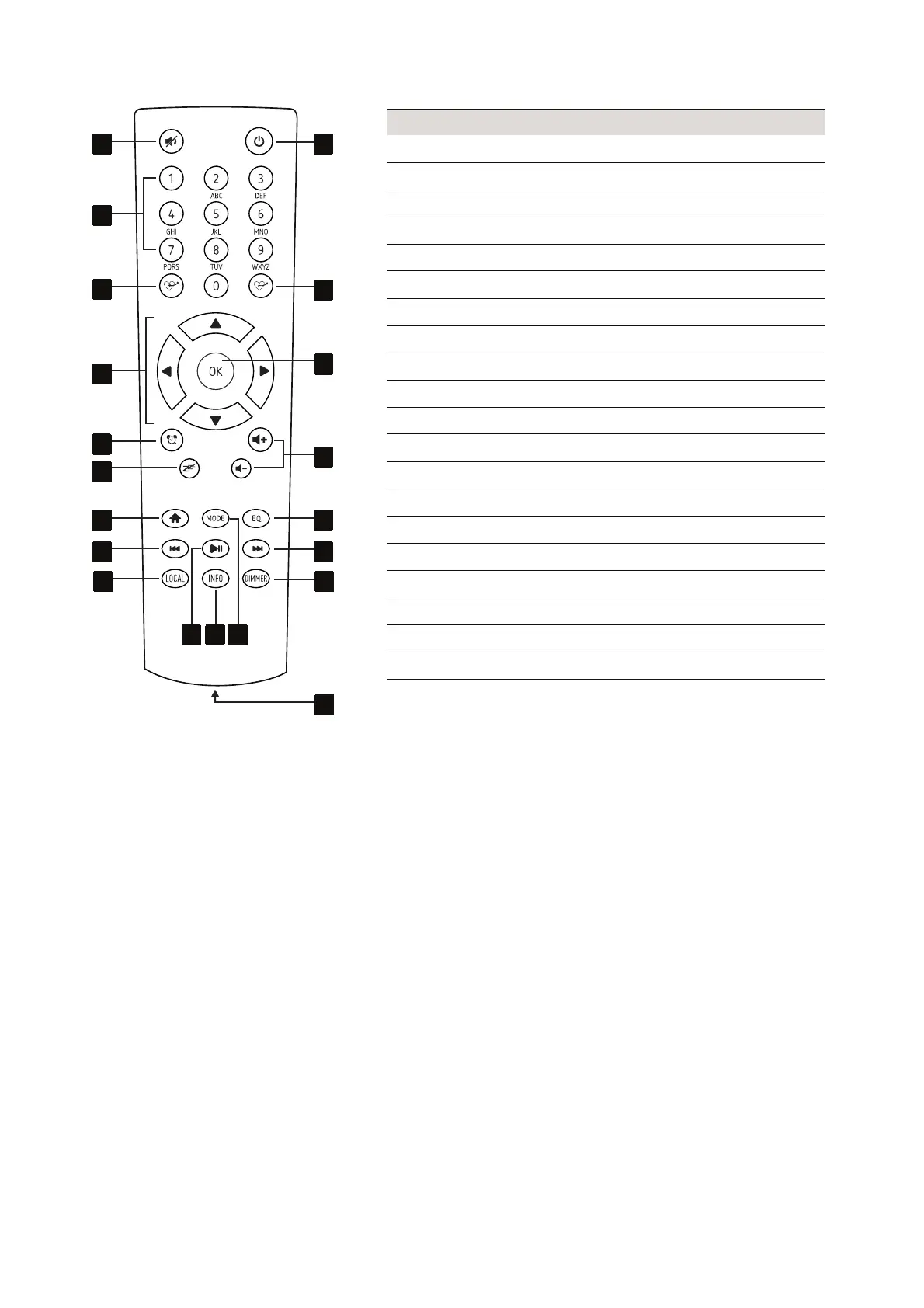
4.3 Remote control
No. Function
1 To mute/unmute the radio sound
2 Number buttons for text input
3 To add the current radio station to My Favorites
4 To select options in the menu
5 To call up/set the alarm
6 To set the sleep timer
7 To call up the main menu
8 To switch to previous station/song
9 To call up local radio stations
10 To play/pause or stop
11 To show network and system information
12 To select the operating mode
13 Compartment for two 1.5 AAA batteries
14 To set the display brightness
15 To switch to next station/song
16 To select equalizer settings
17 To set the headphone volume
18 To confirm settings
19 To call My Favourites
20 To switch on/to switch to stand-by mode
Inserting batteries into the remote control
(1) For operation, the remote control requires two 1.5 V AAA batteries. Remove the cover of the battery
compartment and insert two batteries as indicated in the compartment. Close the battery cover again.
(2) If the range of the remote control decreases, replace the batteries.
(3) If the device is not used for a longer period, please remove the batteries to prevent damage in case of
battery leakage.



 To Next Page