EasyManua.ls Logo

Omron BP7350 - User Manual

Omron BP7350
49 pages
Print Icon
To Next Page IconTo Next Page
Loading...
3608691-7G
Made in Vietnam
OMRON HEALTHCARE Co., Ltd.
53, Kunotsubo, Terado-cho, Muko, Kyoto, 617-0002 JAPAN
Distributed by:
OMRON HEALTHCARE, INC.
1925 West Field Court Lake Forest, IL 60045 U.S.A.
OmronHealthcare.com
© 2019 OMRON HEALTHCARE, INC.
HEM-7340T-Z_Cover.pdf
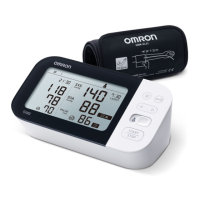
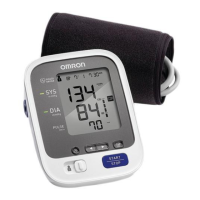
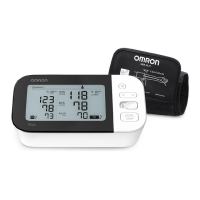
7 series Upper Arm Blood Pressure Monitor
Model BP7350
Instruction Manual

Questions and Answers

  • M
    marshalljamesAug 16, 2025
    Why my Omron BP7350 Blood Pressure Monitor arm cuff does not inflate?
    • J
      Jean BookerAug 16, 2025
      The arm cuff may not inflate because the air plug isn't fully inserted into the monitor; make sure it's securely plugged in. It could also be that the arm cuff isn't applied correctly; try reapplying it and taking another measurement. Finally, there might be an air leak in the arm cuff, in which case you should replace it with a new one.
  • G
    Glenda MitchellAug 22, 2025
    What to do if E2 appears on Omron BP7350?
    • E
      Eugene MeadowsAug 22, 2025
      If "E2" appears, it might be because you moved or talked during the measurement, preventing the arm cuff from inflating sufficiently, so remain still and do not talk during a measurement. If “E2” appears repeatedly, inflate the arm cuff manually until the systolic pressure is 30 to 40 mmHg above your previous readings. This issue can also occur if your systolic pressure is above 210 mmHg. In that case, inflate the arm cuff manually until the systolic pressure is 30 to 40 mmHg above your previous readings.
  • K
    Katherine BrownAug 26, 2025
    What does E4 mean on Omron BP7350?
    • D
      Dawn JonesAug 26, 2025
      The “E4” symbol on your Omron Blood Pressure Monitor means that you moved or talked during the measurement, or that vibrations disrupted the measurement. Remain still and do not talk during a measurement.
  • A
    allen72Aug 28, 2025
    What does Err mean on Omron BP7350?
    • S
      sschmidtAug 28, 2025
      If the “Err” symbol appears on your Omron Blood Pressure Monitor, it means the monitor cannot connect to a smart device or transmit data correctly. Follow the instructions shown in the “OMRON connect US/CAN” app. If the “Err” symbol still appears after checking the app, contact customer service.
  • R
    Rhonda SmithAug 31, 2025
    Why nothing appears on the display of my Omron BP7350 Blood Pressure Monitor?
    • L
      larrystoneAug 31, 2025
      If nothing appears on the display of your Omron Blood Pressure Monitor, it's possible that the battery polarities are not properly aligned. Check the battery installation to ensure they are correctly placed.
  • M
    mark01Sep 3, 2025
    What does E3 mean on Omron BP7350?
    • R
      Renee WolfSep 3, 2025
      The “E3” symbol on your Omron Blood Pressure Monitor means that the arm cuff is inflated exceeding the maximum allowable pressure. Do not touch the arm cuff and/or bend the air tube while taking a measurement. If inflating the arm cuff manually, refer to the end of sub-section 3.1.
  • J
    James WagnerSep 6, 2025
    What does it mean when the heart symbol flashes on my Omron BP7350?
    • N
      Nathaniel KingSep 7, 2025
      When the heart symbol flashes on your Omron Blood Pressure Monitor, it means the monitor is ready to transfer your readings to the smart device. Open the “OMRON connect US/CAN” app to transfer your readings.
  • C
    christinebutlerSep 9, 2025
    What does the heart symbol mean on my Omron Blood Pressure Monitor?
    • C
      crystal94Sep 9, 2025
      If the symbol appears on your Omron Blood Pressure Monitor, it means the pulse rate is not being detected correctly. Apply the arm cuff correctly, then take another measurement. Remain still and sit correctly during a measurement. If the symbol continues to appear, it is recommended to consult with your physician.
  • N
    Nancy FordSep 10, 2025
    What does it mean when Er appears on Omron Blood Pressure Monitor?
    • S
      Shawn OsborneSep 12, 2025
      If “Er” appears on your Omron Blood Pressure Monitor, it indicates the monitor has malfunctioned. Try pressing the [START/STOP] button again. If “Er” still appears, you should contact customer service.
  • R
    rclaySep 12, 2025
    Why is the battery symbol flashing on my Omron BP7350 Blood Pressure Monitor?
    • B
      burkedavidSep 12, 2025
      If the battery symbol is flashing on your Omron Blood Pressure Monitor, it indicates that the batteries are low. Replacing all 4 batteries with new ones is recommended.

Summary

Introduction to the OMRON BP7350 Monitor

Safety Instructions and Intended Use

Provides essential safety information, defines intended use, and lists contraindications.

Receiving and Inspection

Instructions for checking the monitor upon arrival for any potential damage.

Critical Safety Information and Warnings

General Safety Warnings and Precautions

Highlights critical safety warnings and precautions for correct monitor usage.

Data Transmission and RF Restrictions

Informs about radio frequency emissions and restrictions in sensitive locations.

Safety Guidelines: Accessories and Cautions

AC Adapter and Battery Handling

Guidelines for safe handling, operation, and usage of AC adapter and batteries.

Cautionary Notes for Safe Operation

Alerts users to potential hazards causing minor injury or equipment damage if not avoided.

Operational Safety: Environment and Component Handling

Operational Conditions and Component Handling

Details on environmental conditions, restrictions, and handling of arm cuff/tube.

Safety: Data Transmission and Accessory Handling

Data Transmission & Accessory Safety

Further details on data transfer precautions and safe handling of accessories.

1. Understanding Your OMRON BP7350 Monitor

Product Contents and Monitor Components

Lists package items and identifies monitor/cuff parts.

Monitor Components and Arm Cuff Details

Monitor Back;Bottom and Cuff Specifications

Details monitor's back/bottom components and arm cuff specifications.

1.3 Monitor Display and Symbol Guide

Monitor Display and Symbol Overview

Explains the various symbols and indicators shown on the monitor's display screen.

Display Symbols Explained (Part 1: A-I)

Display Symbols A-I

Detailed explanation of display symbols from A to I.

Display Symbols Explained (Part 2: J-P)

Display Symbols J-P

Detailed explanation of display symbols from J to P.

Display Symbols Explained (Part 3: Q-R & Irregular Heartbeat)

Display Symbols Q-R and Heartbeat Indicators

Explains symbols Q and R, including irregular heartbeat patterns and detection.

1.4 Blood Pressure Classification and Physician Advice

Blood Pressure Classification

Categorizes blood pressure readings based on ACC/AHA guidelines.

Physician Consultation is Crucial

Emphasizes consulting a physician for diagnosis and treatment based on readings.

2. Preparing Your OMRON BP7350 Monitor

2.1 Installing Batteries Correctly

Step-by-step guide for correctly installing the batteries in the monitor.

2.2 Setting Date and Time: Manual Configuration

Setting Date and Time Manually

Instructions for manually setting the date and time on the monitor.

2.2 Setting Date and Time: Finalizing Settings

Finalizing Date and Time Settings

Completing the date and time setting process and storing the configuration.

2.3 Accurate Measurement Tips and Pre-Test Habits

Tips for Accurate Blood Pressure Measurements

Provides advice for obtaining accurate blood pressure readings.

Pre-Measurement Precautions

Advises on avoiding certain activities like alcohol or smoking before taking a measurement.

2.4 Applying the Arm Cuff: Connecting the Air Plug

Connecting the Arm Cuff Air Plug

Steps for connecting the arm cuff's air plug securely into the monitor's air jack.

2.4 Applying the Arm Cuff: Proper Placement and Right Arm Use

Proper Arm Cuff Placement

Instructions for correctly applying the arm cuff to the upper arm.

Right Arm Measurement Guidance

Specific guidance for taking measurements on the right arm, including air tube positioning.

2.5 Ensuring Correct Sitting Posture for Measurement

Correct Sitting Posture for Measurement

Guidance on proper posture and seating for accurate blood pressure measurements.

2.6 Selecting Your User ID for Data Storage

Selecting User ID for Readings

How to select the user ID for storing and retrieving measurement readings.

3. Taking Measurements without a Smart Device

Initiating a Blood Pressure Measurement

Steps to initiate a blood pressure measurement using the monitor directly.

Maintaining Stillness During Measurement

Guidance on remaining still and quiet during the measurement process for accuracy.

Measurement Process and Guest Mode

Completing a Measurement and Wait Times

Turning off the monitor after a measurement and recommended wait times between readings.

Using the Guest Mode

How to take a measurement without storing it to a specific user profile.

Measuring High Systolic Blood Pressure

Procedure for High Systolic Pressure

Procedure for taking measurements when systolic pressure is expected to be high.

4. Using Your OMRON BP7350 with a Smart Device

Pairing Monitor with Smart Device via App

Steps to connect the monitor to a smart device via Bluetooth using the OMRON connect app.

Pairing Confirmation and Data Transfer with App

Confirming Pairing and Transferring Data

Verifying connection and information on automatic/manual data transfer to the smart device.

Taking Measurements with the OMRON Connect App

How to take a measurement while using the smart device app for monitoring.

4.3 Managing Bluetooth Connectivity

Disabling and Enabling Bluetooth

Instructions on how to disable or enable the Bluetooth feature on the monitor.

5. Accessing and Viewing Stored Measurements

Viewing Stored Blood Pressure Readings

How to access and review past blood pressure readings stored in the monitor's memory.

5.2 Calculating and Viewing Average Readings

Viewing Average Readings

How to view the average of the latest 2 or 3 recent blood pressure readings.

6. Managing Monitor Settings

6.1 Deleting All Stored Readings

Steps to clear all stored measurement data from the monitor's memory.

6.2 Resetting to Default Settings

Restoring Monitor to Default Settings

How to restore the monitor to its original factory settings.

7. Troubleshooting: Common Error Codes (E1, E2)

Error E1: Cuff Inflation Failure

Explains causes and solutions for the E1 error code related to cuff inflation.

Error E2: Measurement Incompletion

Addresses issues with incomplete measurements after cuff inflation, indicated by E2.

Troubleshooting: Errors E3-E5 and Monitor Malfunction (Er)

Errors E3-E5: Operational Issues

Solutions for errors E3 (pressure limit), E4 (movement), E5 (pulse detection).

Error Er: Monitor Malfunction

Guidance for when the monitor reports a general malfunction, indicated by 'Er'.

Troubleshooting: Connectivity, Pairing, and Battery Errors

Error Err: Connectivity & Data Transfer

Troubleshooting errors related to smart device connection or data transmission ('Err').

Errors P, Sync, Low Battery

Interpreting symbols for pairing, data transfer readiness, and low battery status.

Troubleshooting: Power, Display, Accuracy, and General Issues

Unexpected Power Off & No Display

Solutions for monitor turning off unexpectedly or showing no display on screen.

Accuracy & General Issue Resolution

Factors affecting reading accuracy and troubleshooting for general communication/other problems.

8. Maintaining Your OMRON BP7350 Monitor

Maintenance Precautions and Storage Preparation

Guidelines for protecting the monitor and preparing it for safe storage.

Storage Procedures and Cleaning Guidelines

Storage Details and Cleaning Methods

Specifics on arm cuff/tube storage and recommended cleaning instructions.

8.4 Proper Disposal of Monitor and Accessories

Proper Disposal of Monitor and Accessories

Guidelines for disposing of the monitor and accessories according to local regulations.

9. Optional Accessories for Your Monitor

Available Optional Accessories

Information on optional accessories like Easy Wrap ComFit Cuff and AC Adapter.

Using the AC Adapter and Accessory Compatibility

Using the AC Adapter

Instructions for connecting and using the optional AC adapter.

Accessory Compatibility Warning

Warning about using only specified accessories with the monitor to prevent damage.

10. Technical Specifications of the BP7350

Model, Display, and Measurement Specifications

Technical details of the monitor's model, display, and measurement capabilities.

Power, Battery Life, and Durability Specs

Information on power sources, battery operational life, and durable periods.

Physical Specifications, Contents, and Notes

Physical Specs, Contents, and Important Notes

Details on weight, dimensions, memory, contents, and important specification notes.

Wireless Communication and Interference Information

Wireless Communication Interference Considerations

Guidance on potential interference from other wireless devices operating on the same frequency.

Product Pictograms and Their Meanings

Product Pictograms Explained

Explains the meaning of specific pictograms found on the blood pressure monitor product.

11. FCC Compliance and Radio Frequency Safety

FCC Compliance and User Modification Rules

Regulatory statement regarding FCC compliance and restrictions on user modifications.

FCC RF Exposure Guidelines

Information on compliance with FCC radio frequency exposure limits for uncontrolled environments.

12. Limited Warranty Information and Service

Warranty Coverage and Obtaining Service

Details warranty duration and instructions for obtaining warranty service.

Warranty Disclaimers and Liability Limits

Legal disclaimers and limitations of liability for OMRON regarding the product.

Customer Service Contact Details

Customer Service Contact Information

Provides website address and toll-free phone number for customer support.

13. EMC Information and Declarations

EMC Information and Declarations

Information regarding the monitor's compliance with Electromagnetic Compatibility (EMC) standards.

Trademark and Logo Acknowledgements

Acknowledges ownership of Bluetooth, App Store, and Google Play trademarks and logos.

Omron BP7350 Specifications

General IconGeneral
Model NumberBP7350
TypeUpper Arm Blood Pressure Monitor
Bluetooth ConnectivityYes
Irregular Heartbeat DetectionYes
Hypertension IndicatorYes
Average Reading FunctionYes
Measurement MethodOscillometric
Movement DetectionYes
WHO Classification IndicatorYes
DisplayLCD
Cuff Size9 to 17 inches
Power Source4 AA batteries
WeightApprox. 400g (without batteries)
Memory StorageStores 120 readings (60 readings x 2 users) with date and time

Related product manuals