EasyManua.ls Logo

Omron E5 Z Series - User Manual

Omron E5 Z Series
56 pages
Print Icon
To Next Page IconTo Next Page
Loading...
Digital Temperature Controllers E5@Z 1
Digital Temperature Controllers
E5@Z
Compact and Intelligent
General-purpose Temperature
Controllers
Various temperature inputs: thermocouple, platinum re-
sistance thermometer, infrared temperature sensor,
and analog inputs.
Auto-tuning and self-tuning available. Auto-tuning is
possible even while self-tuning is being executed.
Heating or heating/cooling control is available.
Event input allows multi-SP selection and run/stop func-
tion.
CE marking and UL/CSA certification.
(CE marking and UL/CSA certification are pending for
the E5EZ-PRR.)
®
Contents
Digital Temperature Controllers
E5AZ ............................................................ 2
E5EZ ............................................................ 7
E5CZ ............................................................ 12
E5EZ-PRR.................................................... 29
Common to All Controllers
Nomenclature ............................................... 17
Operation...................................................... 19
Peripheral Devices ....................................... 28
Safety Precautions ....................................... 52
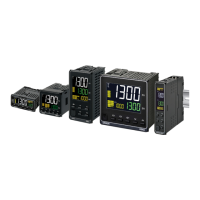
E5@Z Series
E5AZ
1/4 DIN
1/8 DIN
E5EZ E5CZ
1/16 DIN
1/8 DIN
E5EZ-PRR
Digital Position-
Proportional
Controller

Questions and Answers

  • S
    Sabrina JohnsonAug 12, 2025
    What to do if the Omron E5 Z shows a large temperature error or S.Err display?
    • J
      Joanne AlexanderAug 12, 2025
      If you are experiencing a large temperature error or seeing an 'S.Err' display on your Omron Temperature Controller, it could be due to a mismatch in the input type setting. To resolve this, verify the sensor type you are using and then reset the input type on the controller to match. Another potential cause is improper installation of the thermometer. Double-check the thermometer's installation location and polarity, ensuring it is correctly installed.
  • S
    sarahwilliamsAug 20, 2025
    What to do if Omron Controller shows A/D converter error?
    • R
      Richard ChenAug 20, 2025
      If an A/D converter error occurs, first note the error, then reset the power to the Omron Controller. If the display does not change, the Controller may need replacement. If resetting the power removes the error, it is possible that the error was caused by noise. In this case, check for potential sources of noise.
  • M
    Monica ChambersAug 27, 2025
    What to do if Omron Controller shows memory error?
    • D
      dominique94Aug 27, 2025
      If a memory error occurs, reset the power to the Omron Controller. If the display doesn't change after resetting the power, replacement of the unit is necessary. However, if the error is removed, it's possible that the original error was caused by noise. In that case, check the surrounding environment for potential noise sources.
  • S
    Scott BrooksSep 3, 2025
    How to troubleshoot input error on Omron Controller?
    • O
      oclarkSep 3, 2025
      To troubleshoot an input error on the Omron Controller, verify that the input wiring is correct, ensuring there are no disconnections or short-circuits. Also, confirm that the input type is correct. Note that thermocouple input short-circuits cannot be detected.

Omron E5 Z Series Specifications

General IconGeneral
BrandOmron
ModelE5 Z Series
CategoryTemperature Controller
LanguageEnglish

Related product manuals