EasyManua.ls Logo

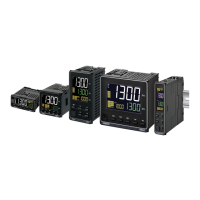
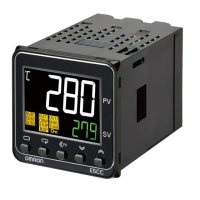
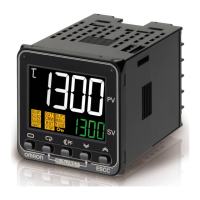
Omron E5C-T Series - User Manual

Omron E5C-T Series
186 pages
Print Icon
To Next Page IconTo Next Page
Loading...
H186-E1-05
1
2
3
5
6
7
A
I
Digital Temperature Controllers
Programmable Type
Communications Manual
E5@C-T
Communications
Data for CompoWay/F
CompoWay/F Commu-
nications Procedures
Communications
Methods
Communications
Data for Modbus
Programless
Communications
Component
Communications
Modbus Communica-
tions Procedure
Appendices
Index
4

Table of Contents

Questions and Answers

  • A
    Alicia RoseAug 17, 2025
    Why is my Omron E5C-T overshooting, undershooting, or hunting?
    • J
      Joshua BentleyAug 17, 2025
      If your Omron Temperature Controller is showing overshooting, undershooting or hunting, it could be due to several reasons. First, if ON/OFF control is enabled, select PID control and perform autotuning. Second, if the control period is too long compared to the temperature's rise and fall speed, shorten the control period. Third, unsuitable PID constants can cause this issue; execute AT (autotuning) or manually set appropriate PID constants. Finally, an HS alarm operation fault may be the cause; use breeder resistance if leakage current is the problem and investigate errors detected by the HS alarm function.
  • S
    Sarah JordanAug 22, 2025
    What to do if Omron E5C-T shows a large temperature error (S.Err)?
    • C
      cgarciaAug 22, 2025
      If your Omron Temperature Controller displays a large temperature error or an input error (S.Err), check the sensor type and reset the input type correctly. Also, ensure the thermometer is installed properly, checking its installation location and polarity. Make sure that the connected device is not faulty.
  • M
    Michelle WilliamsAug 25, 2025
    Why is the temperature not rising in my Omron Temperature Controller?
    • J
      Jasmine FigueroaAug 26, 2025
      If the temperature is not rising on your Omron Temperature Controller, first, ensure that the specified operation (forward or reverse) is suitable for the required control. Check for heater burnout or deterioration and verify the heater's heating capacity is sufficient. Also, check if a cooling system is in operation. Finally, ensure that any peripheral devices with heat prevention are set to a value higher than the set temperature of the Digital Controller.
  • A
    Amanda MacdonaldAug 27, 2025
    Why won't my Omron E5C-T Temperature Controller operate?
    • J
      John BentleyAug 27, 2025
      If your Omron Temperature Controller will not operate, ensure the Run/Reset parameter is set to Run. Check whether the thermometer has burnt out or short-circuited. Ensure thermometer lead wires and power lines are in separate conduits, or wired using a more direct path. The connection between the Digital Controller and thermocouple should use the thermocouple’s lead wires directly, or compensating conductors suitable for the thermocouple. Verify the thermometer's installation location is suitable and set a suitable input shift, or set the input shift value to 0.0 if not required.
  • J
    Jeanne MillerAug 30, 2025
    Why won't the output turn on in my Omron E5C-T?
    • P
      Philip CrossAug 30, 2025
      If the output of your Omron Temperature Controller will not turn ON, ensure the Run/Reset parameter is set to Run. Select either forward or reverse operation depending on the required control. Set a suitable value for the hysteresis. Supply the specified power from the terminals, as the output will not turn ON while the Digital Controller is being operated with power supplied through the USB-Serial Conversion Cable.
  • A
    Andrea TaylorSep 1, 2025
    Why is the control unstable on my Omron Temperature Controller?
    • D
      Dwayne ClineSep 1, 2025
      If the control is unstable on your Omron Temperature Controller, retighten terminal screws to a torque of 0.43 to 0.58 N·m. If the internal components have reached the end of their service life, replace the Digital Controller and all other Digital Controllers purchased in the same time period.
  • J
    Janice ReidSep 4, 2025
    How to unlock Omron Temperature Controller keys?
    • L
      Larry JacksonSep 4, 2025
      If the keys on your Omron Temperature Controller will not operate, turn OFF setting change protect.
  • B
    beverly04Sep 6, 2025
    Why can't I shift levels on my Omron E5C-T?
    • B
      bpattersonSep 6, 2025
      If you cannot shift levels on your Omron Temperature Controller, set the operation/adjustment protect, initial setting/communications protect, and setting change protect values as required.
  • L
    laurenschneiderSep 9, 2025
    Why isn't the SP changing as programmed on my Omron E5C-T Temperature Controller?
    • M
      mjohnsonSep 9, 2025
      If the SP (Set Point) does not change as programmed on your Omron Temperature Controller, set Program SP Mode.
  • T
    timkennedySep 12, 2025
    Why isn't the segment advancing on my Omron E5C-T?
    • J
      Jason GutierrezSep 12, 2025
      If the segment does not advance on your Omron Temperature Controller, set the wait band correctly.

Omron E5C-T Series Specifications

General IconGeneral
Mounting MethodPanel Mount
Input TypeThermocouple, RTD
Control MethodON/OFF, PID
Display TypeLCD
Output TypeRelay, SSR Drive
Power Supply100 to 240 VAC, 50/60 Hz; 24 VAC/VDC
Temperature RangeDepends on input type
Dimensions48 x 48 mm
Setting Resolution0.1°C or 1°C
Ambient Operating Temperature0 to 55°C
Ambient Operating Humidity35 to 85% RH (non-condensing)
Protection RatingIP66 (front panel)
WeightApprox. 200 g

Related product manuals