2 - 3 Ethernet Communications
2-19
2
Connecting to Mitsubishi Electric PLCs
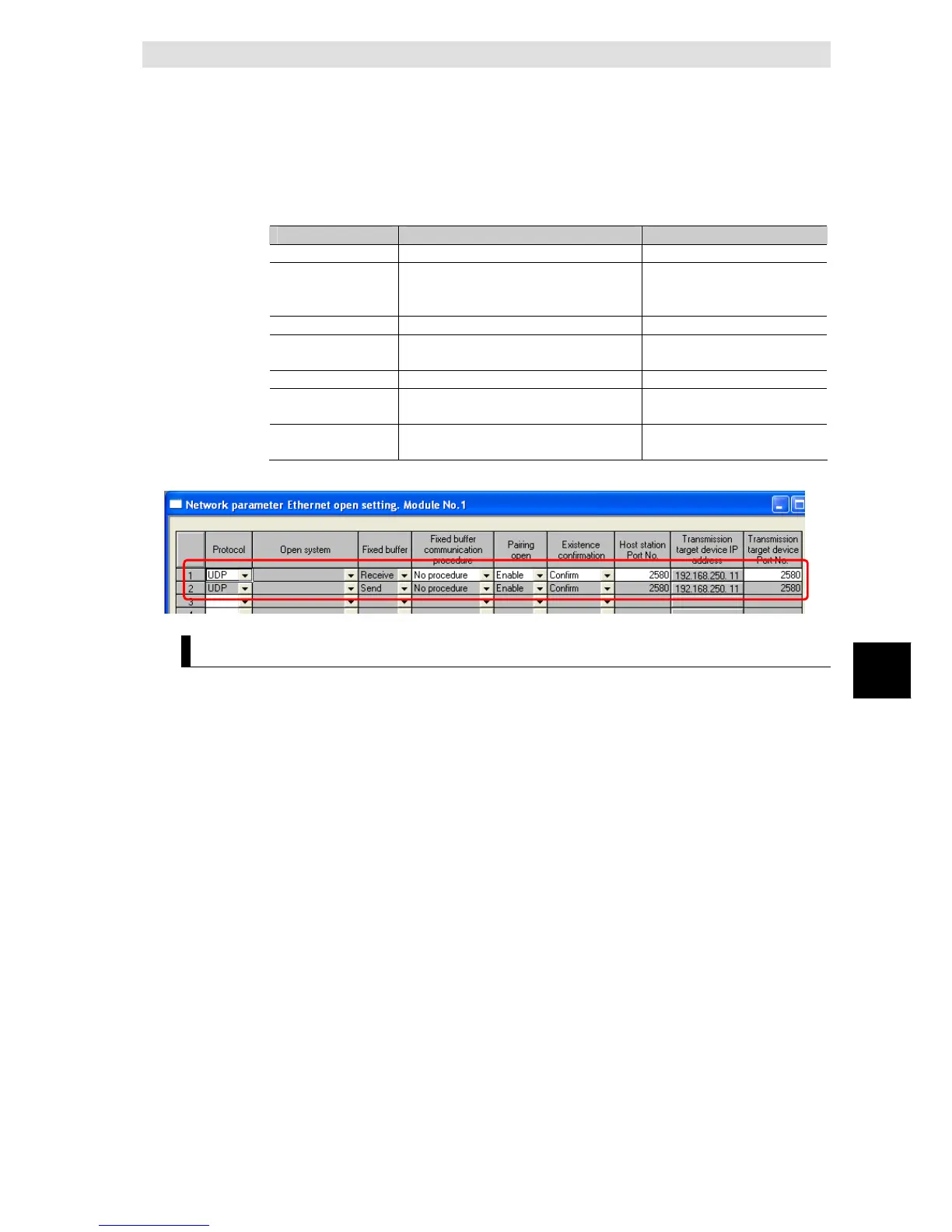
z Open Settings
Set the setting the Ethernet operations by selecting [Project data list]-[Parameter]
– [Network param] – [Ehternet/CC IE/MELSECNET] – [Open Settings].
Parameter Description Set value for this example
Protocol Set a communication protocol UDP
Fixed buffer
communication
procedure
Select a communicatin procedure using
fixed buffer
No procedure
Paring open Select a paring open Enable
Existence
confirmation
Select an existence confirmation Confirm
Host station Port No. Set a port number of the host station 2580
Transmission target
device IP address
Set an IP address of the transmission
target device
192.168.250.11
Transmission target
device Port No.
Set a por number of the transmission
target device
2580
Communication cable
The Ethernet Option Board is connected with a switching HUBs by using the
twisted-pair cable that applies the modular connector of the RJ45 form to both
ends. Either of category 3, 4, 5 or 5e UTP cable (Unshield twist pair cable), or STP
cable (Shield twist pair cable) is available.


 To Next Page
 Loading...