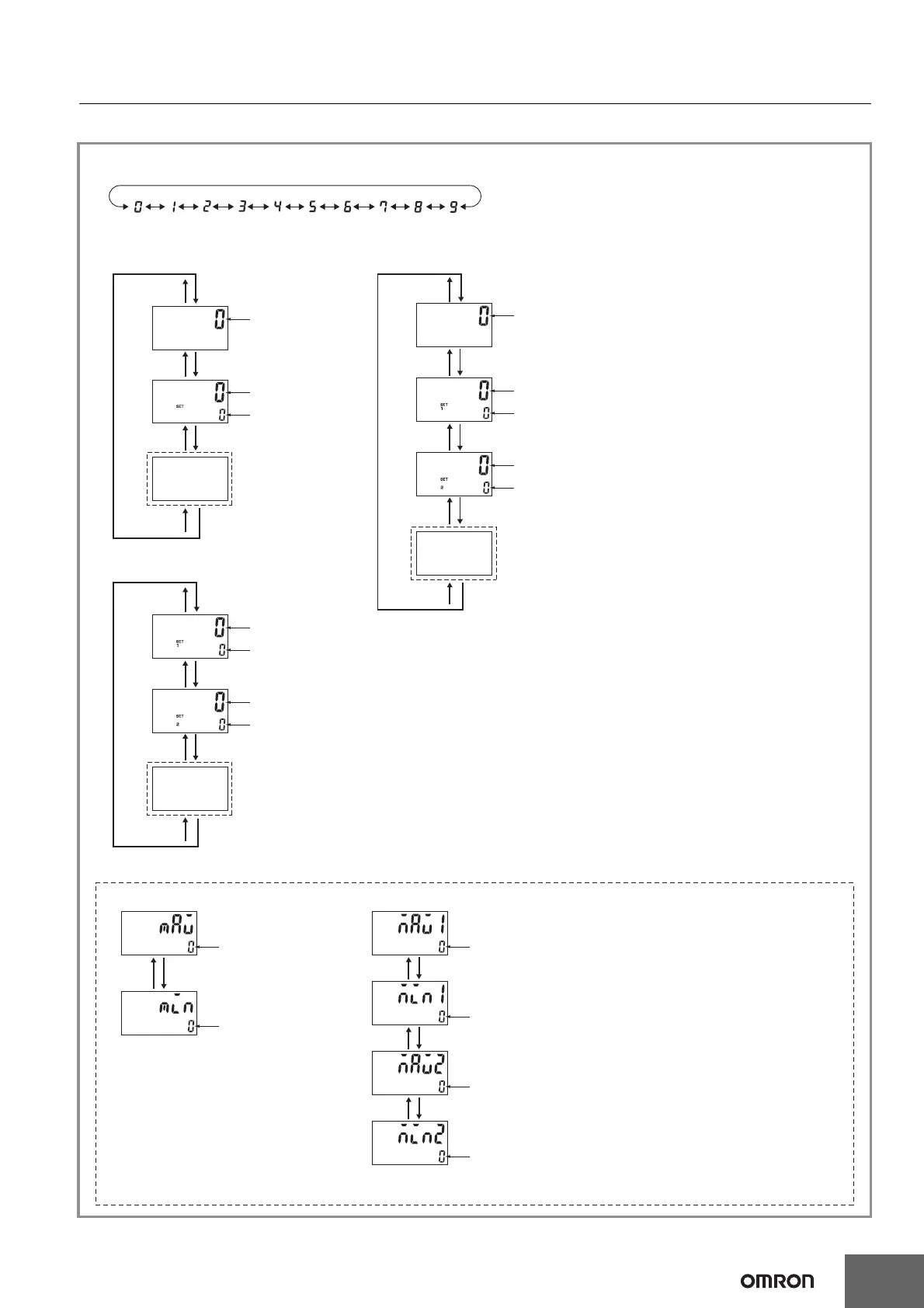
Output Mode: HI or LO
Output Mode: HI-LO or AREA
H7CC-R11@
H7CC-R11W@
*
*
*
*
*
*
*
*
*
*
*
*
*
*
*
*
*
*1
*1
*1
Displayed for Models Other Than “-W” Models
Displayed for “-W” Models
Measurement value
Measurement value
Comparison value
Measurement value
Measurement value
Comparison value 1
Measurement value
Comparison value 2
Measurement value 1
Measurement value 2
Comparison value 1
Comparison value 2
Bottom hold value
Peak hold value
Bottom hold value 1
Peak hold value 2
Bottom hold value 2
Peak hold value 1
• Measurement Value
Displays the currently measured value.
• Comparison Value, Comparison Value 1,
and Comparison Value 2
Set the comparison value, comparison
value 1, and comparison value 2.
The measurement value is compared to
comparison value, comparison value 1, and
comparison value 2 and an output is made
according to the selected output mode.
*1 Peak/bottom hold enabled
• Peak/bottom hold value
The peak (maximum) and bottom (minimum)
values are displayed after counting starts.
• Peak/bottom hold value 1 and 2
Peaks (maximums) 1 and 2 and bottoms
(minimums) 1 and 2 are displayed after
counting starts.
• Set each digit using the individual UP1 to UP6 Keys (DW1 to DW6 Keys).
* Use UP1+UP3 to move up and
DW1+DW3 to move down
* Use UP1+UP3 to move up and
DW1+DW3 to move down
* Use UP1+UP3 to move up and
DW1+DW3 to move down
* Use UP1+UP3 to move up and
DW1+DW3 to move down
* Use UP1+UP3 to move up and
DW1+DW3 to move down
Note: The hold values will be initialized when
hold operation is performed or reset 1 input
is turned OFF while peak/bottom hold
values 1 and 2 are being displayed.(The
reset 2 input operates in the same way if
the input mode is set to 2-input mode.)


 To Next Page
 Loading...